Log InCreate An Account
  1. Plugins
  2. »
  3. ACE Studio
  4. »
  5. ACE Bridge 2
  6. »
  7. Details

ACE Bridge 2

Included with ACE Studio
ACE Bridge 2
ACE Bridge 2 by ACE Studio is a Virtual Instrument and a Virtual Effect Audio Plugin for macOS and Windows. It functions as an Audio Units Plugin, a VST 3 Plugin and an AAX Plugin.
Product
Version
1.0.19
Product
Version
1.0.19
Instrument
Formats
Effect
Formats

MyKVR: Groups, Versions, ...

209 KVR members have added ACE Bridge 2 to 215 MyKVR groups 216 times.

Download KVR Studio Manager (FREE)

Not In Your MY KVR Groups
(or group limitation prevents versioning)
+215 in private groups

KVR Rank

Overall: 848   735   831

30-Day: 924; 7-Day: 2060; Yesterday: 5364

ACE Bridge 2 is a VST3/AU instrument plugin, as a bridge between your DAW and ACE Studio.

It can bridge audio from ACE Studio to a MIDI track in your DAW, and can also scan MIDI back to ACE Studio.

Installation:

  • For Win - it will be installed with ACE Studio by the installer, and it can be reinstalled by the reinstallation of ACE Studio.
  • For Mac - ACE Studio will ask you to install ACE Bridge 2 at the first launch. You can manage the installation from the preferences window of ACE Studio.

After installation, you should find it on the VST3 instrument plugin list in your DAW. (AU for Logic).

After inserting the plugin on a MIDI track in your DAW, you need to connect it to ACE Studio.

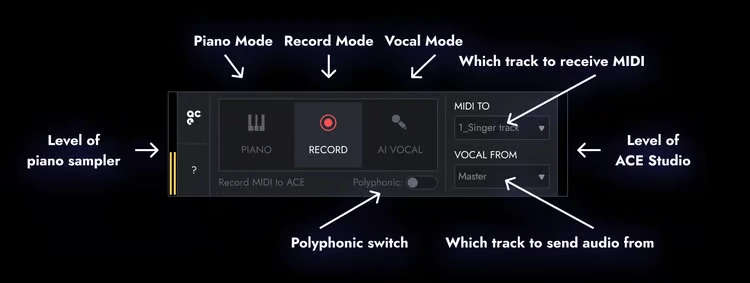
ACE Bridge 2 has three modes:

  1. Piano Mode - The plugin will perform as a piano sampler, it will sound the MIDI notes on its track or any MIDI signals input from your MIDI device.
    • Please note: Under Piano Mode, ACE Studio will not sync the playback, and you will not hear sound output when you start the playback independently in ACE Studio.
  2. Record Mode - The plugin will record all MIDI signals from the track during playback. When you stop the playback, it will send the recorded MIDI back to ACE Studio as a MIDI clip, and place them at the same place.
    • The plugin will sync the playback to ACE Studio, but it is only one-way sync, when you start playback in ACE Studio, your DAW will not follow.
    • You can set up which track to receive MIDI content from DAW.
    • Polyphonic - Check this box if you want to input polyphonic, otherwise, the MIDI content will turn into monophonic when being brought to ACE Studio.
    • Please note: Under Record Mode, you will not hear sound output when you start the playback independently in ACE Studio.
  3. Vocal Mode - The plugin will bridge sound from ACE Studio to your DAW.
    • The plugin will sync the playback to ACE Studio, but it is only one-way sync, when you start playback in ACE Studio, your DAW will not follow.
    • You can set up which track to be bridged to DAW.

Each time you start playback, the plugin will update the current tempo and time signature to ACE Studio.

{See video at top of page}

Latest User Reviews

Average user rating of 0.00 from 0 reviews

Comments & Discussion for ACE Studio ACE Bridge 2

Discussion
Discussion: Active

Please log in to join the discussion

Log In To KVR Audio