
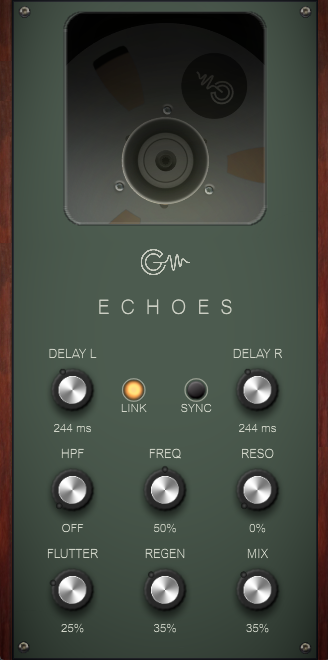
20 KVR members have added Air-G Echoes to 17 MyKVR groups 21 times.
Download KVR Studio Manager (FREE)
Air-G Echoes is part of Air-G Audio, a collection of plugins built on the open source work of Airwindows, Chris Johnson's project that has been publishing high-quality free DSP code for years.
Echoes is a tape delay, and what defines it is that it's varispeed: the "tape" actually changes speed depending on the time you set, so moving the delay time while audio is playing produces that characteristic pitch glide of old tape echo machines, not the clean jump of a digital delay. It repeats the signal with warmth, filtering, and an organic instability that's hard to get from a delay built around simple math. Air-G adds independent left and right times with a LINK button to lock them together, DAW tempo sync in musical note values, and a high-pass filter in the feedback loop so each repeat gradually loses low end, the classic dub trick for long tails that don't muddy the mix.
The engine is Airwindows' TapeDelay2. The tone filter (FREQ and RESO) works inside the feedback loop, so its color accumulates with each repeat and every echo comes out slightly different from the last. RESO can be pushed to resonant extremes for pronounced dub tones. FLUTTER adds organic instability: a subtle, lifelike wobble at low values, and something completely unpredictable at the maximum.
Echoes works well inserted directly on a channel or sent from an effects bus with MIX at maximum. It's at home with dark slapback on vocals, long dub tails with high REGEN and heavy filtering, stereo delays with different L/R times, or tempo-synced echo.
---
Air-G Audio is a collection of plugins built on the open source code of Airwindows. The project is built around adding a graphical interface that makes the experience more comfortable and visual, along with a few features that expand the possible uses without straying from the original sound. The simplicity and lightness of Chris's code are the starting point and the guide.
Thanks to Chris Johnson for making his work public and accessible. Air-G Audio exists because Airwindows exists. The Airwindows code used in this plugin is published under the MIT License.
Air-G Echoes is free. You can download it without paying anything, following the same open philosophy that runs through all of Chris's work. If the plugin is useful to you in your music, a contribution is always welcome. Chris Johnson's Patreon is also worth knowing about: it's the most direct way to support the Airwindows project and the work that makes plugins like this one possible. patreon.com/airwindows.
Available for Windows, Linux and macOS.
*New: Windows & Linux — All VST3, no installer download
***Windows note: the installer is not signed with a paid certificate, so SmartScreen may show a "Windows protected your PC" warning. Click "More info", then "Run anyway" to continue. This is expected and not a problem with the plugin.
***macOS note: the plugin is not signed with an Apple developer certificate, so Gatekeeper may block it on first use. The "Open Anyway" option in System Settings does not work reliably for audio plugins. The correct fix requires Terminal:
1. Open Terminal (Applications > Utilities > Terminal).
2. Type: sudo xattr -rd com.apple.quarantine (leave a space at the end, do not press Enter yet).
3. Open Finder and navigate to your plug-in folder: VST3 plugins are in /Library/Audio/Plug-Ins/VST3/, and AU plugins (for Logic and GarageBand) are in /Library/Audio/Plug-Ins/Components/. Drag the plugin file (the .vst3 or the .component) into the Terminal window. The path fills in automatically.
4. Press Enter and type your admin password when prompted (it will not be visible). Press Enter again.
5. Rescan your plugins in your DAW. The plugin should now appear. If you installed both the VST3 and the AU versions, repeat the process for each file.
Reviewed By Dexter US [all]
July 5th, 2026
Version reviewed: 1.0 on Windows
It is an interesting delay but it seems that certain freq values will make the delay stop making sound.. Once it stops making a sound it can be a challenge to get it to start echoing again. I didn't go back to the original to see if it is a bug or if it is the way the original was working but maybe there is a better max value for freq. I love the graphics other than that.
Response from Air-G Audio from Air-G Audio on July 6th, 2026
Thanks a lot for the feedback.
I'll try to investigate what might not be working properly with FREQ and make sure it's addressed in future updates.
If it's not too much trouble, could you be a bit more specific? Does it happen at any particular point or under certain conditions when using FREQ?
Thanks again, I really appreciate it.

Please log in to join the discussion
Submit: News, Plugins, Hosts & Apps | Advertise @ KVR | Developer Account | About KVR / Contact Us | Privacy Statement | Sell @ KVR | KVR Marketplace Terms & Conditions
© KVR Audio, Inc. 2000-2026

