
19 KVR members have added Air-G Spaces to 17 MyKVR groups 20 times.
Download KVR Studio Manager (FREE)
Air-G Spaces is part of Air-G Audio, a collection of plugins built on the open source work of Airwindows, Chris Johnson's project that has been releasing some of the most distinctive free DSP algorithms in the audio world.
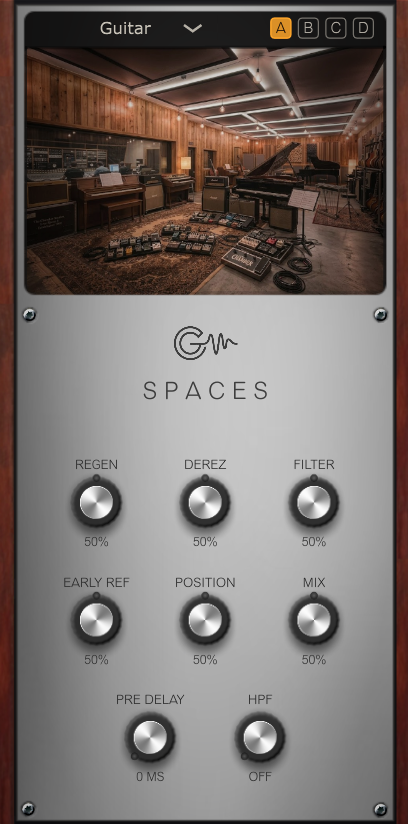
Spaces brings 16 different reverbs into a single plugin. Each one belongs to Airwindows' k-series, a family of reverbs Chris designed from scratch using his own algorithms: rooms, halls, plates, chambers, and spaces that don't correspond to anything in the physical world. A selector chooses the active space; the interface adapts around it, showing only the controls that space actually uses and updating the image of the location. Four memory slots (A/B/C/D) let you save settings and compare between them instantly. Two controls are always available regardless of the chosen space: Pre Delay and HPF, a high-pass filter on the reverb signal only. When a space already includes one of those controls natively, the Air-G version mirrors it rather than doubling it.
The 16 spaces cover a wide range: realistic small rooms (Wood Room; Station, inspired by the vocal sound on Bowie's *Station to Station*), a cathedral where the source position can be moved from right at the mic to the back of the room (Cathedral), a rock hall where "the air crackles with volume" (Guitar Hall), dreamlike environments (Alien Spaceship, Cyber City), an infinite-space reverb designed for live ambient performance (Cosmos), four EMT-style plates (kPlateA, B, C, D), a chamber with tape echo, and a recital hall. The Derez control works across all of them: it lowers the pitch and enlarges the space using Bezier reconstruction, sounding consistent at any sample rate.
Spaces covers the full range of reverb needs in one plugin: small rooms for vocals and acoustic guitars, bus plates, drum halls with loads of character, and infinite environments for synthesis and ambient composition. The four memory slots and always-present Pre Delay and HPF make the workflow fast and direct.
---
Air-G Audio is a collection of plugins built on the open source code of Airwindows. The project is built around adding a graphical interface that makes the experience more comfortable and visual, along with a few features that expand the possible uses without straying from the original sound. The simplicity and lightness of Chris's code are the starting point and the guide.
Thanks to Chris Johnson for making his work public and accessible. Air-G Audio exists because Airwindows exists. The Airwindows code used in this plugin is published under the MIT License.
Air-G Spaces is free. You can download it without paying anything, following the same open philosophy that runs through all of Chris's work. If the plugin is useful to you in your music, a contribution is always welcome. Chris Johnson's Patreon is also worth knowing about: it's the most direct way to support the Airwindows project and the work that makes plugins like this one possible. patreon.com/airwindows.
Available for Windows, Linux and macOS.
*New: Windows & Linux — All VST3, no installer download
***Windows note: the installer is not signed with a paid certificate, so SmartScreen may show a "Windows protected your PC" warning. Click "More info", then "Run anyway" to continue. This is expected and not a problem with the plugin.
***macOS note: the plugin is not signed with an Apple developer certificate, so Gatekeeper may block it on first use. The "Open Anyway" option in System Settings does not work reliably for audio plugins. The correct fix requires Terminal:
1. Open Terminal (Applications > Utilities > Terminal).
2. Type: sudo xattr -rd com.apple.quarantine (leave a space at the end, do not press Enter yet).
3. Open Finder and navigate to your plug-in folder: VST3 plugins are in /Library/Audio/Plug-Ins/VST3/, and AU plugins (for Logic and GarageBand) are in /Library/Audio/Plug-Ins/Components/. Drag the plugin file (the .vst3 or the .component) into the Terminal window. The path fills in automatically.
4. Press Enter and type your admin password when prompted (it will not be visible). Press Enter again.
5. Rescan your plugins in your DAW. The plugin should now appear. If you installed both the VST3 and the AU versions, repeat the process for each file.
Reviewed By Dexter US [all]
July 5th, 2026
Version reviewed: 1.0 on Windows
Reverbs are certainly a strong point for air windows and to have alot of them in one spot is amazing. I was trying out cyber city that may have been hiding in my index with the 100s of reverbs that I have and it was amazing and this made it easy to find. The plates sound nice and they are a favorite of mine for air windows. Would have been good if it didn't have to be uploaded to drive c.
Response from Air-G Audio from Air-G Audio on July 6th, 2026
Thanks a lot for taking the time to try this one as well.
I had the exact same experience, which is why I decided to bring Chris's entire "K" series together into a single interface. This project actually came from that idea: making the tools I use in my own productions more convenient and enjoyable to work with.
Thanks again, I really appreciate it!.

Please log in to join the discussion
Submit: News, Plugins, Hosts & Apps | Advertise @ KVR | Developer Account | About KVR / Contact Us | Privacy Statement | Sell @ KVR | KVR Marketplace Terms & Conditions
© KVR Audio, Inc. 2000-2026

