
1 KVR member has added Air-G Volt Mini to 1 MyKVR group 1 time.
Download KVR Studio Manager (FREE)
Air-G Volt Mini is part of Air-G Audio, a collection of plugins built on the open source work of Airwindows, Chris Johnson's project that has been releasing high-quality free DSP algorithms for years.
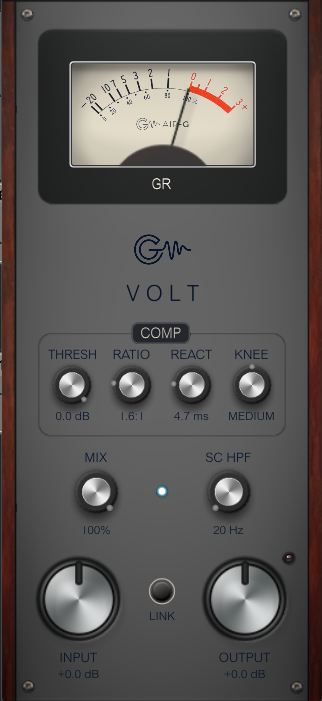
Air-G Volt Mini is the compact version of Air-G Volt, with the same cascaded bus compression engine built on Airwindows' Logical4, in a reduced vertical interface styled after 500-series rack modules. Every control is there: THRESHOLD, RATIO, REACTION, KNEE, INPUT, OUTPUT, LINK, MIX, SC HPF, and the gain reduction VU meter. The difference is purely visual, designed for crowded sessions or those who prefer a smaller footprint.
For a full description of the audio engine and typical uses, see the Air-G Volt page.
---
Air-G Audio is a collection of plugins built on the open source code of Airwindows. The project is built around adding a graphical interface that makes the experience more comfortable and visual, along with a few features that expand the possible uses without straying from the original sound. The simplicity and lightness of Chris's code are the starting point and the guide.
Thanks to Chris Johnson for making his work public and accessible. Air-G Audio exists because Airwindows exists. The Airwindows code used in this plugin is published under the MIT License.
Air-G Volt Mini is free. You can download it without paying anything, following the same open philosophy that runs through all of Chris's work. If the plugin is useful to you in your music, a contribution is always welcome. Chris Johnson's Patreon is also worth knowing about: it's the most direct way to support the Airwindows project and the work that makes plugins like this one possible. patreon.com/airwindows
Available for Windows, Linux and macOS.
macOS note: the plugin is not signed with an Apple developer certificate, so Gatekeeper may block it on first use. The "Open Anyway" option in System Settings does not work reliably for VST3 plugins. The correct fix requires Terminal:
1. Open Terminal (Applications > Utilities > Terminal).
2. Type: sudo xattr -rd com.apple.quarantine (leave a space at the end, do not press Enter yet).
3. Open Finder, navigate to /Library/Audio/Plug-Ins/VST3/ and drag the plugin's .vst3 file into the Terminal window. The path fills in automatically.
4. Press Enter and type your admin password when prompted (it will not be visible). Press Enter again.
5. Rescan your plugin folder in your DAW. The plugin should now appear.
 $79.00Comp VCA-65$79.00Comp TUBE-STA
Please log in to join the discussion
Submit: News, Plugins, Hosts & Apps | Advertise @ KVR | Developer Account | About KVR / Contact Us | Privacy Statement | Sell @ KVR | KVR Marketplace Terms & Conditions
© KVR Audio, Inc. 2000-2026

