Log InCreate An Account
  1. Plugins
  2. »
  3. FX-Mechanics
  4. »
  5. AmbiRR2
  6. »
  7. Details
AmbiRR2
AmbiRR2 by FX-Mechanics is a Virtual Effect Audio Plugin for macOS, Windows and Linux. It functions as an Audio Units Plugin and a VST 3 Plugin.
Product
Version
0.1.1
Product
Version
0.1.1
Product
Version
0.1.1
Effect
Formats
Copy Protection
None
Open Source
LGPL

MyKVR: Groups, Versions, ...

3 KVR members have added AmbiRR2 to 2 MyKVR groups 4 times.

Download KVR Studio Manager (FREE)

Not In Your MY KVR Groups
(or group limitation prevents versioning)
+2 in private groups

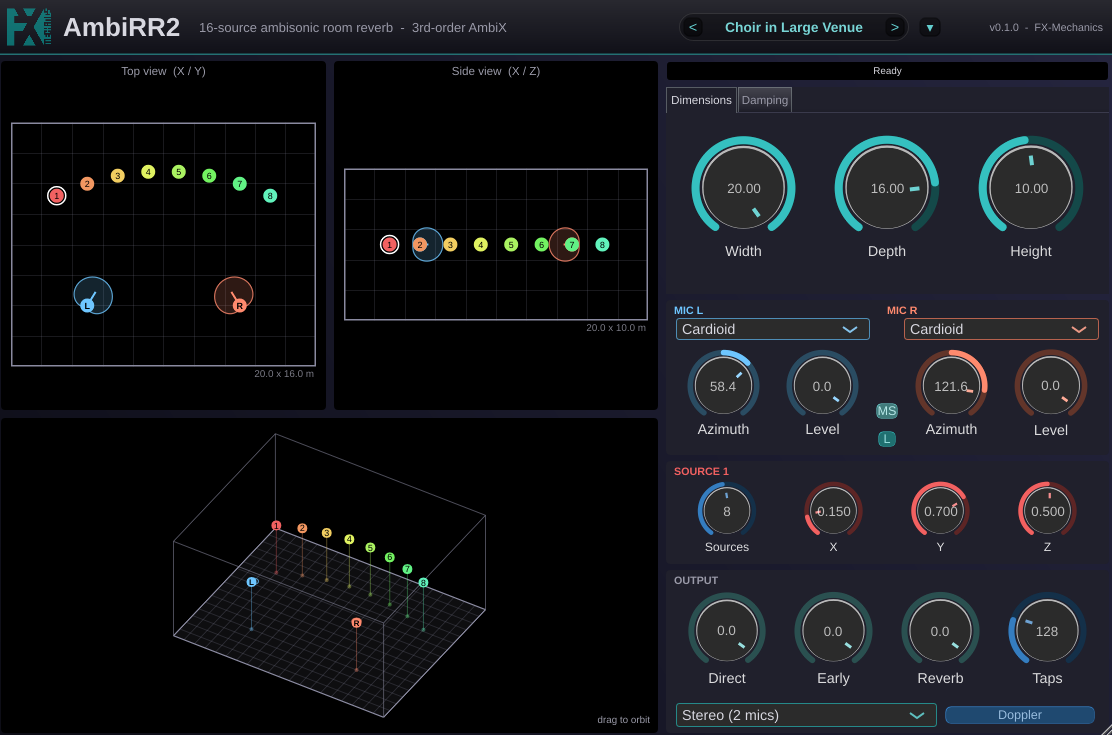
AmbiRR2 places up to 16 mono sources inside a virtual room and renders what that room does to them, either as an ambisonic sound field (1st to 3rd order, AmbiX, ACN/SN3D) or as a stereo recording captured by two virtual microphones you can freely place and aim.

The room is a simple box shaped by width, depth, height and per-wall damping. Under the hood, AmbiRR2 splits the room's response into two parts that are computed separately: an image-source model renders the direct sound and early reflections precisely, per source, with correct arrival time, level and direction; a diffuse-field convolution renders the reverberant tail, shared by all sources and matched to the room's decay time. Because the tail never depends on position, sources and the listener can move (and be automated) freely in the DAW without the clicks, dropouts or CPU spikes that come from rebuilding an impulse response mid-performance. Only the room's shape and wall materials require a rebuild, and that only happens when you actually change them.

Two output modes:

  • Stereo (2 mics): a true spaced-pair model. Each microphone has its own polar pattern (omni, cardioid, supercardioid, hypercardioid, figure-8) and its own position, so genuine AB, ORTF, XY or Blumlein-style pairs fall out of where you place and aim the mics, complete with real inter-mic time and level differences.
  • Ambisonic (1st, 2nd or 3rd order AmbiX): a full 3D sound field you can rotate freely (head turns are computed in real time, with no recompute), decode to any speaker layout, or feed into a binaural decoder for headphone listening.

An optional Doppler mode swaps the default click-free crossfade for true per-tap pitch-shifting, so fast-moving sources rise and fall in pitch the way they would in a real room.

Typical uses include game-audio and VR/AR spatial sound design, ambisonic music production, binaural headphone mixing, and building believable moving sound sources for picture.

Features

  • Up to 16 mono sources positioned freely in a virtual room.
  • 1st, 2nd or 3rd-order Ambisonic (AmbiX, ACN/SN3D) output, or 2-channel stereo from two configurable virtual microphones.
  • Physically modeled direct sound and early reflections (image-source method), plus a diffuse late-reverb tail matched to the room's size and absorption.
  • Independent, automatable source, listener and microphone positions, with click-free crossfades between positions.
  • Optional true Doppler pitch-shift for fast-moving sources.
  • Adjustable room dimensions and per-wall absorption / HF damping, with a link mode to set all six walls at once.
  • Draggable 2D top/side views and an orbiting 3D room view for placing everything visually.
  • Independent Direct / Early / Reverb output levels, and an adjustable reflection-detail (Taps) vs. CPU tradeoff.
  • VST3, AU.

Basic instructions

  1. Set up the room. Open the Dimensions tab and set Width, Depth and Height. Open the Damping tab and set how absorbent each wall is (use Link to apply one material to all six walls at once, then unlink to fine-tune a single surface).
  2. Choose the output. At the bottom of the Output panel, pick an Ambisonic order (1st-3rd) or Stereo (2 mics).
  3. Place the sources. Set the Sources count to how many of the 16 inputs are active, then drag each numbered dot in the Top or Side view to position it (or dial in X/Y/Z directly for the selected source).
  4. Place the listener or the microphones. Ambisonic mode: drag the amber listener dot and set its Azimuth/Elevation (roll the mouse wheel over it to turn it). Stereo mode: drag each microphone, pick its polar pattern, and use the Link toggle to move and aim the pair as one rigid rig.
  5. Balance the sound. Use the Direct, Early and Reverb knobs to balance the dry source, the reflections and the reverb tail. Taps trades reflection detail for CPU.
  6. Automate freely. Source, listener and microphone positions (and Azimuth/Elevation) can be automated with no clicks or CPU spikes. Room dimensions and wall damping should be set once per scene, since changing them rebuilds the reverb and is not meant to be automated.
  7. Optional: turn on Doppler if sources move quickly and a real pitch-shift effect is wanted instead of a smooth crossfade.
  8. For headphone monitoring, feed AmbiRR2's ambisonic output into an ambisonic binaural decoder, such as the free IEM Plug-in Suite's BinauralDecoder, placed directly after it in the channel strip.

Formats and requirements

VST3, AU (macOS) and Standalone. A DAW capable of hosting a 16-input.

multichannel track is needed to use all 16 sources at once (fewer sources can.

be used on tracks with fewer inputs).

License

LGPL-3.0-or-later. Source available on GitHub.

Latest User Reviews

Average user rating of 0.00 from 0 reviews

Products similar to AmbiRR2...

Comments & Discussion for FX-Mechanics AmbiRR2

Discussion
Discussion: Active

Please log in to join the discussion

Log In To KVR Audio
