
3 KVR members have added Auto Level to 2 MyKVR groups 3 times.
Download KVR Studio Manager (FREE)
Auto Level is built to keep your audio sitting where it should, without you constantly riding the fader. It listens to the incoming signal and makes smooth, controlled adjustments to bring the level toward a consistent target, helping your voice or track stay present and easy to follow.
For spoken content, this solves one of the most common problems right away. If your level moves around while talking—leaning back from the mic, speaking louder for emphasis, or dropping off at the end of a sentence—Auto Level keeps everything steady. Your voice stays clear and consistent, which makes podcasts, voiceovers, and video content easier to listen to without constant volume changes.
In music, it works just as well as a utility tool that keeps tracks under control without feeling heavy-handed. It can help a vocal stay in place, keep a bass line more consistent, or smooth out dynamic performances that are otherwise hard to manage. Instead of compressing the signal in a way that changes the character, it focuses on keeping the overall level where you want it.
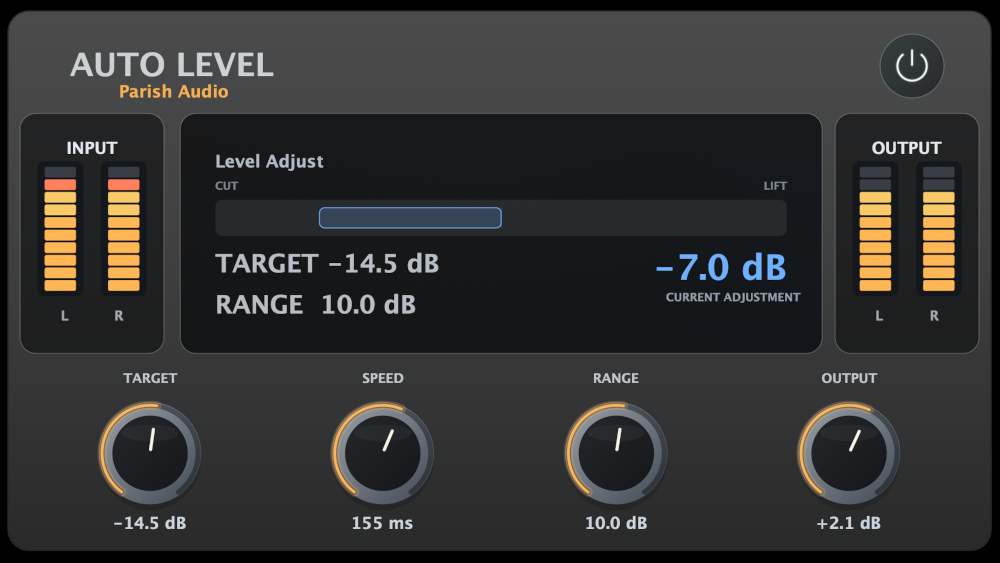
The controls are designed to stay practical and easy to understand. You set your target level, decide how quickly the plugin responds, and define how far it's allowed to move. That gives you a predictable, controlled result without needing to fine-tune a complex chain.
Because the level adjustment is smoothed over time, fast peaks can still slip through before the correction fully reacts. Pairing Auto Level with a compressor works especially well here. The compressor catches those quick spikes, while Auto Level handles the overall consistency. Together, they give you a more controlled, finished result without overworking either tool.
The result is a plugin that helps you keep things steady, clear, and easy to manage. Whether you're recording spoken content or working on a mix, it gives you a straightforward way to maintain consistent levels and stay focused on the sound instead of chasing it.

Please log in to join the discussion
Submit: News, Plugins, Hosts & Apps | Advertise @ KVR | Developer Account | About KVR / Contact Us | Privacy Statement | Sell @ KVR | KVR Marketplace Terms & Conditions
© KVR Audio, Inc. 2000-2026

