Log InCreate An Account
  1. Plugins
  2. »
  3. OSC Audio
  4. »
  5. BFM (Big F*ing Meters)
  6. »
  7. Details

BFM (Big F*ing Meters)

Metering Suite Plugin by OSC Audio
MyKVRFAVORITE3WANT11
$9.99 (iOS) / $20 (Mac / PC)
BFM (Big F*ing Meters)
BFM (Big F*ing Meters) by OSC Audio is a Virtual Effect Audio Plugin and a Mobile Audio App and a Software Application for macOS, Windows and iOS. It functions as an Audio Units Plugin, a VST 3 Plugin, an AAX Plugin and a Standalone Application.
Product
Version
1.6.1
Windows 10 or later.
Product
Version
1.6.1
macOS 10.14 or later.
Product
Version
1.6.1
iOS 11 or later.
Effect
Formats

MyKVR: Groups, Versions, ...

81 KVR members have added BFM (Big F*ing Meters) to 74 MyKVR groups 91 times.

Download KVR Studio Manager (FREE)

Not In Your MY KVR Groups
(or group limitation prevents versioning)
+74 in private groups

KVR Rank

Overall: 15628   11729   13245   678

30-Day: 18139; 7-Day: 32456; Yesterday: 31588

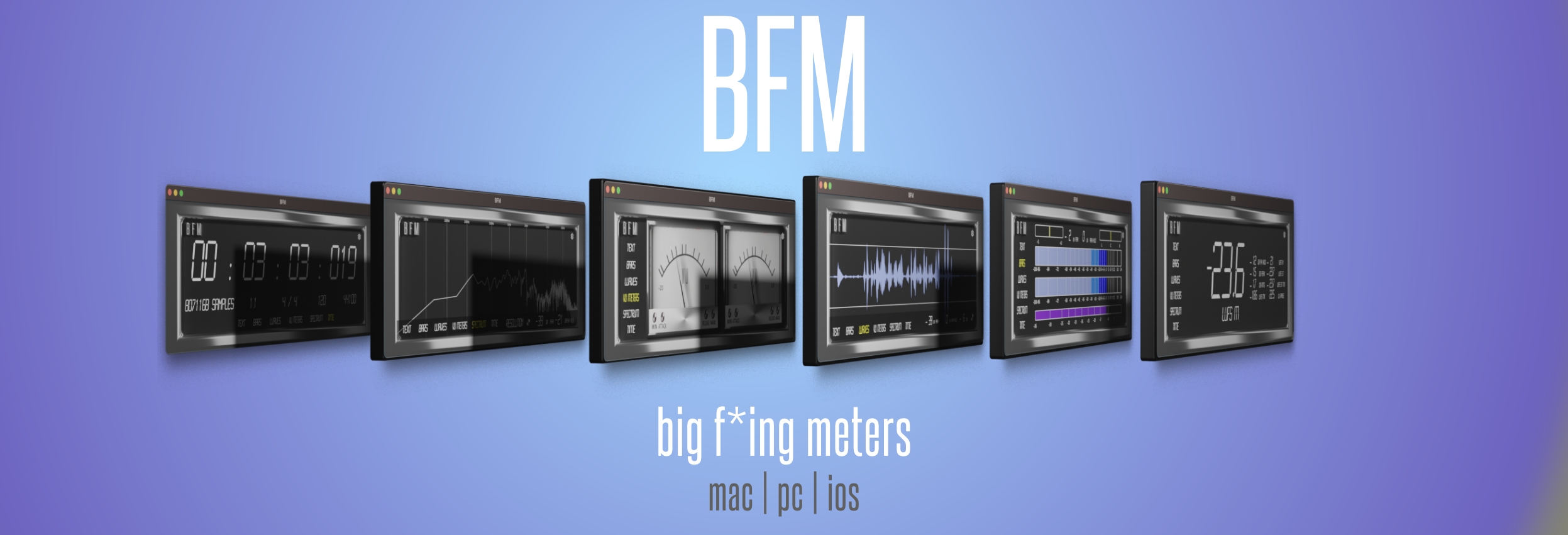
BFM or Big F*ing Meters is a macOS, Windows, iOS compatible Metering plug-in designed exactly how the name sounds... really f*ing big. With the main goal of readability we wanted to bring a meter that you can see from across the studio and keep your records clip-free.

BFM currently offers 6 Modes with RMS, LUFs, Peak, and Peak Hold values, to give you a variety of views to keep your signal under control. The Text, Bars, Waves, VU Meters, Spectrum, & Time let you decide how you want to keep track of your signal with multiple fonts/formats to view them in:

  • Text gives you a quick look at just the values easy to see from across the room. This view offers the most values with RMS, Peak, Peak Hold, and LUFs (Short Term & Momentary with Maximum values and LUFS range) values available. Controllable sensitivity & peak hold time for all pages. Reset Peak Hold with a click off the value.
  • Bar offers a more traditional meter for seeing the range of values showing RMS, Peak, Peak Hold, and LUFS. Correlation & Balance meters included to set your stereo image and phase response. Peak Hold resets on value click. Sensitivity changes on bar click. LUFS readings select on click. Included reference points for -24 (EBU), -16 (Apple Music), & -7 as a suggested maximum for most genres.
  • Wave view gives you a look at your waveform after your channel effects with the ability to quickly mark in dB where you want to see your signals peak. To freeze click the waveform. To reset Peak Hold click the value.
  • VU Meter Designed for a quick look at your overall levels. Featuring controllable Attack, Release, Minimum, and Maximum value control. Left/Right, Mid/Side, PPM, and LUFS options available. Click VU to enter dark mode.
  • Spectrum is a simplified frequency spectrum view with 3 quality modes. Great for getting an overall look at where your frequencies are when mixing or editing. Tap to freeze and inspect. There is also the PEAK value displayed on this page. To reset Peak Hold click the value.
  • Time designed for quickly viewing all project time-related information. Includes SMPTE, BPM, Time Signature, current Bar/Beat, and current sample rate. Click to freeze and remember where you were.

Learn more.
Buy Now.

Latest User Reviews

Average user rating of 5.00 from 1 review
BFM (Big F*ing Meters)

Reviewed By Mojameric [all]
January 28th, 2023
Version reviewed: 1 on Windows

This is just what my old eyes needed for recording drums. I downloaded it from here https://www.youtube.com/watch?v=O6ZY6I0JBSw Freemeters code is automatically applied.

Thank you oscaudio.

Read Review

Products similar to BFM (Big F*ing Meters)...

Comments & Discussion for OSC Audio BFM (Big F*ing Meters)

Discussion
Discussion: Active

Please log in to join the discussion

Log In To KVR Audio
