Log InCreate An Account
  1. Plugins
  2. »
  3. Fracture Sounds
  4. »
  5. Blueprint: Wurli
  6. »
  7. Details

Blueprint: Wurli

Kontakt Instrument Plugin by Fracture Sounds
MyKVRFAVORITE2WANT2
Blueprint: Wurli Blueprint: Wurli
Blueprint: Wurli by Fracture Sounds is a Virtual Instrument Audio Plugin and a Software Application and Soundware (samples or presets that load into other products) for macOS and Windows. It includes, and is therefore "powered by", Kontakt Player, which functions as an Audio Units Plugin, a VST 3 Plugin, an AAX Plugin and a Standalone Application.
The OS and Format icons below are for the latest version of Kontakt Player. The version numbers are for Blueprint: Wurli.
Product
Version
1.0.0
Product
Version
1.0.0
Instrument
Formats
Soundware
For
Soundware
Formats
Kontakt Player 8

MyKVR: Groups, Versions, ...

53 KVR members have added Blueprint: Wurli to 53 MyKVR groups 56 times.

Download KVR Studio Manager (FREE)

Not In Your MY KVR Groups
(or group limitation prevents versioning)
+53 in private groups

KVR Rank

Overall: 24254   16552   19584

30-Day: 17796; 7-Day: 27007; Yesterday: 36002

About

Completing our trio of free vintage electric pianos, Wurli captures the unmistakable charm of the classic Wurlitzer electric piano. Recorded from an original model at Nave Studios, it delivers everything from smooth, mellow tones to the signature growl that defined countless soul, pop, and rock records.

With its bespoke Atmosphere Layer, crafted from evolving pads and subtle textures, Wurli goes beyond traditional electric piano sounds. From expressive vintage warmth to immersive cinematic soundscapes, it's a versatile instrument that bridges timeless character with modern creativity.

Walkthrough

{See video at top of page}

The Interface

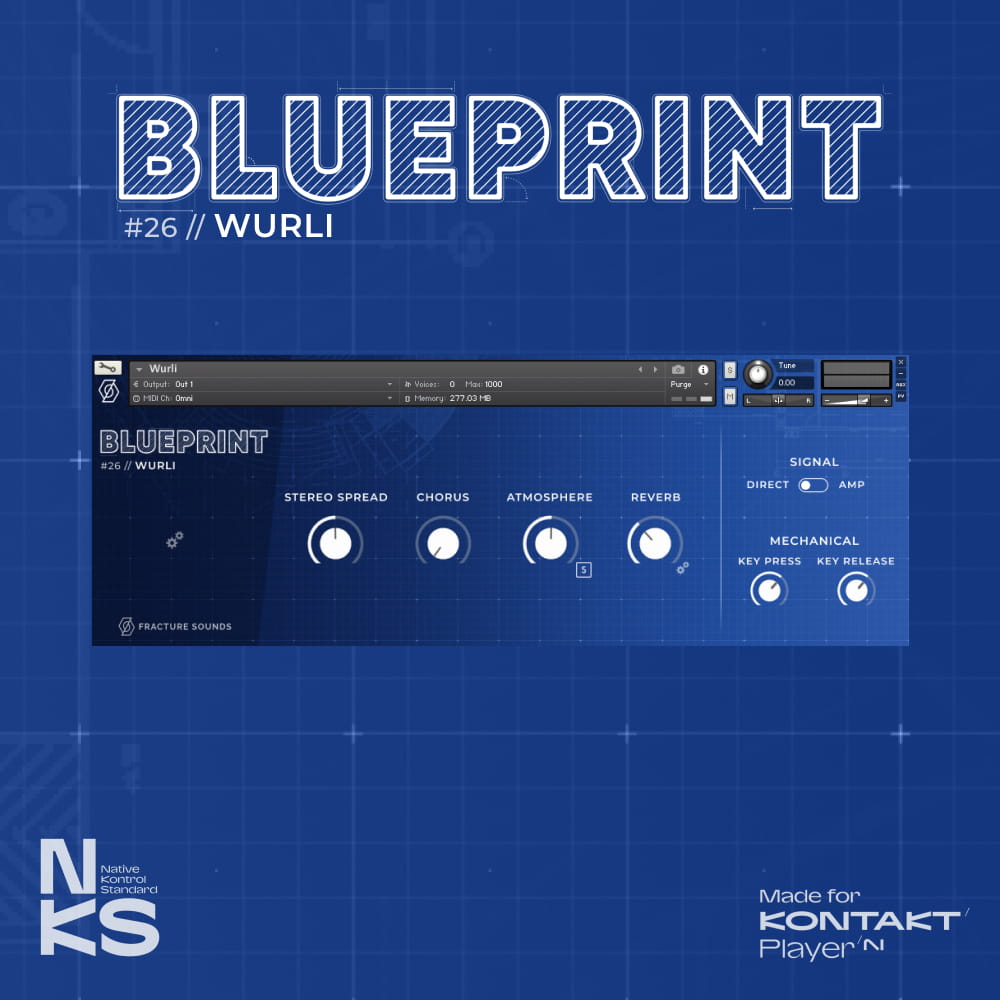
  • Stereo Spread – Increasing the stereo spread will pan the lower notes to the left and the upper notes to the right.
  • Chorus – Control the intensity of the in-built chorus effect.
  • Atmosphere – Add an ethereal Atmosphere Layer pad to extend the sonic possibilities of the library.
  • Reverb – Control the overall volume of the built-in reverb. Click the settings cog for more controls.
  • Signal – Switch between a DI or amped signal, for a cleaner or more gritty sound.
  • Mechanical – Control the volume of the acoustic key and release noise picked up from the mics.
  • Settings Cog – Click the cog to the left of the interface to open up further settings.
  • Sample Start – Increase the sample start time to reduce latency. Decrease the sample start time for more realism. The latency above is the correct number for the use of negative delay (pre-delay) in your DAW MIDI settings.
  • Velocity Response – Increase the velocity response to accentuate the volume difference between soft and hard velocities. Reduce the slider to increase the volume of the soft dynamics.

Latest User Reviews

Average user rating of 0.00 from 0 reviews

Products similar to Blueprint: Wurli...

Comments & Discussion for Fracture Sounds Blueprint: Wurli

Discussion
Discussion: Active

Please log in to join the discussion

Log In To KVR Audio