11 KVR members have added Canyon Soundings to 5 MyKVR groups 14 times.
Download KVR Studio Manager (FREE)
You have to move strangely in the desert sometimes. All the angles are oblique, all the paths occluded. What's a sound wave to do?
This is Canyon Soundings, a collection of impulse responses from a small rocky canyon near Joshua Tree, California. It is unique (or at least quite distinctive) in the realm of outdoor impulse responses in focusing on a single location, with sound sources positioned across the stereo field. They range up and down the canyon, almost exclusively "out of view" of the microphones.
In recent years, there have been quite a few IR-based reverbs designed to position instruments within the space of scoring stages, concert halls and the like. You can place the flutes where the flutes are supposed to go, the violas where the violas are supposed to go, maybe even aim the bell of the trumpet stage left or stage right. You might think of Canyon Soundings as an attempt to bring this idea outside and let it get weird.
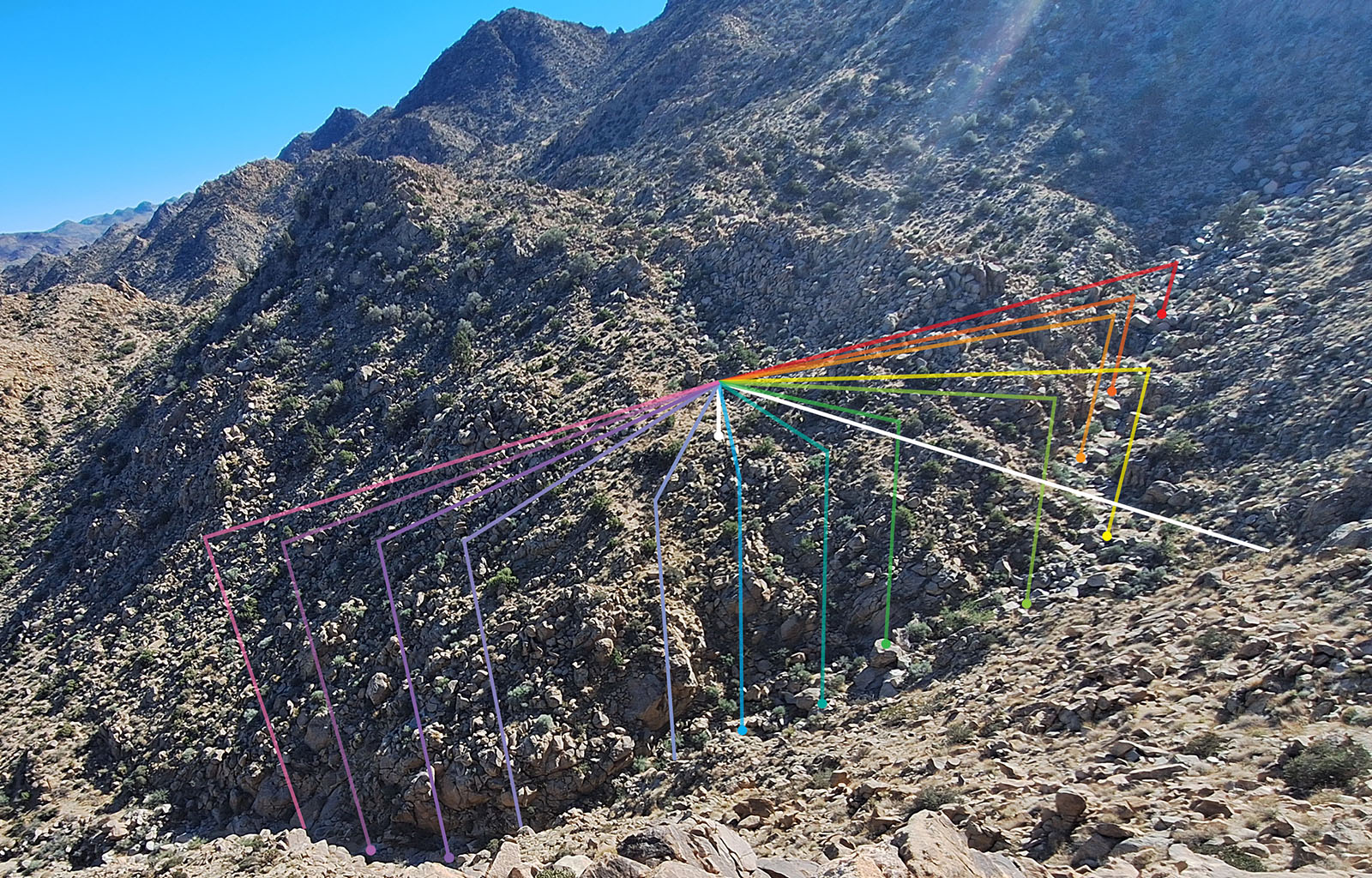
So here we are, looking across this canyon at a steep rocky hillside. Indeed, there are steep rocky hillsides all around. We ourselves are on one such hillside, slightly less steep than the others but just as rocky, on the inside of a bend in the canyon where it exits the mountains. The main channel is about 15 meters wide and deep, and we are set back from the edge a bit so that we cannot see the bottom. In the bottom of the canyon there are sounds, and they are moving. They are coming around the bend. That's the idea, anyway.
There are 13 sites, ranging from 100m up the canyon to 90m down the canyon. They are named alphabetically from left to right: Site A through Site M. Included in the download, there is a KMZ file with the locations of the microphones and all the sound sources. This can be loaded in Google Earth or your KML/KMZ viewer of choice. The image above shows the canyon as viewed from the side opposite the mics, with colorful indicators pointing to the various sites and a white line showing the center of the stereo field.
At each site (except one*) there are four separate impulse responses, captured with the speaker aimed up the canyon (Left), down the canyon (Right), at the wall opposite the mic position (Away), and back toward the wall adjacent the mics (Back).
In the Samples folder, There are 51 normalized stereo impulse responses, as 48kHz, 24-bit .wav files. All file names include the site name, speaker direction, azimuth and distance of the site relative to the mic pair, and normalization. For instance, the file "Site H Speaker Back (20°R 55 m) (normalized 13 dB).wav" is for Site H, with the speaker aimed toward the canyon wall on the same side as the microphones. The first set of parentheses contain the location of Site H relative to the mics (22 degrees to the right of stereo center, 55 meters away), while the second set of parentheses indicate the normalization gain that has been applied (13 dB) **. It makes for an unwieldy file name, but hopefully one that is informative enough to make decisions when importing the files into your convolution software of choice.
The files can be used individually or in pairs as "true stereo" impulses. They may be loaded into any impulse response-based reverb that lets you load your own .wav files, but to make navigating the collection a bit easier, there is also a bank of presets for Audiothing's Fog Convolver 2.
If you copy the Canyon Soundings folder into your Fog Convolver banks folder (you can find the location for this under the Settings tab), the presets should show up in the Fog preset browser. The presets are divided into three categories:
The license is CC0 - No Rights Reserved. You may use, modify and redistribute these files in any way you like. Use them on an album or film? Cool. Incorporate them into your own product? Great. Mash 'em up, smash 'em up? Please. Use them to train your infernal plagiarism machine? I can't stop you. If you are the courteous type and want to give some acknowledgement, you may credit me, Nathan Snider.
* Alas, the recording for the left facing sweep at Site A was irreparably marred by a distant motorcycle. If you are looking at the Fog Convolver bank and wondering why there is no Wide preset for Site A, this is also why. Once the weather and wildlife conditions are right, I will be re-recording this as well as a few new sites between B and E (a range that is currently a bit uneven).
** All measurements (degrees, meters and decibels) are rounded to the nearest whole number for simplicity. The gain value is relative to the whole set of files, with the loudest impulse (in this case "Site F Speaker Back...") assumed to start at 0dB. If you are trying to achieve a realistic fall off in volume with distance, you can use these values to reduce the gain in your convolution software.

Please log in to join the discussion
Submit: News, Plugins, Hosts & Apps | Advertise @ KVR | Developer Account | About KVR / Contact Us | Privacy Statement | Sell @ KVR | KVR Marketplace Terms & Conditions
© KVR Audio, Inc. 2000-2026