Log InCreate An Account
  1. Plugins
  2. »
  3. Noizefield Instruments
  4. »
  5. CloudWash
  6. »
  7. Details
CloudWash
CloudWash by Noizefield Instruments is a Virtual Effect Audio Plugin and a Software Application for Windows. It functions as a VST 3 Plugin and a Standalone Application.
Product
Version
1.0.1
Windows 10 or later required
VST3-compatible DAW for plugin operation
Effect
Formats
Copy Protection
None
Open Source
MIT

MyKVR: Groups, Versions, ...

1 KVR member has added CloudWash to 1 MyKVR group 1 time.

Download KVR Studio Manager (FREE)

Not In Your MY KVR Groups
(or group limitation prevents versioning)
+1 in private groups

KVR Rank

Overall: 27675   20918

30-Day: 15516; 7-Day: 10891; Yesterday: 12561

CloudWash

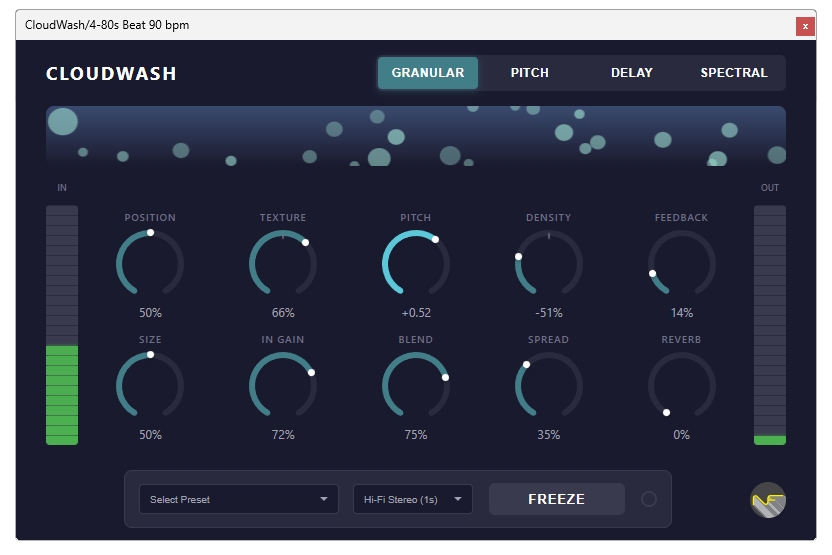
CloudWash is a powerful granular texture processor plugin for Windows, inspired by the legendary Mutable Instruments Clouds. It transforms audio into evolving textures, ambient pads, granular soundscapes, pitch-shifted delays, and spectral effects directly inside your DAW.

This plugin was created using the open-source AudioPluginCoder (APC) framework by Noizefield. APC enables efficient and modern audio plugin development. Learn more about APC on GitHub:

https://github.com/Noizefield/audio-plugin-coder/tree/main

Features

  • Four distinct processing modes: Granular, Pitch, Delay, and Spectral.
  • Up to 8 seconds of internal audio buffer.
  • 64 simultaneous grains in Granular mode.
  • 13 real-time parameters with deep control.
  • 20 factory presets for instant inspiration.
  • Freeze function for sustaining complex textures.
  • Modern WebView-based interface with real-time visualization.
  • High-quality stereo reverb and stereo spread control.

Supported Platforms

  • Format: VST3 (Windows x64).
  • Standalone application included.
  • Windows 10 or later required.
  • VST3-compatible DAW for plugin operation.

Download

CloudWash is available now. To download, please log in or register for a Noizefield account. Registration is free and gives access to all downloads.

Register at Noizefield or Login to Noizefield

Documentation & Support

Documentation, installation guides, and support resources for CloudWash are available on the official website:

https://noizefield.com

User Notes

After installation, ensure your DAW rescans VST3 folders so CloudWash is detected correctly. Follow the setup instructions in the documentation for best results.

Latest User Reviews

Average user rating of 0.00 from 0 reviews

Products similar to CloudWash...

Comments & Discussion for Noizefield Instruments CloudWash

Discussion
Discussion: Active

Please log in to join the discussion

Log In To KVR Audio
