51 KVR members have added Delta Expose to 54 MyKVR groups 59 times.
Download KVR Studio Manager (FREE)
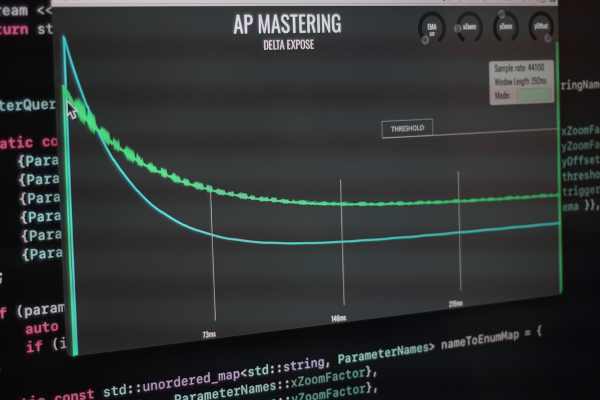
Delta Expose is an extreme high resolution dynamics analyser plugin.
Delta Expose started life as CompView, a basic plugin originally created for a YouTube series on compression. CompView demonstrated how different types of compression could be mimicked with a sufficiently flexible compressor. Though initially a quick demonstration, thousands of people downloaded it and there was significant interest in its insights.
However, CompView had a major limitation: it relied on a high-frequency test tone to analyze gain reduction. While this method is common among analyser plugins, it introduces significant drawbacks. The test tone must be high-pitched to provide a clear plot, but compressors often apply frequency-dependent gain reduction. This means that what appears to match at 12kHz may behave entirely differently at 1kHz or 500Hz, leading to misleading results.
Delta Expose was created to solve this problem. Unlike CompView and some commercially available analysers which work on a similar principle, Delta Expose works on an entirely different principle: it directly compares gain differences between input and processed signals on a sample-for-sample basis. No special test tones, no frequency limitations—just a vastly improved resolution at any frequency, any sample rate, and at extreme zoom levels. Even at 44.1kHz, Delta Expose delivers unmatched clarity in visualizing compression curves.
Send an original signal into the sidechain, a processed signal into the main input, and Delta Expose will reveal exactly how gain changes over time. Whether you are inspecting compressors, dynamic processors, or any gain-based effect, Delta Expose provides an actual direct visualization of gain reduction with absurdly high resolution—down to two samples per pixel.
Delta Expose is probably the most revealing analyser available for visualizing the gain relationship between an original and processed signal. And plus, it looks cool.
As of version 2, Delta Expose now works in all professional DAWs as it magically routes the test signal internally between the generator and analyzer instances. However you may only use one single generator-analyser pair per session. Having multiple generators across multiple tracks will result in undefined weirdness and should definitely be avoided.
If you want to test hardware compressors or other signals other than what is generated from Delta Expose, you should use the original quadraphonic version, which more or less only works in REAPER.
{See video at top of page}

Please log in to join the discussion
Submit: News, Plugins, Hosts & Apps | Advertise @ KVR | Developer Account | About KVR / Contact Us | Privacy Statement | Sell @ KVR | KVR Marketplace Terms & Conditions
© KVR Audio, Inc. 2000-2026