2 KVR members have added Distance Designer to 2 MyKVR groups 3 times.
Download KVR Studio Manager (FREE)
{See video at top of page}
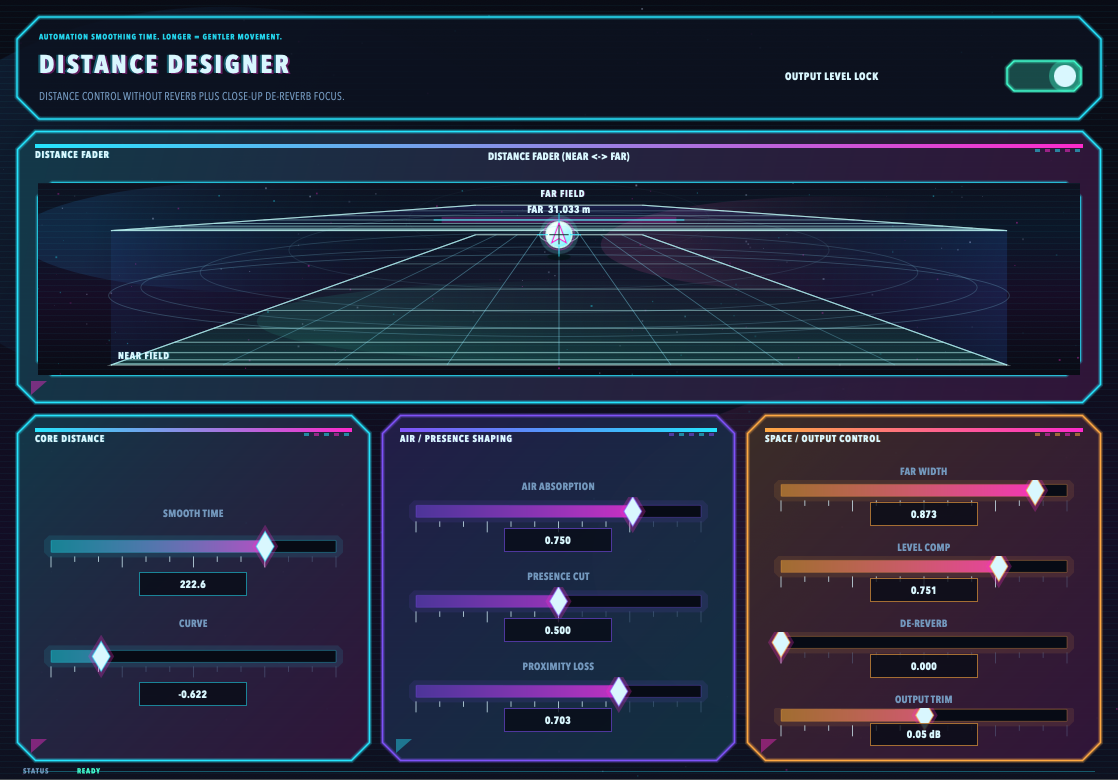
Distance Designer is a macOS AU/VST3 audio effect plugin for controlling the perceived front-to-back distance of a sound source without adding reverb or delay.
Instead of creating a room or ambience tail, Distance Designer reshapes the mix cues that make a sound feel near or far: level, tone, stereo width, proximity, air absorption, presence, and output compensation.
The main Distance Fader moves the source from Near Field to Far Field. Supporting controls let you fine-tune automation smoothing, distance curve, air absorption, presence cut, proximity loss, far width, level compensation, de-reverb style focus, output trim, and output level lock.
Typical uses:
- Push backing vocals behind the lead without adding more reverb
- Place brass, strings, guitars, synths, or FX deeper in the mix
- Create cinematic front-to-back motion
- Reduce mix congestion without washing the source in ambience
- Automate depth movement with a single distance control.
Distance Designer is not a traditional reverb plugin. It is designed as a depth placement and distance-shaping tool for producers, composers, mix engineers, and sound designers.
Features:
- Main Distance Fader for near-to-far placement
- Distance smoothing for automation movement
- Distance curve control
- Air absorption
- Presence cut
- Proximity loss
- Far width control
- Level compensation
- De-reverb style focus
- Output trim
- Output Level Lock
- 80s-inspired neon HUD interface
- macOS AU/VST3.

Please log in to join the discussion
Submit: News, Plugins, Hosts & Apps | Advertise @ KVR | Developer Account | About KVR / Contact Us | Privacy Statement | Sell @ KVR | KVR Marketplace Terms & Conditions
© KVR Audio, Inc. 2000-2026