
356 KVR members have added Drum Flow to 374 MyKVR groups 401 times.
Download KVR Studio Manager (FREE)
Your 'Drum Sound' provides the heartbeat of a song; it's the foundation that every classic mix is built on.
Everyone wants a unique drum sound, and you can't get there by replacing all your drums with the same old samples. Working with real drums is a challenge because every drum, drummer, and room requires a different approach. The trick is to extract the maximum 'punch' without losing the nuance. The AVA Drum Flow plugin can help you get there without skipping a beat.
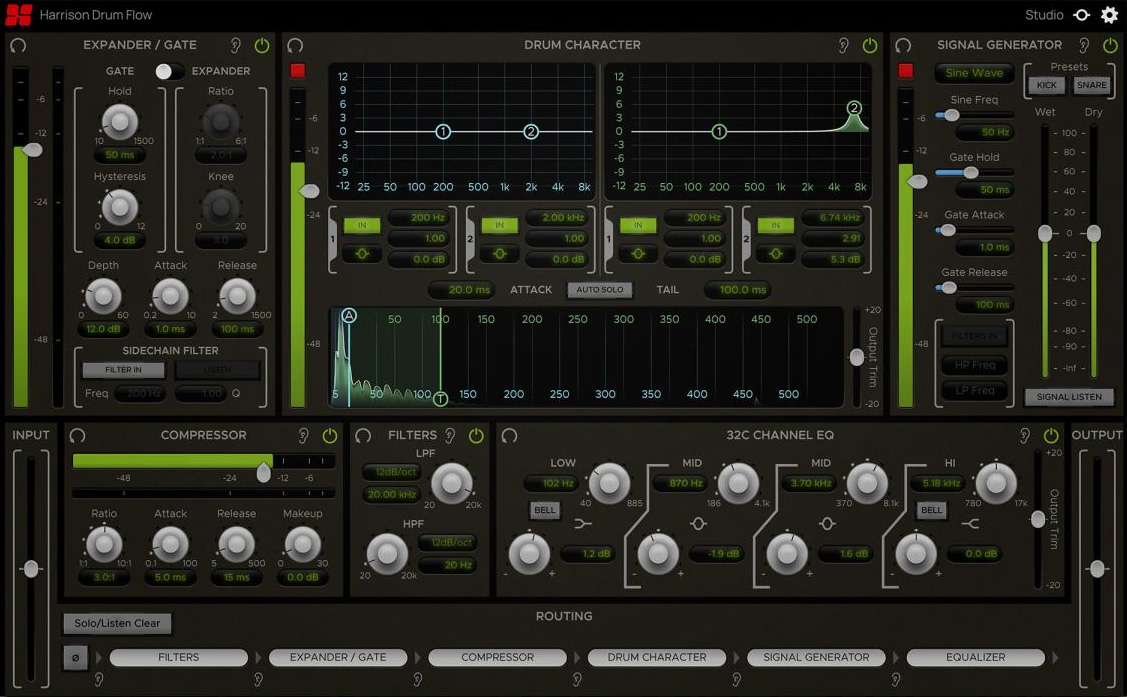
Drum Flow is an all-in-one processing suite designed specifically to improve your drum tones. It contains 6 routable processing elements and a master section with input, output, and routing controls.
The elements included are:
Drum Character:
The Drum Character is an EQ that detects the transients of drum hits and allows you to EQ their Attack and Tail ranges separately.
Expander/Gate:
The Expander/Gate is a dynamics processor that attenuates signals below a set threshold. This is useful for removing unwanted parts of a signal that were picked up due to microphone bleed.
Signal Generator:
The Signal Generator offers a convenient way to enhance drum hits with various types of synthesized signals, such as white noise on a snare or a low-frequency sine wave on a kick. The generated signal is fed through a gate which is keyed off of the main input allowing the signal to be triggered on drum hits. The generated signal can then be blended with the main input signal in parallel using the Wet and Dry faders.
Compressor:
The Compressor is based on the Harrison Mixbus channel strip compressor with the addition of Attack and Release controls.
32C Channel EQ:
The 32C Channel EQ is modeled after the analog EQ found on the Harrison 32C channel strip. It has four bands with Frequency and Gain controls, optional high & low shelf filters, and an Output Trim control.
Filters:
The Filter module contains a Low-Pass Filter (LPF) and a High-Pass Filter (HPF) with variable slopes. Set the corner frequencies of the Filters by adjusting their Frequency knobs or by typing values directly in to the corresponding Frequency control labels.
Module Controls:
The processing elements are separated into modules which can each be individually bypassed, soloed, and reset using the following controls on each module's top bar.
The Reset button resets all of a module's parameters to their default states.
The Solo button bypasses all processing outside of the module being soloed except for master controls (polarity, input and output trim). This allows individual modules to be auditioned exclusively without hearing the effects of any of the other modules.
The In button toggles the enablement of each module. If disabled, a module's processing is bypassed and its effects will not be heard.
Master Control Section:
The master controls consist of the Input, Output and Routing sections at the bottom of the plug-in editor. The controls in these sections allow you to invert the input polarity, adjust the input & output trim, and set the routing order between processing elements.
Reviewed By CarDiaC010 [all]
February 21st, 2025
Version reviewed: 2.0.1 on Windows
This is a super plug-in where you can craft the drum sounds exactly as you like, it allows you to fix the EQ using a HighPass Filter a Low Pass Filter or both.
Very effective on Kick Snare Toms Cymbals there are Gates Compression and lots of other goodies to play about with.
This is one of those plug-ins that you did not know you needed, but it is one that you will reach for in every mix.
Nice product good price, you should think about making this plug-in the next one that you purchase.

Please log in to join the discussion
Submit: News, Plugins, Hosts & Apps | Advertise @ KVR | Developer Account | About KVR / Contact Us | Privacy Statement | Sell @ KVR | KVR Marketplace Terms & Conditions
© KVR Audio, Inc. 2000-2026

