
365 KVR members have added DynAssist to 382 MyKVR groups 402 times.
Download KVR Studio Manager (FREE)
Vocal editing has never been so easy!
Save hours on vocal-editing and focus on the important things. No pressure of tight deadlines and more time being creative.
How much time have you wasted on vocal editing yet?
Perfectly leveled gain
Match signal to your target loudness (LUFS-I)
Sibilance detection
Breath detection
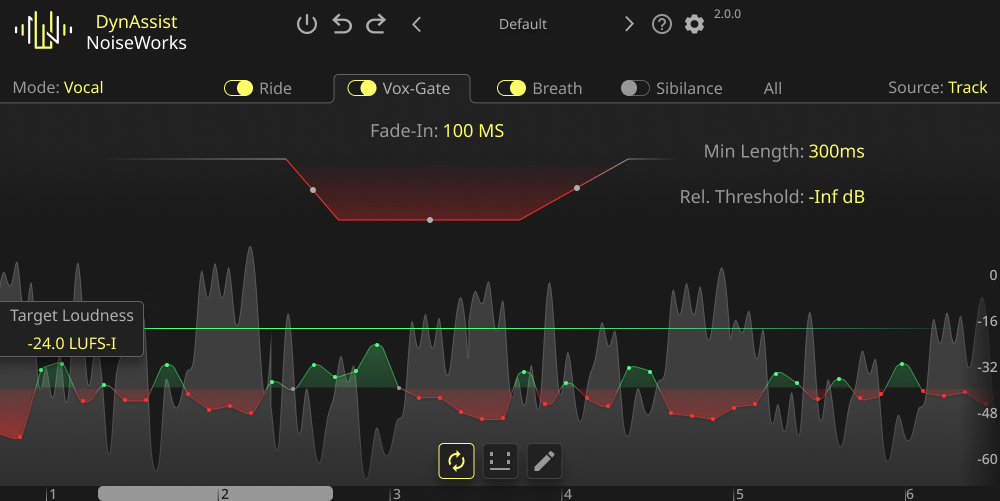
Smart Vox Gate
Instrument Mode.
Gain Riding with infinite Lookahead
DynAssist adjusts the loudness to the Target Loudness in LUFS-I. Thanks to the 'infinite lookahead' enabled by ARA*, pumping artifacts are prevented. This was a common problem with previous vocal riders.
Additionally, DynAssist ensures minimal CPU load with 0.0 ms latency, ensuring that your workflow is not disrupted by playback delays at any time.
AI-powered Vox-Gate
The AI-powered Vox-Gate works based on voice activity to remove pauses and silence, eliminating the need to set an additional threshold. This method also prevents the accidental cutting off of the first or last syllable, a common issue with existing gates, due to incorrect gate opening or closing.
To prevent voice bleeding, use the Loudness Cutoff, which functions like a threshold but is specific to voice.
Highly precise breath detection
The AI-powered breath detection is more precise than any other solution on the market. It ensures that every clip has well-leveled breaths, eliminating the need for manual editing.
In the interface waveform, breaths are highlighted in a darker grey, making it easier for you to overview the clip without having to listen to the entire file.
Sibilance detection
The Sibilance feature works as you would expect. It detects and levels sibilance that exceeds the threshold you set.
In DynAssist's waveform, sibilance is highlighted in a lighter grey. The overlapping automation provides detailed information about what happens to each sibilance.

Please log in to join the discussion
Submit: News, Plugins, Hosts & Apps | Advertise @ KVR | Developer Account | About KVR / Contact Us | Privacy Statement | Sell @ KVR | KVR Marketplace Terms & Conditions
© KVR Audio, Inc. 2000-2026

