51 KVR members have added Dynaverse to 45 MyKVR groups 58 times.
Download KVR Studio Manager (FREE)
Dynamic Modulated Delay
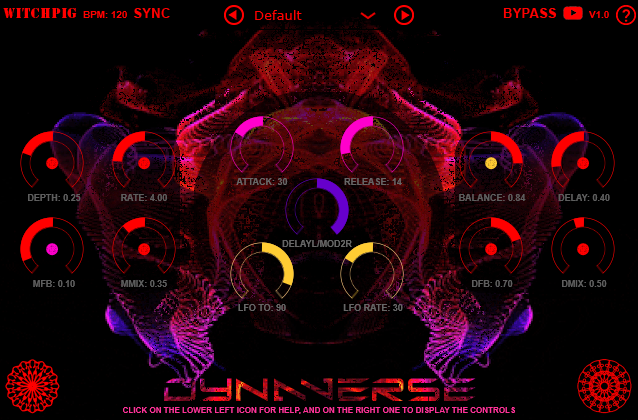
Set the routing and mode of modulation (Chorus/Flanger) through the purple control in the middle. Click on the small red circle inside the modulation (left) or delay (right) controls, to automate them by volume input (pink), or click again, to automate them by the LFO (yellow). Clicking again will set the control back to non-automated (red).
The central pink controls will set how quickly the assigned parameter goes up or down, in relation to the input volume. The central yellow controls will set where the LFO moves the assigned control up to, and how fast it moves (if the 'LFO TO' is less than the red position, it will have nowhere to move up to).
{See video at top of page}

Please log in to join the discussion
Submit: News, Plugins, Hosts & Apps | Advertise @ KVR | Developer Account | About KVR / Contact Us | Privacy Statement | Sell @ KVR | KVR Marketplace Terms & Conditions
© KVR Audio, Inc. 2000-2026