
1 KVR member has added E-CutFilter300 to 1 MyKVR group 1 time.
Download KVR Studio Manager (FREE)
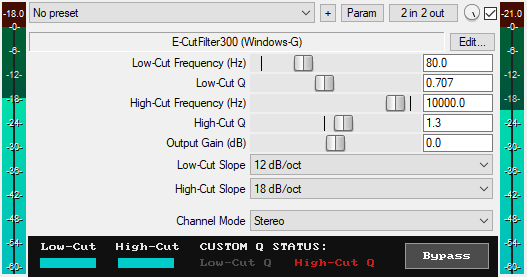
A JSFX filter plugin for REAPER that offers:
* Low-pass and high-pass filters with a true Butterworth response.
* Multiple slope options: 6, 12, 18, 24, 36, 48, 60, 72, 96, and 120 dB/oct.
* Adjustable Q sliders.
* Output Gain (dB): Sets the final output level of the plugin from -20dB to +20dB to compensate for volume changes.
* Channel Modes: Apply filtering in Stereo, Mid, Side, Left Only, or Right Only modes.
* GUI smooth Bypass button for toggling the effect on or off without audio clicks. Available for automation as "Bypass (Smooth)" in the parameter list.
* Zipper-Noise-Free Operation: Advanced interpolation ensures no zipper noise during slider automation or real-time adjustments.
* Minimal CPU usage.
You can grab it for just $10. All future updates are free, just make sure to use a valid email so I can send future updates to you.
Email Support: info.windowsg@gmail.com
================================================.
Using This JSFX Plugin in Other DAWs:
If you want to use this JSFX plugin in other DAWs, you can do so using the open-source YSFX plugin.
YSFX is available in VST3, AU, and CLAP formats for Windows, macOS, and Linux.
Download your preferred version of YSFX from here (Click on "Assets" for the downloads to appear):
https://github.com/JoepVanlier/ysfx/releases
YSFX comes in two versions:
* ysfx-s FX (for JSFX effects).
* ysfx-s instrument (for JSFX instruments).
1. Open ysfx-s FX in your DAW,
2. Then click "Load", find your "E-CutFilter300_Windows-G" file, and click "Open."
The JSFX plugin will now run inside the YSFX host, working perfectly in any DAW that supports VST3, AU, or CLAP plugins.

Please log in to join the discussion
Submit: News, Plugins, Hosts & Apps | Advertise @ KVR | Developer Account | About KVR / Contact Us | Privacy Statement | Sell @ KVR | KVR Marketplace Terms & Conditions
© KVR Audio, Inc. 2000-2026

