
4 KVR members have added E-FlangerFX700 (JSFX) to 5 MyKVR groups 5 times.
Download KVR Studio Manager (FREE)
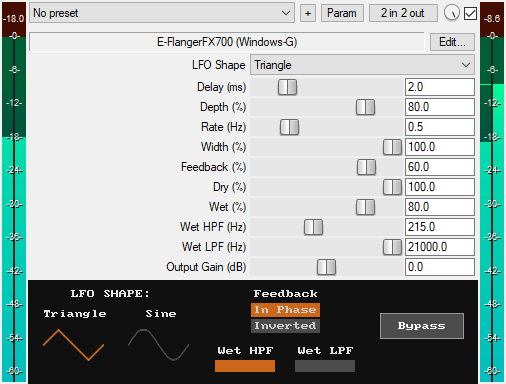
A JSFX flanger plugin for REAPER that offers:
* Two LFO Shapes:
1. Triangle: has constant modulation speed so it produces less obvious volume pumping, giving a steady and consistent flanging effect.
2. Sine: has variable modulation speed so it produces more noticeable volume pumping, giving a dynamic and pumpy flanging effect.
* Delay (0–10 ms): Sets the base delay time for the LFO modulation. Short delays (0.1–2 ms) create a metallic flanging. Moderate delays (3–4 ms) produce less resonant, single-voice flanging. Longer delays (5–10 ms) produce spacious flanging with more noticeable doubling.
* Depth (0–100%): Controls how far the modulation sweeps above and below the base delay time; this is the intensity of the modulation. Lower values create narrower sweeps, resulting in a subtle, gentle flanging, while higher values create wider sweeps, resulting in a more intense flanging. At 0%, there's no modulation, while at 100%, the modulation uses the full range of the delay time.
* Rate (0–5 Hz): Controls the speed of the modulation. Lower rates create slow, gentle sweeping, while higher rates create rapid whooshing effects. If you are unsure of how to dial in tempo-synced Hertz values for the Rate slider, you can use my E-AudioUnitConverter plugin. It converts note values into milliseconds, seconds, and Hertz based on your chosen tempo: https://windowsg.gumroad.com/l/unitconverter
* Width (0–100%): Controls the stereo width by offsetting the phase relationship between the left and right channels. At 0%, the modulation pattern is mono (identical on both channels), creating a centered flanging. At 100%, the channels are maximally out of phase, creating a wide stereo flanging.
* Feedback (-99% to +99%): Controls the amount of the delayed signal that loops back into the delay buffer. Positive values (1% to 99%) create in-phase feedback, producing resonant flanging. Negative values (-99% to -1%) create inverted-phase feedback, producing hollower flanging. At 0%, there's no feedback loop. The slider range is limited to -99% to +99% as a safety measure to prevent the feedback signal from looping at full strength when it's at ±100%, which would cause the signal to build infinitely and create distortion.
* Dry (0–100%): Controls the level of the original, unprocessed signal. At 0%, the original signal is completely removed. At 100%, the original signal is at full level.
* Wet (0–100%): Controls the level of the flanged signal. At 0%, the flanging effect is completely removed. At 100%, the flanging effect is at full level.
Having separate dry and wet controls for a flanger lets you isolate and listen to the flanged signal, which helps you make more precise mixing decisions.
* Wet HPF (10 Hz – 20 kHz): Applies a high-pass filter to the wet signal only. The filter becomes active only when the frequency is set above 10 Hz. Use it to roll off low frequencies and focus the flanging on the mids and highs.
* Wet LPF (20 Hz – 21 kHz): Applies a low-pass filter to the wet signal only. The filter becomes active only when the frequency is set below 21 kHz. Use it to roll off high frequencies and create a darker flanging effect.
* Output Gain (dB): Sets the final output level of the plugin from -30dB to +30dB to compensate for volume changes.
* Bypass (Smooth): The GUI features a dedicated bypass button for toggling the flanging effect on or off without audio clicks. Available for automation as "Bypass (Smooth)" in the parameter list.
* Visual Indicators: Clear indicators show the selected LFO shape (Triangle or Sine), the active status of the wet high-pass/low-pass filters as well as the feedback control, and whether the feedback is in phase or inverted.
* Zipper-Noise-Free Operation: Advanced interpolation ensures no zipper noise during slider automation or real-time adjustments.
* Minimal CPU Usage
You can grab it for FREE.
Listen to the audio demos here or on the Gumroad product page to hear what the plugin can do.
Email Support: info.windowsg@gmail.com
==================================================
Using This JSFX Plugin in Other DAWs:
If you want to use this JSFX plugin in other DAWs, you can do so using the open-source YSFX plugin.
YSFX is available in VST3, AU, and CLAP formats for Windows, macOS, and Linux.
Download your preferred version of YSFX from here (Click on "Assets" for the downloads to appear):
https://github.com/JoepVanlier/ysfx/releases
YSFX comes in two versions:
* ysfx-s FX (for JSFX effects).
* ysfx-s instrument (for JSFX instruments).
1. Open ysfx-s FX in your DAW,
2. Then click "Load", find your "E-FlangerFX700_Windows-G" file, and click "Open."
The JSFX plugin will now run inside the YSFX host, working perfectly in any DAW that supports VST3, AU, or CLAP plugins.
 $49.00Rotary CLS-222
Please log in to join the discussion
Submit: News, Plugins, Hosts & Apps | Advertise @ KVR | Developer Account | About KVR / Contact Us | Privacy Statement | Sell @ KVR | KVR Marketplace Terms & Conditions
© KVR Audio, Inc. 2000-2026

