
8 KVR members have added E-Goniometer400 to 5 MyKVR groups 10 times.
Download KVR Studio Manager (FREE)
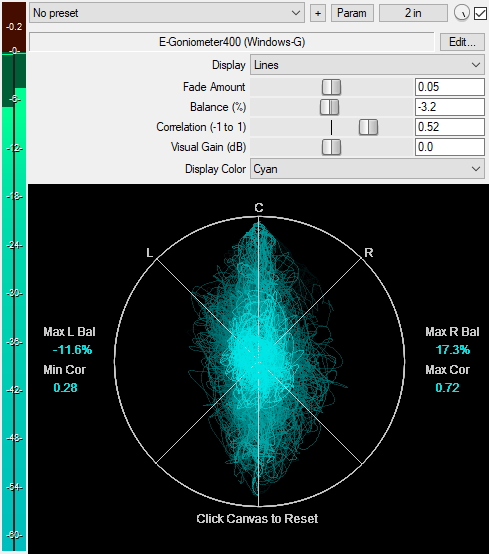
A JSFX Goniometer plugin for analyzing stereo image, balance, and phase correlation. This is a revamped version of the "JS Goniometer [LOSER]" by Michael Gruhn. I, Windows-G, have added several new features. The plugin now features:
* A display type menu: switch between dots, lines, or rays for different visualization styles.
* A circle around the L/R diagonal lines and a center vertical line for better visual reference of the stereo width and mono content.
* A visual gain slider to amplify the display when input audio is too quiet.
* Fade amount control: adjusts how quickly the display visuals fade out over time.
* A display color menu for choosing your preferred color for the scope.
* Support for Retina/high-DPI screens.
* Accurate balance and correlation meters (ported from "JSFX Correlation Meter [JM]" by Jozef Mackowiak).
* Maximum left and right balance values: records and displays the maximum left and right balance positions your mix reached during playback.
* Minimum and maximum correlation values: records and displays the lowest and highest correlation values reached during playback.
* Persistent readouts after offline render: the max/min values are preserved after an offline render completes. The readouts auto-reset on each playback start; however, you can manually click anywhere on the canvas to reset them when needed.
For advanced users, the code includes an additional hidden control called Weight (adjusts the reaction time of the Balance and Correlation meters), which you can unhide. In case you want to hide any slider, simply click Edit at the top right of the plugin's GUI, add a hyphen (-) before the slider description, then press Ctrl + S to save. Example: slider2:0.050<0,0.1,0.001>-Fade Amount.
You can grab it for free.
Email Support: info.windowsg@gmail.com
==================================================
Using This JSFX Plugin in Other DAWs:
If you want to use this JSFX plugin in other DAWs, you can do so using the open-source YSFX plugin.
YSFX is available in VST3, AU, and CLAP formats for Windows, macOS, and Linux.
Download your preferred version of YSFX from here (Click on "Assets" for the downloads to appear):
https://github.com/JoepVanlier/ysfx/releases
YSFX comes in two versions:
* ysfx-s FX (for JSFX effects).
* ysfx-s instrument (for JSFX instruments).
1. Open ysfx-s FX in your DAW,
2. Then click "Load", find your "E-Goniometer400_Windows-G" file, and click "Open."
Your plugin will now run inside the YSFX host, working perfectly in any DAW that supports VST3, AU, or CLAP plugins.

Please log in to join the discussion
Submit: News, Plugins, Hosts & Apps | Advertise @ KVR | Developer Account | About KVR / Contact Us | Privacy Statement | Sell @ KVR | KVR Marketplace Terms & Conditions
© KVR Audio, Inc. 2000-2026

