Log InCreate An Account
  1. Plugins
  2. »
  3. Windows-G
  4. »
  5. E-Goniometer400 (VST3)
  6. »
  7. Details

E-Goniometer400 (VST3)

GonioMeter Plugin by Windows-G
MyKVRFAVORITE2WANT6
E-Goniometer400 (VST3)
E-Goniometer400 (VST3) by Windows-G is a Virtual Effect Audio Plugin for Windows. It functions as a VST 3 Plugin.
Product
Version
1.0.0
Effect
Formats
Copy Protection
None
Open Source
MIT

MyKVR: Groups, Versions, ...

7 KVR members have added E-Goniometer400 (VST3) to 3 MyKVR groups 9 times.

Download KVR Studio Manager (FREE)

Not In Your MY KVR Groups
(or group limitation prevents versioning)
+3 in private groups

KVR Rank

Overall: 18429   15636

30-Day: 2203; 7-Day: 174; Yesterday: 1443

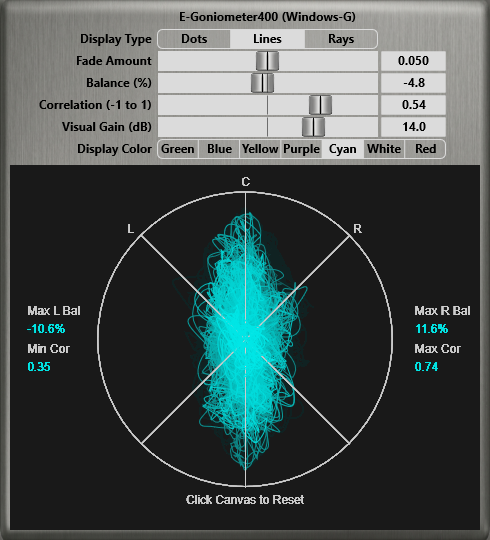
A Windows-only VST3 plugin for analyzing stereo image, balance, and phase correlation.

Features:

  • A display type menu: switch between dots, lines, or rays for different visualization styles (ported from "JS Goniometer [LOSER]" by Michael Gruhn).
  • Fade amount control: adjusts how quickly the display visuals fade out over time.
  • A display color menu for choosing the preferred color for the scope.
  • A visual gain slider to amplify the display when input audio is too quiet.
  • Accurate balance and correlation metering (ported from "JSFX Correlation Meter [JM]" by Jozef Mackowiak).
  • Max L/R Bal readouts: display the maximum left and right balance positions the mix reached during playback.
  • Min/Max Cor readouts: display the lowest and highest correlation values reached during playback.
  • The readouts auto-reset on each playback start. However, you can manually click anywhere on the canvas to reset them when needed.
  • For advanced users, the generic GUI sliders displayed by the DAW include a slider called Weight, which can be adjusted to change the reaction time of the Balance and Correlation sliders.
  • Support for Retina/high-DPI screens. Right click anywhere on the plugin's GUI and choose from the "UI Zoom" options to increase the size of the plugin interface.
  • Double-click sliders to reset them to their default values. Hold Ctrl while clicking and dragging for fine slider increments.

You can grab it for FREE.

Email Support: info.windowsg@gmail.com

Latest User Reviews

Average user rating of 0.00 from 0 reviews

Products similar to E-Goniometer400 (VST3)...

Comments & Discussion for Windows-G E-Goniometer400 (VST3)

Discussion
Discussion: Active

Please log in to join the discussion

Log In To KVR Audio
