
1 KVR member has added E-HighEndClassicEQ300 (JSFX) to 1 MyKVR group 1 time.
Download KVR Studio Manager (FREE)
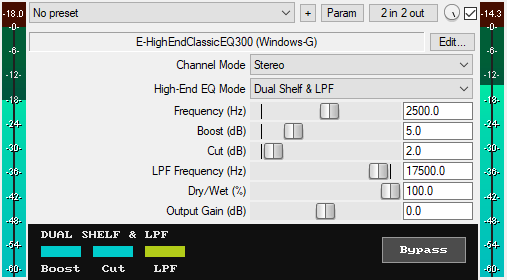
A JSFX EQ plugin for REAPER emulates the high-end EQ curves found in Pultec-style/passive equalizers. It can be used for are adding air to vocals, brilliance to your cymbals, and lifting the top end of your overall mix. By leveraging parallel boost/cut processing and carefully selected Q-factor values, it achieves that pultec-style high-end enhancement without introducing phase artifacts. It features:
* 3 High-End EQ Modes: Choose between three Pultec-inspired EQ modes:
1. Classic Bell & Shelf (Pultec-style): Combines a bell filter for boosting and a shelf filter for cutting in parallel, ideal for that vintage-style high-end boost and roll-off.
2. Classic Dual Shelf + HPF (Pultec-style): Uses two shelf filters for Boosting and Cutting in parallel, perfect for adding clean high-end presence and air.
3. Classic Dual Shelf + LPF (Pultec-style): Adds a user-adjustable low-pass filter after the dual shelf stage, great for taming unwanted harshness or simulating vintage high-end roll-off.
* Channel Modes: Apply equalization in Stereo, Mid, or Side modes to precisely enhance the airiness or sparkle where it matters most.
* Continuous Frequency Control (1kHz–20kHz): Unlike vintage pultec EQs with fixed bands, you can adjust the frequency from 1kHz to 20kHz, this lets you precisely target the high-frequency range to enhance or tame air or brilliance.
* Independent Boost and Cut Controls: Independently control the boost (0-20 dB) and cut (0-20 dB) for clean high-end tonal shaping.
* Dedicated LPF Frequency Slider (1kHz–21kHz): When in "Classic Dual Shelf + LPF" mode, you can adjust the low-pass filter frequency from 1kHz to 21kHz, to roll off unwanted high frequencies.
* Dry/Wet Mix Control (0–100%): Blend your processed signal with the original dry signal for parallel processing.
* Output Gain (-30dB to +30dB): Sets the final output level of the plugin to compensate for volume changes.
* GUI Bypass Button: A smooth bypass button for toggling the EQ on or off without audio clicks. Available for automation as "Bypass (Smooth)" in the parameter list.
* Zipper-Noise-Free Operation: Advanced smoothing ensures no zipper noise during slider automation and real-time adjustments.
* Light on CPU.
You can grab it for $8 on Gumroad. All future updates are free, just make sure to use a valid email so I can send future updates to you.
Listen to the audio demo here or on the Gumroad product page to hear what the plugin can do.
Email Support: info.windowsg@gmail.com
==================================================
Using This JSFX Plugin in Other DAWs:
If you want to use this JSFX plugin in other DAWs, you can do so using the open-source YSFX plugin.
YSFX is available in VST3, AU, and CLAP formats for Windows, macOS, and Linux.
Download your preferred version of YSFX from here (Click on "Assets" for the downloads to appear):
https://github.com/JoepVanlier/ysfx/releases
YSFX comes in two versions:
* ysfx-s FX (for JSFX effects).
* ysfx-s instrument (for JSFX instruments).
1. Open ysfx-s FX in your DAW,
2. Then click "Load", find your "E-HighEndClassicEQ300_Windows-G" file, and click "Open."
The JSFX plugin will now run inside the YSFX host, working perfectly in any DAW that supports VST3, AU, or CLAP plugins.

Please log in to join the discussion
Submit: News, Plugins, Hosts & Apps | Advertise @ KVR | Developer Account | About KVR / Contact Us | Privacy Statement | Sell @ KVR | KVR Marketplace Terms & Conditions
© KVR Audio, Inc. 2000-2026

