
1 KVR member has added E-Limiter600 to 1 MyKVR group 1 time.
Download KVR Studio Manager (FREE)
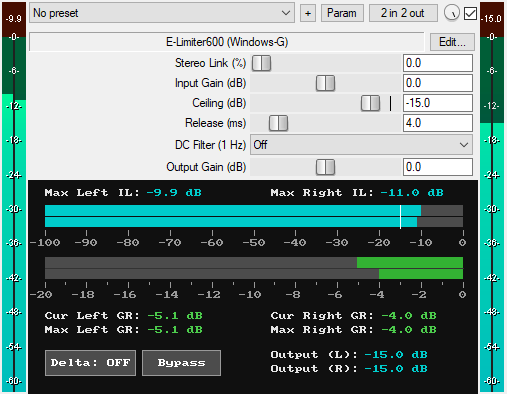
A JSFX lookahead peak limiter plugin for REAPER that features:
* 1 ms lookahead: The 1ms lookahead is sufficient in this limiter because it uses an extended peak hold system (190 × 1ms lookahead) in the detection envelope. When a peak is detected, the detection envelope holds it for 190ms while the audio is delayed by 1ms. This means the main limiting envelope sees the held peak value 1ms before the actual audio arrives, allowing it to start applying gain reduction 1ms in advance. The extended 190ms hold ensures the detection envelope maintains steady peak information for the main envelope to track smoothly, preventing ceiling overshoot and distortion artifacts without needing a longer lookahead delay. The 190ms peak hold is NOT a delay of the audio signal itself; it's just how long the detection envelope remembers peaks. The 1ms latency introduced by the lookahead is reported to the DAW for automatic delay compensation.
* Stereo Link (0% to 100%): Controls how much the left and right channels are linked during limiting. At 0%, each channel is limited independently based on its own level, which can alter the stereo image but can sound expressive. At 100%, both channels are limited together based on the loudest of the two channels, preserving the stereo image but can sound static. Values in between 0% and 100% provide a continuous blend of independent and linked limiting behavior.
* Input Gain (-40 dB to +40 dB): Boosts or attenuates the level of the input signal. This is useful for maximizing loudness, driving the limiter harder to achieve more gain reduction, or reducing the input level to avoid excessive limiting.
* Ceiling (-100 dB to 0 dB): A brick-wall ceiling that sets the maximum output level the limiter will allow. Because the ceiling range extends from -100 dB up to 0 dB, it can be used flexibly for track-level, mix-bus, and master-bus limiting.
* Release (1 ms to 2000 ms): Controls how fast the gain reduction returns to unity after the detected signal drops below the ceiling. Fast release (1 ms to 14 ms) creates quick recovery, allowing the limiter to restore gain rapidly, which is ideal for maximizing loudness. Slow release (70 ms to 2000 ms) makes the gain reduction return toward unity at a slow pace, causing gain reduction to persist for a longer period, which can result in quieter output but may be useful for achieving a "glue" effect. Medium release (15 ms to 69 ms) provides a middle ground between fast and gradual recovery, that is, between louder and quieter output. The release uses an exponential curve for smooth sound.
* Optional DC Filter (1 Hz): An optional 12dB/oct high-pass filter at 1 Hz that removes DC offset from the output signal after the limiting process. Limiters introduce DC offset during limiting, even if minimal, so the DC filter removes this DC buildup to maintain a clean signal. The DC filter is active only when enabled.
* Output Gain (-40 dB to +40 dB): Sets the final output level of the limited signal. This is particularly useful when the DC Filter is turned ON, as even a 1 Hz DC filter can increase peak levels slightly (e.g., by around 0.2 dB). The output gain can be used to compensate for the slight peak increase introduced by the 1 Hz DC filter.
* GUI Delta Button: Solos the difference between the wet and dry signals. It lets you hear what the limiter removed from the main signal. This is very useful when adjusting settings. It is available for automation as "Delta (Smooth)" in the plugin's parameter list.
* GUI Bypass Button: A smooth bypass button for toggling the limiting effect on or off without audio clicks. The bypass button accounts for the Input Gain setting by using the signal after Input Gain is applied, allowing the user to toggle between the dry and wet signals at roughly the same loudness level, so the user is not tricked into thinking the louder signal sounds better. It is available for automation as "Bypass (Smooth)" in the plugin's parameter list.
* GUI Max Left/Right IL Readouts (dB): Display the maximum input signal levels for left and right channels since playback started. The values automatically reset on each playback start and when Stereo Link and Input Gain parameters change.
* GUI Input Level Meter: Displays the current input signal levels for the left and right channels independently on a -100 dB to 0 dB scale. A white reference line indicates the ceiling level.
* GUI Gain Reduction Meter: Displays the current amount of gain reduction being applied by the limiter.
* GUI Cur Left/Right GR Readouts (dB): Display the current amount of gain reduction being applied by the limiter to left and right channels. The values automatically reset on each playback start and when limiting parameters change.
* GUI Max Left/Right GR Readouts (dB): Display the maximum gain reduction applied by the limiter to left and right channels since playback started. The values automatically reset on each playback start and when limiting parameters change.
* GUI L/R Output Max Readouts (dB): Display the maximum output levels reached for left and right channels since playback started. The value automatically resets on each playback start. You can also click on the readouts to reset them.
* Zipper-Noise-Free Operation: Advanced interpolation ensures no zipper noise during slider automation or real-time adjustments.
* Minimal CPU Usage.
You can grab it for $10. All future updates are free, just make sure to use a valid email so I can send future updates to you.
Listen to the audio demo here or on the Gumroad product page to hear what the plugin can do.
Email Support: info.windowsg@gmail.com
==================================================
Using This JSFX Plugin in Other DAWs:
If you want to use this JSFX plugin in other DAWs, you can do so using the open-source YSFX plugin.
YSFX is available in VST3, AU, and CLAP formats for Windows, macOS, and Linux.
Download your preferred version of YSFX from here (Click on "Assets" for the downloads to appear):
https://github.com/JoepVanlier/ysfx/releases
YSFX comes in two versions:
* ysfx-s FX (for JSFX effects).
* ysfx-s instrument (for JSFX instruments).
1. Open ysfx-s FX in your DAW,
2. Then click "Load", find your "E-Limiter600_Windows-G" file, and click "Open."
The JSFX plugin will now run inside the YSFX host, working perfectly in any DAW that supports VST3, AU, or CLAP plugins.
 $79.00Bus Peak
Please log in to join the discussion
Submit: News, Plugins, Hosts & Apps | Advertise @ KVR | Developer Account | About KVR / Contact Us | Privacy Statement | Sell @ KVR | KVR Marketplace Terms & Conditions
© KVR Audio, Inc. 2000-2026

