
7 KVR members have added E-PeakClipper500 to 5 MyKVR groups 8 times.
Download KVR Studio Manager (FREE)
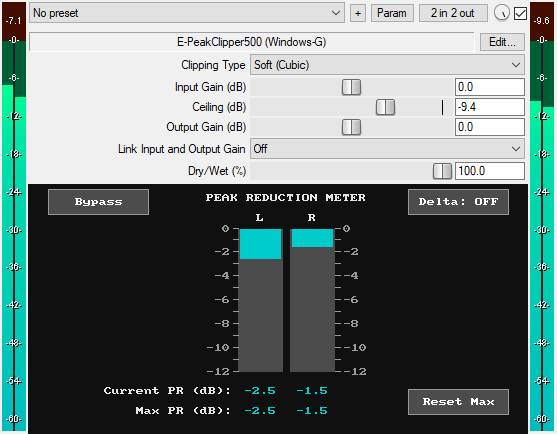
A JSFX clipper plugin for REAPER that offers:
* Three Clipping Modes:
1. Soft (Cubic): Soft clipping with a dominant 3rd harmonic. Cleaner because it emphasizes just one harmonic.
2. Soft + Hard (50/50 Blend): A balanced middle ground, blending 50% cubic soft clipping with 50% pure hard clipping.
3. Hard: The classic sound of digital clipping. Clean at small amounts, but when driven heavily produces aggressive harmonic excitement.
* Accurate Peak Reduction Meter: Real-time bar graphs showing the exact amount of peak reduction (0 to -12 dB) per channel. It accurately displays the peak reduction after the dry/wet blend is applied, so it reflects the mix setting.
* Current Peak Reduction Readouts: Live numerical display of ongoing clipping activity per channel.
* Maximum Peak Reduction Readouts: Numerical display of the highest amount of clipping since playback started, per channel.
* Intelligent Auto-Reset: Current and Max values automatically clear when you start playback, giving you fresh readings each time you hit play.
* Ceiling Control: adjust output ceiling from -30dB to 0dB.
* Output Gain (dB): Sets the final output level of the plugin from -30dB to +30dB to compensate for volume changes.
* Auto-Link Input and Output Gain: Maintain consistent loudness by linking input and output gain with an inverse relationship. Great for controlling how much audio level you drive into the clipper without changing perceived loudness.
* Dry/Wet: Blend between the original signal and the clipped signal, from 0% (fully dry) to 100% (fully clipped).
* GUI Delta Button: Solos the difference between the wet and dry signals. It reveals what the clipper removed from the input signal. This is very useful when adjusting settings. Available for automation as "Delta (Smooth)" in the plugin's parameter list.
* GUI Reset Max Button: Clear the max values at any time.
* GUI Bypass Button: A smooth bypass button for toggling the effect on or off without audio clicks. The bypass button accounts for the Input Gain setting by using the signal after Input Gain is applied, allowing the user to toggle between the dry and wet signals at roughly the same loudness level, so the user is not tricked into thinking the louder signal sounds better. It is available for automation as "Bypass (Smooth)" in the parameter list.
* Minimal CPU usage
You can grab it for free.
Email Support: info.windowsg@gmail.com
==================================================.
Using This JSFX Plugin in Other DAWs:
If you want to use this JSFX plugin in other DAWs, you can do so using the open-source YSFX plugin.
YSFX is available in VST3, AU, and CLAP formats for Windows, macOS, and Linux.
Download your preferred version of YSFX from here (Click on "Assets" for the downloads to appear):
https://github.com/JoepVanlier/ysfx/releases
YSFX comes in two versions:
* ysfx-s FX (for JSFX effects).
* ysfx-s instrument (for JSFX instruments).
1. Open ysfx-s FX in your DAW,
2. Then click "Load", find your "E-PeakClipper500_Windows-G" file, and click "Open."
The JSFX plugin will now run inside the YSFX host, working perfectly in any DAW that supports VST3, AU, or CLAP plugins.

Please log in to join the discussion
Submit: News, Plugins, Hosts & Apps | Advertise @ KVR | Developer Account | About KVR / Contact Us | Privacy Statement | Sell @ KVR | KVR Marketplace Terms & Conditions
© KVR Audio, Inc. 2000-2026

