
10 KVR members have added E-TelephoneFX300 (JSFX) to 4 MyKVR groups 11 times.
Download KVR Studio Manager (FREE)
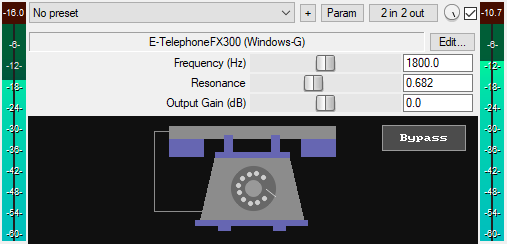
A JSFX telephone effect plugin for REAPER that features:
* Frequency (700 Hz – 3.0 kHz): Sets the center frequency of the bandpass filter.
* Resonance (0.2 – 4.0): Controls the Q factor of the bandpass filter. Higher values produce a more resonant telephone sound.
* Output Gain (dB): Sets the final output level of the plugin from -30 dB to +30 dB to compensate for volume changes.
* Hidden HPF & LPF: The high-pass and low-pass filters are fixed internally and hidden. They work alongside the bandpass filter to reinforce the frequency shaping.
* GUI Bypass Button: A smooth bypass button for toggling the effect on or off without audio clicks. It is available for automation as "Bypass (Smooth)" in the plugin's parameter list.
* Minimal CPU usage.
You can grab it for FREE.
Email Support: info.windowsg@gmail.com
==========================================
Using This JSFX Plugin in Other DAWs:
If you want to use this JSFX plugin in other DAWs, you can do so using the open-source YSFX plugin.
YSFX is available in VST3, AU, and CLAP formats for Windows, macOS, and Linux.
Download your preferred version of YSFX from here (Click on "Assets" for the downloads to appear):
https://github.com/JoepVanlier/ysfx/releases
YSFX comes in two versions:
* ysfx-s FX (for JSFX effects).
* ysfx-s instrument (for JSFX instruments).
1. Open ysfx-s FX in your DAW,
2. Then click "Load", find your "E-TelephoneFX300_Windows-G" file, and click "Open."
The JSFX plugin will now run inside the YSFX host, working perfectly in any DAW that supports VST3, AU, or CLAP plugins.
 $79.00Comp DIODE-609
Please log in to join the discussion
Submit: News, Plugins, Hosts & Apps | Advertise @ KVR | Developer Account | About KVR / Contact Us | Privacy Statement | Sell @ KVR | KVR Marketplace Terms & Conditions
© KVR Audio, Inc. 2000-2026

