
1 KVR member has added E-TranceGate700 (JSFX) to 1 MyKVR group 1 time.
Download KVR Studio Manager (FREE)
A JSFX trance gate plugin for REAPER that offers:
* Two Pattern Modes:
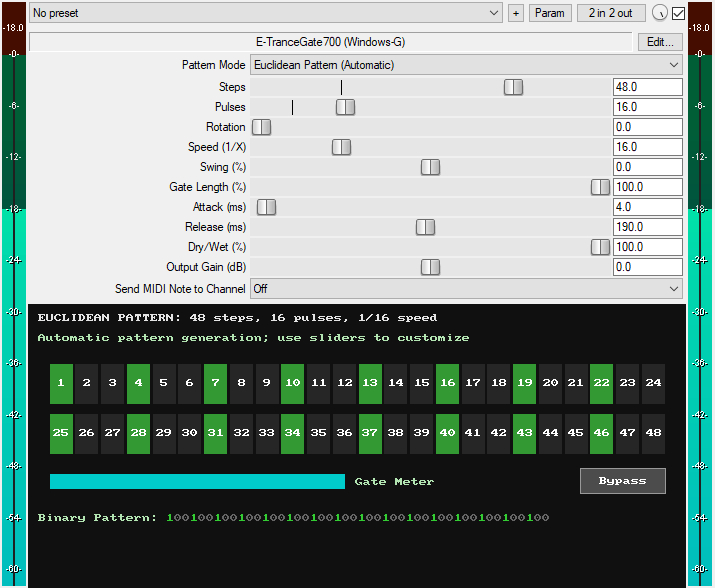
1. Euclidean Pattern (Automatic): Automatically generates rhythmic patterns using the mathematical Euclidean algorithm. Use sliders to customize the pattern.
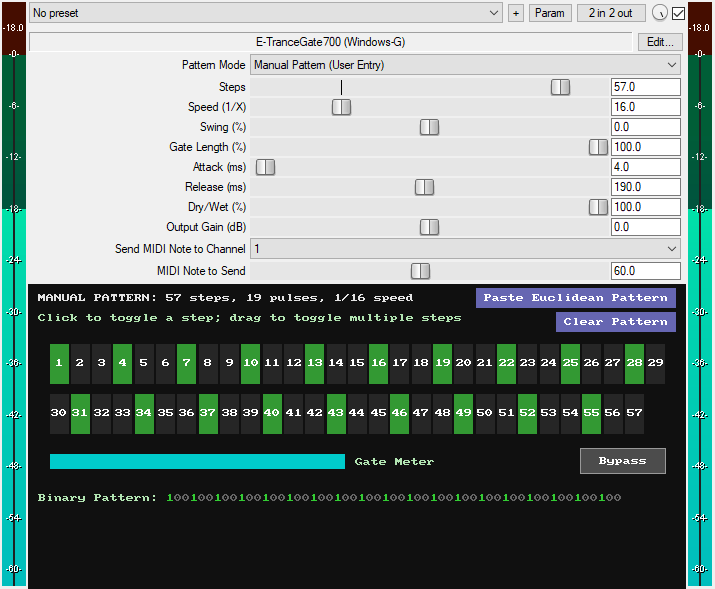
2. Manual Pattern (User Entry): Draw and edit your own custom step patterns on a click-and-drag interface. Click or drag to toggle steps on or off.
You can generate a pattern in Euclidean mode, then switch to the Manual mode and click "Paste Euclidean Pattern" to transfer it to the manual editor as a starting point for further tweaking. You can also use the "Clear Pattern" button to wipe the canvas and start your manual pattern from scratch.
* Steps: Set the number of steps in the pattern, from 1 to 64.
* Pulses: Set the number of "on" steps distributed within the total number of steps using Euclidean math.
* Rotation: Shift the generated Euclidean pattern forward or backward to change its groove.
* Speed (1/X): Set the rhythm speed relative to the project's tempo using note resolutions from 1 (whole notes) to 64 (64th notes).
* Swing (%): Add groove by delaying or advancing the off-beats from -50% to 50%.
* Gate Length (%): Set how long each gate stays open within each step, from 1% to 100% of the step's length.
* Attack (ms): Set fade-in time when gates open, from 1ms to 900ms.
* Release (ms): Set the time it takes for the gate to fade out after it closes, from 1ms to 900ms. It uses an exponential curve for a natural decay. Short times create a choppy sound, while long times create a sustained sound. Automating this slider with a square wave or other LFO shapes can create unique rhythmic movement.
* Dry/Wet: Blend between the original signal and the gated effect, from 0% (fully dry) to 100% (fully gated).
* Advanced Host Sync: Maintains perfect tempo sync with sample-accurate timing and features smart resync that automatically realigns when re-enabling from bypass, eliminating the sync drift issues common with other gate plugins.
* MIDI Output: Send the gate's triggers as MIDI notes to any MIDI channel from 1 to 16, with a dedicated slider to specify which MIDI note to send to that channel.
* Visual Feedback: The GUI features a step sequencer display with real-time playback indicator, a gate meter that visually shows the gate envelope, and a binary pattern readout of 1s and 0s.
* Output Gain (dB): Set the final output level of the plugin from -35dB to 35dB to compensate for volume changes.
* GUI Bypass Button: A smooth bypass button for toggling the effect on or off without audio clicks. Available for automation as "Bypass (Smooth)" in the plugin's parameter list.
* Zipper-Free Operation: Advanced interpolation prevents audio artifacts during automation and real-time adjustments of sliders.
* Minimal CPU usage: Complex rhythms used only 0.60% on a low-powered PC.
You can grab it for $10. All future updates are free, just make sure to use a valid email so I can send future updates to you.
Listen to the audio demos here or on the Gumroad product page to hear what the plugin can do.
Email Support: info.windowsg@gmail.com
==================================================
Using This JSFX Plugin in Other DAWs:
If you want to use this JSFX plugin in other DAWs, you can do so using the open-source YSFX plugin.
YSFX is available in VST3, AU, and CLAP formats for Windows, macOS, and Linux.
Download your preferred version of YSFX from here (Click on "Assets" for the downloads to appear):
https://github.com/JoepVanlier/ysfx/releases
YSFX comes in two versions:
* ysfx-s FX (for JSFX effects).
* ysfx-s instrument (for JSFX instruments).
1. Open ysfx-s FX in your DAW,
2. Then click "Load", find your "E-TranceGate700_Windows-G" file, and click "Open."
The JSFX plugin will now run inside the YSFX host, working perfectly in any DAW that supports VST3, AU, or CLAP plugins.
 $49.00Rotary CLS-222
Please log in to join the discussion
Submit: News, Plugins, Hosts & Apps | Advertise @ KVR | Developer Account | About KVR / Contact Us | Privacy Statement | Sell @ KVR | KVR Marketplace Terms & Conditions
© KVR Audio, Inc. 2000-2026

