43 KVR members have added Feedback Emulator to 24 MyKVR groups 51 times.
Download KVR Studio Manager (FREE)
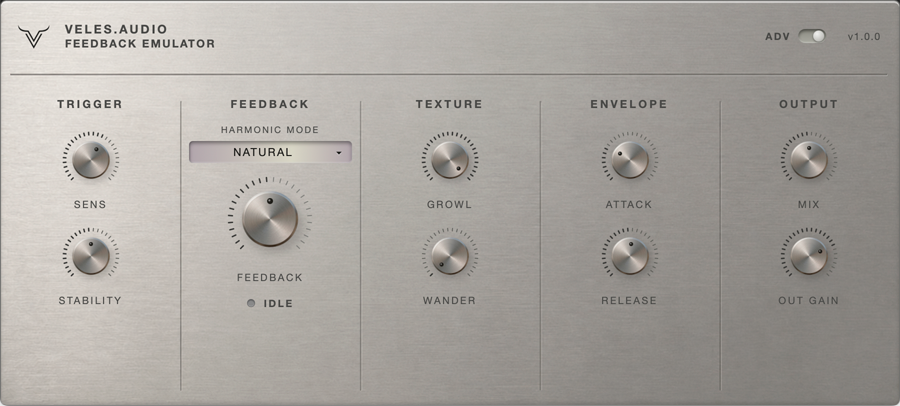
Feedback Emulator is a free guitar feedback synthesizer for Windows (VST3). It gives a DI electric guitar the singing, blooming feedback of a cranked amp — in headphones, at bedroom volume, recorded direct into an audio interface.
The plugin does not loop or re-amp your signal. It listens to what you play — pitch, dynamics, sustain — and synthesizes the feedback from scratch: a bank of resonators tuned to the harmonics of the note, driven by a true self-oscillating loop with automatic gain control. The same physics that makes a guitar sing in front of a loudspeaker, modeled instead of miked.
Place it before your amp sim, on the clean DI signal.
Played with your hands, not the mouse:
Controls:
Five factory presets cover the range from a subtle sustain extension to octave squeals and ambient drones: Natural Sustain, Classic Rock Feedback, Octave Squeal, Harmonic Chaos, Ambient Drone.
Details:
Free for personal and commercial use.
{See video at top of page}
— Changelog
v1.0.2 (07 Sep 2026): The plugin interface no longer runs in an embedded WebView2 browser. It is drawn natively by JUCE instead, so the window opens faster, uses less memory and does not depend on the WebView2 runtime being installed. Hosts that showed a blank or white plugin window now render the UI correctly.
v1.0.1 (12 Jul 2026) Fixed: Broken, garbled feedback on stereo tracks. The feedback engine is a mono voice, but on stereo tracks it was being advanced twice per sample frame (once per channel), corrupting its internal state. The plugin now runs as true dual-mono: input is downmixed to feed a single engine, the feedback signal is shared by both channels, and each channel keeps its own dry signal.
v1.0.0: Initial KVR DC 2026 release.
Reviewed By tafkam4055 [all]
August 27th, 2026
Version reviewed: 1.0 on Windows
Really enjoy this plugin, been looking for something like this for awhile. Let's me dial in sounds I like from metal albums with a simple vst.
Reviewed By Warkyuu [all]
July 9th, 2026
Version reviewed: 1.0.0 on Windows
I am definitely not the target audience for a plugin like this, however I can say that this plugin is fun, simple, and looks wonderful. It's a concept that I have not seen before, which makes it an endearing plugin to use.
Response from y_odinson from veles.audio on July 9th, 2026
Hey Warkyuu - thanks for the review, means a lot. Since you said it's not really your kind of plugin, I'm extra curious: was there anything that felt off, missing, or unclear while using it? Trying to sand down the rough edges and outside impressions are the most useful ones. No worries if nothing comes to mind - appreciate the kind words either way.

Please log in to join the discussion
Submit: News, Plugins, Hosts & Apps | Advertise @ KVR | Developer Account | About KVR / Contact Us | Privacy Statement | Sell @ KVR | KVR Marketplace Terms & Conditions
© KVR Audio, Inc. 2000-2026