
55 KVR members have added Frahm to 56 MyKVR groups 64 times.
Download KVR Studio Manager (FREE)
Built on top of a particle-based force field system, Frahm takes the movement of particles that it simulates and treats them as sound sources in three dimensional space.
Frahm allows you to select from ten different force-field algorithms, adjust their parameters and even mix two of them together for your desired result.
When multiple instances of Frahm are layered on top of each-other in your DAW, you can create highly intricate soundscapes, all in real time.
The heart of Frahm is it's "force field" particle system. Essentially, these functions take in a position of a particle and return a direction for the particle to move in. The particle then gets nudged in that direction.
Each of one of Frahm's force-field algorithms have their own parameters which can uniquely affect the behavior of the algorithm. Couple this with the ability to cross-fade between two different functions, Frahm can create sound movements in almost any fashion.
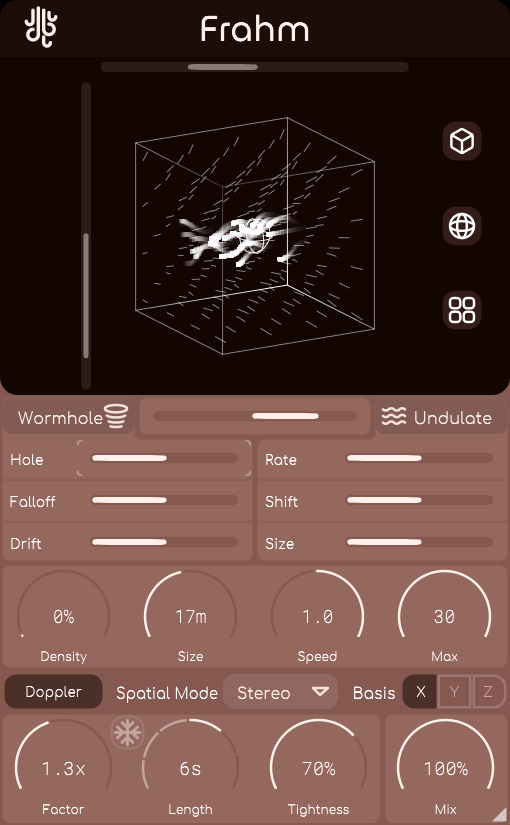
Outside of the individual algorithm parameters, Frahm also features "Meta parameters", such as movement speed, movement basis (that is, which axis particles will be travelling along), and simulation size.
Spatializing with doppler-shift sounds great. What sounds better is doing it for every single particle, all the while using only a fraction of the CPU usage as other plugins doing fractional delays.
Resize, freeze, and alter Frahm's internal audio buffer with minimal artifacting all in real time.
Frahm's OpenGL 3d viewport lets you see exactly how your particles are moving. Use the X / Y sliders to change the view angle of the space, or just drag your mouse.
It it gets better though; Enable "Force Field" display mode in the viewport's options to get an understanding of what movements will occur depending on where your particles are located.


This sounds very interesting for the sort of things I work on. I'm going to check it and I'm wondering how much this product is different from some other tools, like, for example, GRM SpaceGrains.
OK, I tried the demo. GRM SpaceGrains has really many common points and is more powerful, from a certain point of view, but it works by setting its parameters which represent only the sound features, not a simulated physical model. The strongest merit of Frahm, comparing the two, seems on the contrary to be the realistic environment in which the user is set, the physical modelling, which permits you to really envision what is happening: you are there, in that point of the "room", and particles of sound are flying around you, and you can even listen to the Doppler effect, which changes according to the real distance from where you are and according to the motion speed. One can "physically" envision the situation. Both the softwares are very good, but their approaches are different.
Please log in to join the discussion
Submit: News, Plugins, Hosts & Apps | Advertise @ KVR | Developer Account | About KVR / Contact Us | Privacy Statement | Sell @ KVR | KVR Marketplace Terms & Conditions
© KVR Audio, Inc. 2000-2026

