
2 KVR members have added Jo'clock — 時表 — to 2 MyKVR groups 3 times.
Download KVR Studio Manager (FREE)
Jo'clock is a small tempo reference plug-in for producers, mixers, and beat makers who want BPM-based timing values without opening a calculator.
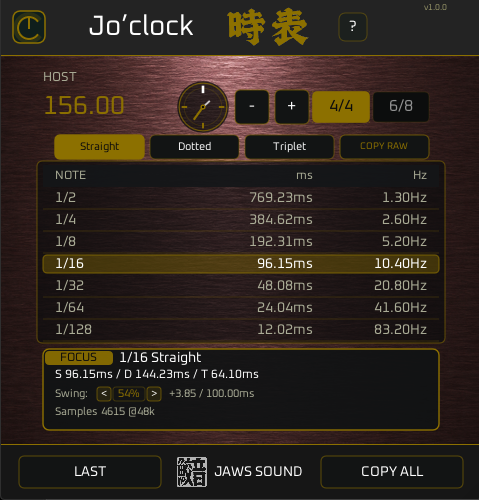
It shows musical note values as milliseconds, Hertz, and samples, so you can quickly set delay times, LFO rates, modulation speeds, pre-delay, release times, and other tempo-related settings.
Jo'clock does not process your audio.
It passes the signal through unchanged and works as a clean timing utility inside your DAW.
Use Host Sync to follow your project tempo, or switch to Manual BPM when you want to check another tempo. You can type a BPM directly, step it with the +/- buttons, and instantly see updated timing values.
Features.
Host Sync / Manual BPM.
Follow the tempo of your DAW, or enter a BPM manually.
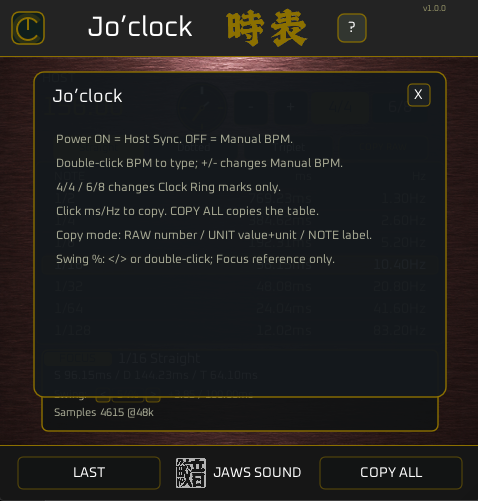
Power ON uses Host Sync.
Power OFF uses Manual BPM.
You can double-click the BPM value to type a tempo directly.
Note / ms / Hz Table.
Jo'clock converts common note values into:
milliseconds.
Hertz.
samples.
Useful for delay times, modulation rates, LFO speeds, rhythmic effects, pre-delay, and timing checks.
Straight / Dotted / Triplet.
Switch between straight, dotted, and triplet timing.
The note column updates clearly:
1/16.
1/16.
1/16T.
So you can see the timing mode at a glance.
4/4 and 6/8 Clock View.
The clock ring gives a simple visual reference for the selected meter.
4/4 and 6/8 do not change the timing table.
They only change the clock marks, helping you read the groove more naturally.
Focus Row.
The Focus Row shows extra detail for the selected note value.
It displays straight, dotted, and triplet references, sample count, and Swing timing information for the selected division.
Swing %.
Swing can be adjusted from 52% to 66%.
Use the < / > buttons to move in 1% steps, or double-click the value to type it directly.
Swing is shown as a reference in the Focus Row. It does not change the main timing table or copied values.
Copy Modes.
Copy the values in the format you need.
RAW copies the number only.
UNIT copies the value with its unit.
NOTE copies the note label with the timing value.
COPY ALL copies the whole table.
Audio Pass-through.
Jo'clock does not color, compress, EQ, widen, or change your audio.
It is a utility plug-in.
Your signal passes through unchanged.
Best For.
delay timing.
reverb pre-delay.
modulation rates.
LFO speeds.
swing reference.
sample-based timing checks.
beat making.
mixing.
sound design.
quick tempo calculations inside the DAW.
Why Jo'clock?
Tempo math comes up all the time in music production.
You want to set a delay.
You want an LFO to move in time.
You want to know what 1/16T is at the current BPM.
You want a quick Hz value without searching online.
Jo'clock keeps those answers in one small plug-in window.
No routing.
No audio processing.
No menu digging.
Just tempo, note values, milliseconds, Hertz, samples, copy buttons, and a clean clock view.
After purchase or download, run the installer.
The plug-in will be installed to your system VST3 folder.
Default install path:
C:\Program Files\Common Files\VST3\JAWS SOUND.
Platform.
Available now:
Windows • VST3.
Coming Soon:
macOS, AU, and AAX versions are planned for future updates.

Please log in to join the discussion
Submit: News, Plugins, Hosts & Apps | Advertise @ KVR | Developer Account | About KVR / Contact Us | Privacy Statement | Sell @ KVR | KVR Marketplace Terms & Conditions
© KVR Audio, Inc. 2000-2026

