
846 KVR members have added Luftikus to 279 MyKVR groups 1013 times.
Download KVR Studio Manager (FREE)
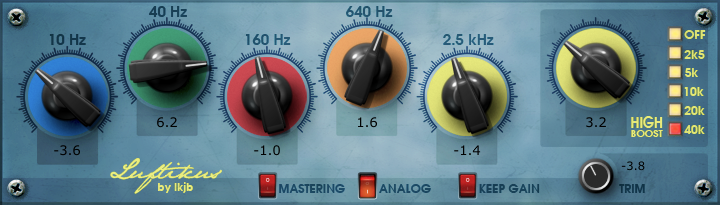
Luftikus is a digital adaptation of an analog EQ with fixed half-octave bands and additional high frequency boost. As an improvement to the hardware it allows deeper cuts and supports a keep-gain mode where overall gain changes are avoided.
Features
Luftikus is based on JUCE and open source (MIT licensed). Downloads and source code available on github.
Change-log
Version 1.3.0:
Version 1.2.1:
Version 1.2.0:
Version 1.1.0:
I use this over basically every dynamic EQ in existence. It doesn't even have adjustable band frequencies - you just boost or scoop 5 fixed bands. You can boost the bass, boost the treble, scoop (or boost) the mids. That's what you use it for. It's also zero latency, meaning you can delicately mix in the wet signal in your mixer without any nasty phase artifacts. So you can go a bit overboard and then dial it back. Then "High Boost" is useful if you want to boost only the extremely high frequencies. The Keep Gain button has also come in handy, if you don't want any amplification to occur from the EQing (sometimes I do, sometimes I don't). However the Mastering button seemed pointless to me, as well as the Analog button having no real discernable effect to me.
It's just quicker to work with, and in most cases this is all you need. I'm not so sure what makes it so special, perhaps the fact that the 2.5 kHz band is a shelf band, whereas most 7-band EQs use a peak band here. But it's always sounded good, while other random 7 or 8 band EQs just felt awkward to me and made me want to see what I was doing graphically, but with Luftikus, it doesn't matter if I can't see it - there's this connection, I know what to expect, and it almost always meets my expectations. It's almost like the bands are more optimized for our ears, for practical purposes. And it's free.
Amazing plugin. Simple to use, and it sounds amazing. I don't know why it works to the extent that it does, but it's more than the sum of its six frequency knobs- which are super easy to adjust by hovering the cursor and using the mouse wheel- it somehow blends and smooths out the audio without diminishing anything else. I also really like the keep gain function, which holds the volume level consistent while still allowing boost/cut without having to worry about overhead. It's not the only plugin you need, but it's not the one you want to go without once you've used it.
Reviewed By nonewwavenofun [all]
June 28th, 2024
Version reviewed: 1 on Windows
A free emulation of the Maag EQ4 that's even better than the paid Plugin Alliance version because of usability improvements like automatic gain matching. It doesn't work on everything due to its fixed EQ bands, but I love using it on electric bass.
Reviewed By laurensius_steven [all]
July 8th, 2023
Version reviewed: 1 on Mac
I used this for 2 years now, its help me alot, the carachter suitable to me for band and everything like orchestra .
thank for making this EQ .
Warm and energetic - sound reminds me of the old Kjaerhus EQ. Wouldn't use it on the master, maybe sounds a little bit blurry there, but on the bus - if you know what you want - it can be a versatile workhorse making parts richer, fuller. Not the only EQ you will need but the "special one" you will be glad to have it.
 $199.00Pro-Q 4

One of my favorite consoles to mix on had fixed frequencies and sounded amazing. This plug sounds great and has some good choices.
Hi, I wonder if anyone can help me please!
I'm trying to download the Luftikus plugin Via KVR to use with Ableton Live, but I receive an error message saying "The achieve is either in unknown format or damaged" I've tried repairing the zip file, I've tried using Jetbrains DotPeek Decomppiler but none of this works.
I'm running 64-bit Win 7 OS.
Cheers
The one on the download doesn't work for Windows. Tested With FL Studio 20. These ones work: https://code.google.com/archive/p/lkjb-plugins/downloads
Who compiled the version available for download here? As far as I can tell from the GitHub page, the developer released this plugin as source only; no binaries.
Anyone knows if there's a version working on macOS Sierra with Logic Pro X 10.4.4?
TY.
THIS POST HAS BEEN REMOVED
Has the developer updated this to work with Mac OS Monterey and also be M1 native? Love this EQ and after moving to an M1 machine, it won't authorize anymore and sadly can't use it now.
a mi me descarga pero no me deja abrir es para mac alguien que ayude.
does not have a instalation file.
Eh, read M2?
Hi guys,
I'm trying to install Luftikus on my mac M1 Monterey 12.6 but it does not show on Ableton. i tried to drag the file into VST/VST2/VST3 folder, as well as the whole Luftikus folder but nothing is happening.
I can not find any information online. could you please help me? am i missing something?
Thank you in advance for the help.
To my knowledge the Luftikus is not ready for Apple Silicon. Last update on GitHub was 4 years ago - so presumably "intel only".
Since I'm on Intel myself, I cannot help much here. My (maybe outdated) information is that a mixed operation of native DAW and Intel plugins might be possible (via installing Rosetta on your Mac) but is not recommended. But maybe this is a starting point to research further.
i suspected it was because the M1, thank you for answering.
I posted about this last year.. this plugin is not Apple Silicon compatible. Until the developer updates it, you can't use it.
I couldn't find anything, but thank you for confirming.
Hi I'm trying to download but the link doesn't allow you to do so. How do you do this?

Both Mac & Win downloads work for me. It's right here on the "download" tab: https://www.kvraudio.com/product/luftikus-by-lkjb/downloads
Sounds great, however, for some reason the VST3 version is not controllable via MCU controller at least when using Driven by Moss in Reaper. VST works as expected. When I move the faders to control the gain of a band it moves the faders, but does not receive control commands as I'd expect from the MCU.
I can download but theres no activation and it doesnt appear on the DAW.
I have the same problem.
THIS POST HAS BEEN REMOVED
If anyone is looking to run this on Apple Silicon, there's an updated version here: https://github.com/apresta/luftikus
Gente, para usar el pluguing, lo descargan cortan los 4 archivos descargados y los copian en la Carpeta de pluguins en c/ program files/ common files/ vst3.. Lo Pegan ahi.
Please log in to join the discussion
Submit: News, Plugins, Hosts & Apps | Advertise @ KVR | Developer Account | About KVR / Contact Us | Privacy Statement | Sell @ KVR | KVR Marketplace Terms & Conditions
© KVR Audio, Inc. 2000-2026

