1 KVR member has added Mix Dojo to 1 MyKVR group 1 time.
Download KVR Studio Manager (FREE)
Update: New in version 1.1.5.
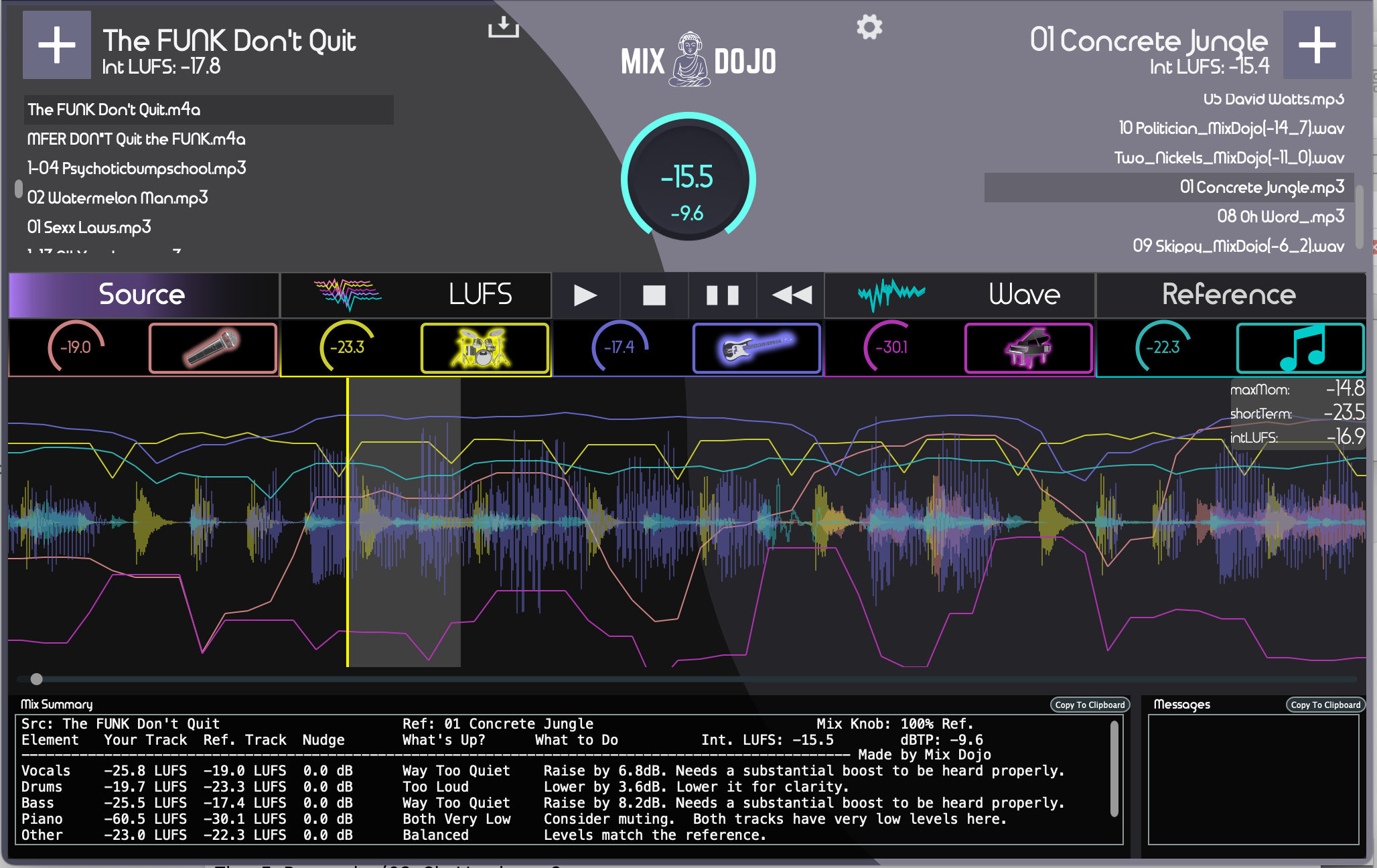
- New layout that provides full width waveform display.
- Dynamic text feedback that describes levels, and changes that would need to be made to the source track to achieve the chosen reference levels.
- Dynamic peak and average LUFS are now displayed when the knob changes.
- Text feedback is now displayed regarding processing status of imported files.
-------------------
Mix Dojo is our new Mix analysis and reference matching application.
It lets you make your mix levels match the levels of your chosen reference track. You can then also fine tune the amount of reference mix to apply, while dynamically seeing and hearing the differences. It also provides the resultant integrated LUFS value in real time.
It includes a stem splitter that runs entirely on your local machine and does not require any upload or download of audio files. It splits Vocals, Drums, Bass Piano and Other (everything else).
Mix Dojo analyzes your mix, by stem splitting it and processing audio levels of each separate stem. Then, you can add as many reference tracks to the application and apply the reference mix levels to your track. You can see and hear what your mix would be like using the reference levels. Level information and the applied differences are displayed in real time.
You can also use Mix Dojo to remove a single or multiple stems and produce a mix missing certain parts, for example, you can remove the vocals, or drums and save it.
With Mix Dojo, you can easily take a rough mix and make it sound professional. In addition, you can use the level differences displayed and apply them directly in your DAW to make your mix match the reference.
There is a 14 day free trial available on our website.


I am the developer of Mix Dojo, Let us. know what you think.
Hello All,
We have just released the 1.1.0 update for Mix Dojo!
This version includes:
-------------------------------
- Redesigned the user interface layout.
- Added a text feedback area that updates in real-time based on setting and track changes,
- The text area describes the levels of each instrument and the complete mix, including integrated LUFS and the maximum peak level found on the track.
- Integrated LUFS is included for each instrument for source and reference tracks.
- The text area also includes instructions for the exact changes needed to make your source mix match the current settings in Mix Dojo.
- Re-positioned the nudge knobs into the same area as the mute buttons to be easier to adjust individual instruments in the mix.
- Added a dynamically updated dBTP number to the main knob in addition to the integrated LUFS number.
The update is available at http://mixdojo.com.
If you have already tried Mix Dojo, email support@sifuaudio.com, and we will extend your trial for you to check out this version.
I hope you enjoy it!
Jim Heintz
Co-Founder/Lead Developer at SifuAudio, LLC.
Please log in to join the discussion
Submit: News, Plugins, Hosts & Apps | Advertise @ KVR | Developer Account | About KVR / Contact Us | Privacy Statement | Sell @ KVR | KVR Marketplace Terms & Conditions
© KVR Audio, Inc. 2000-2026