
3 KVR members have added MX2 Clip Properties to 2 MyKVR groups 3 times.
Download KVR Studio Manager (FREE)
By default, every new MIDI clip in Live is just one bar long, with standard settings you often don't want — so you always end up editing them. This small (and free!) Max for Live device saves you time by letting you set your preferred default properties for MIDI clips. Once set, they apply automatically to all newly created clips.
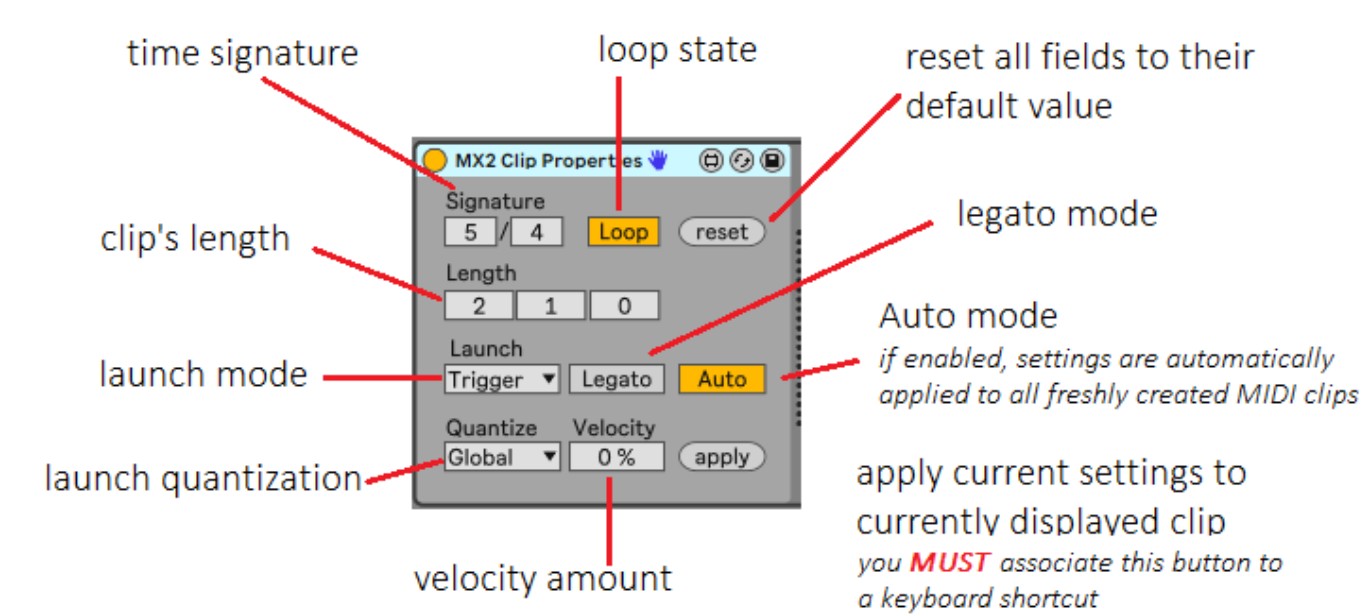
With MX2 Clip Properties, you can predefine the following settings:
* Clip length – override Live's fixed 1-bar default.
* Time signature – e.g. 3/4, 6/8 instead of Live's 4/4.
* Loop state – enabled or disabled.
* Launch mode – Trigger, Gate, Toggle, or Repeat.
* Legato mode – on or off.
* Launch quantization – e.g. None, 1/8, 1 bar, etc. (instead of the default "Global").
* Velocity amount – Live defaults to 0; you pick what makes sense.
You can also apply these settings to clips that already exist — great for retroactive consistency. If you need different presets for different scenarios, just drop multiple instances of MX2 Clip Properties into your Set, each with its own config.
IMPORTANT: requires Ableton Live 12 Suite Edition or Ableton Live Standard Edition with Max-for-Live support. It should work also with Live 11, but hasn't been tested on that version.


Please log in to join the discussion
Submit: News, Plugins, Hosts & Apps | Advertise @ KVR | Developer Account | About KVR / Contact Us | Privacy Statement | Sell @ KVR | KVR Marketplace Terms & Conditions
© KVR Audio, Inc. 2000-2026

