
2 KVR members have added MX2 Device Mappings to 1 MyKVR group 2 times.
Download KVR Studio Manager (FREE)
Dynamic MIDI control for Ableton Live — finally done right.
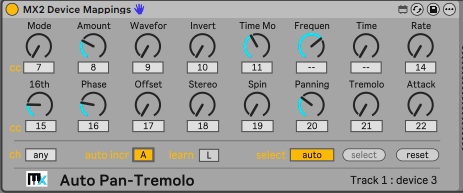
MX2 Device Mappings is a Max for Live plugin for Ableton Live 12.2+ that lets you control any device parameter in your set — quickly, flexibly, and without the usual MIDI mapping limitations.
Standard MIDI mapping in Live is powerful, but rigid: once you map a knob, it's tied to that parameter forever. Also, it requires that you map individual knobs and sliders in your MIDI controllers, one by one, and makes it clumsy to reuse those mappings in other Live projects.
Instead of creating static, one-to-one mappings, MX2 Device Mappings introduces a dynamic mapping workflow: your MIDI controller can instantly adapt to the currently selected device, or stay locked to a specific one — your choice. Even better: with the auto mapping feature, you need to map only the first knob or slider in the controller and all remaining sliders are automatically mapped. When used with macros in Live racks, this feature alone saves you precious time.
Key features:
MX2 Device Mappings requires Ableton Live 12 Suite Edition or Live 12 Standard with Max-for-Live support, version 12.2 or later. It is offered for free until April 15, 2026.


Please log in to join the discussion
Submit: News, Plugins, Hosts & Apps | Advertise @ KVR | Developer Account | About KVR / Contact Us | Privacy Statement | Sell @ KVR | KVR Marketplace Terms & Conditions
© KVR Audio, Inc. 2000-2026

