
3 KVR members have added Nowhere Side — 側整 — to 3 MyKVR groups 4 times.
Download KVR Studio Manager (FREE)
Is The Mud Hiding In The Sides?
Your mix is wide.
The low end is there.
But something still feels cloudy, loose, or unfocused.
Sometimes the problem is not volume.
Sometimes the problem is low and low-mid buildup in the stereo sides.
Nowhere Side — 側整 — is a simple Side Clean plugin that reduces low and low-mid mud in the sides while keeping the center intact.
It does not collapse the whole mix.
It does not narrow everything.
It simply helps clean the sides.
Perfect for synths, pads, drum loops, samples, reverb returns, stereo bass layers, 808 layers, and mix bus cleanup.
Side Clean.
Clean The Low-Mid Sides.
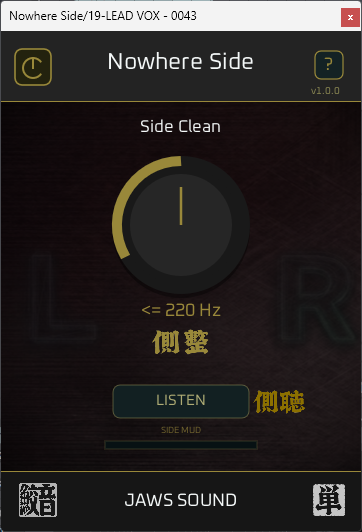
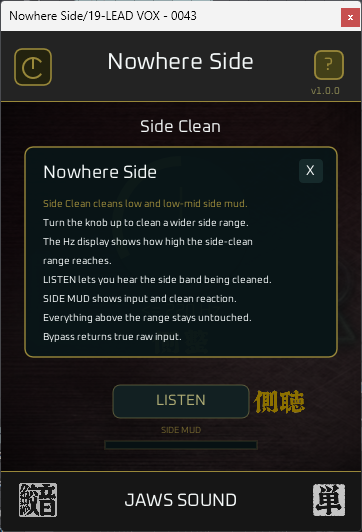
Use the CLEAN knob to choose how high the side-clean range reaches.
88 / 122 / 156 / 220 / 280 / 360 / 420 Hz.
Default: 220 Hz.
Lower settings clean only the low side area.
Higher settings reach into the low-mid range, where stereo mud often builds up.
The goal is not to make your mix narrow.
The goal is to clean the sides while keeping the center stable.
LISTEN.
Hear What You Are Cleaning.
LISTEN lets you hear only the side band being processed.
No guessing from numbers.
Hear the target range.
Choose the setting.
Turn LISTEN off.
That's it.
SIDE MUD.
See The Mud And The Clean Reaction.
SIDE MUD is a two-stage meter.
The top meter shows low and low-mid side mud in the input.
The bottom meter shows how much Nowhere Side is cleaning.
When the effect is subtle, you can still see it working.
When the sides are muddy, you can see that too.
Why Nowhere Side?
Wide stereo sounds can feel exciting.
But when low and low-mid energy spreads too much into the sides, the mix can become cloudy, loose, or unfocused.
Nowhere Side gives you a fast way to clean that area.
Clean low and low-mid side buildup.
Keep the center intact.
Use LISTEN to hear the target range.
Use SIDE MUD to see input mud and clean reaction.
Bypass returns true raw input.
Clean the sides without closing the mix.
That is Nowhere Side.
Perfect For.
Stereo Synths.
Pads.
Reverb Returns.
Drum Loops.
Sample Loops.
808 Layers.
Stereo Bass Layers.
Mix Bus Cleanup.
Low-Mid Cleanup.
Side Mud Control.
Mix Checking.
Nowhere Low vs Nowhere Side.
Nowhere Low centers the low end.
Nowhere Side cleans low and low-mid mud from the sides.
Use Nowhere Low when the low end feels too wide or unstable.
Use Nowhere Side when the stereo sides feel cloudy or muddy.
Use both when needed:
Nowhere Low to lock the foundation.
Nowhere Side to clean the sides around it.
Installation.
Download and run the installer.
Default install path:
C:\Program Files\Common Files\VST3\JAWS SOUND.
Platform Support.
Available Now:
Windows • VST3.
Coming Soon:
macOS / AU / AAX.

Please log in to join the discussion
Submit: News, Plugins, Hosts & Apps | Advertise @ KVR | Developer Account | About KVR / Contact Us | Privacy Statement | Sell @ KVR | KVR Marketplace Terms & Conditions
© KVR Audio, Inc. 2000-2026

