2 KVR members have added Nu-Q to 1 MyKVR group 2 times.
Download KVR Studio Manager (FREE)
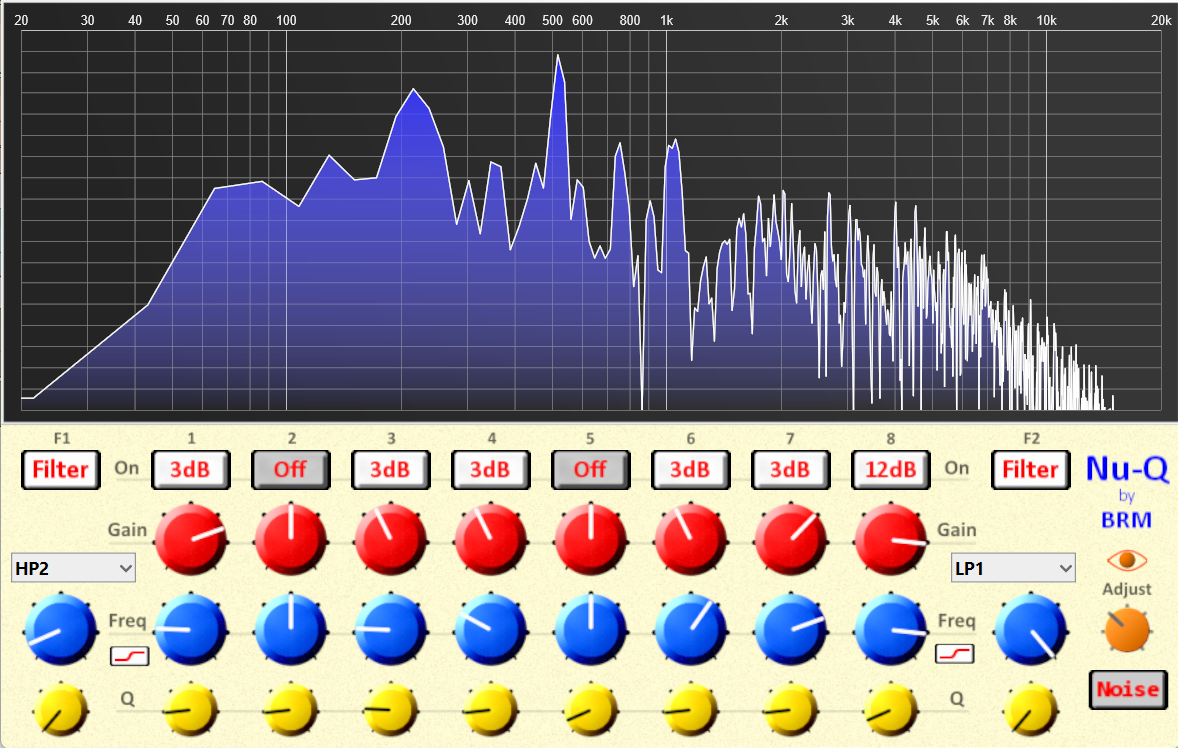
Nu-Q is a 10-band EQ and Filter Bank. There are two multi-mode filters and eight Bell-shaped EQ points, two of which are switchable to shelf mode for low and high shelves. This leaves plenty of points for any (sane) situation.
Filters can be switched in/out individually. EQ points feature range modes: Off to 48dB. This makes comparing every action easy as well as easily visible at all times. There is always an overview of what is happening – no having to click dots and open panes.
The frequency spectrum view is referred to as Eyes and can be switched in and out using the eye icon. The Adjust knob lets you adjust the level of the signal going to the view (summed mono). This is a bit different, as this sort of view is not meant for exact decision-making but general feedback. If you really need to know where your points are, you can raise the Mode + Gain for that point to create a visible spike/dip and drop back as you do the real task based on what you hear and feel (never by numbers and rules).
There is a button to switch in White Noise, which can be helpful from time to time, especially when getting a feel for how Nu-Q works. I put it there during build, then realized that it made no sense to remove it, as it can not only help new users but also be a nice noise source for those filters (saving the need for a synth).
Being automatable and modulatable, if you want movement or even dynamic EQ features, you can fly them in using your fave compression tools (and maybe a freq splitter). If you think mid/side is vital, you can make that too in most DAWs.
{See video at top of page}


Please log in to join the discussion
Submit: News, Plugins, Hosts & Apps | Advertise @ KVR | Developer Account | About KVR / Contact Us | Privacy Statement | Sell @ KVR | KVR Marketplace Terms & Conditions
© KVR Audio, Inc. 2000-2026