Log InCreate An Account
  1. Plugins
  2. »
  3. Estudio 528
  4. »
  5. OMF Audio Extractor
  6. »
  7. Details

OMF Audio Extractor

OMF Audio Extractor
OMF Audio Extractor by Estudio 528 is a Software Application for Windows. It functions as a Standalone Application.
Product
Version
1.2
- Windows 10 or higher

- No Python installation or additional dependencies required
Other
Stand-Alone Utility / Application
Copy Protection
None
Important Note
OMF files embed the full source audio (not chopped clips), so you get the complete originals. Timeline positions, clip boundaries, fades, etc., are in metadata but not parsed here—use AAF exports for timeline-accurate sessions.

MyKVR: Groups, Versions, ...

1 KVR member has added OMF Audio Extractor to 2 MyKVR groups 2 times.

Download KVR Studio Manager (FREE)

Not In Your MY KVR Groups
(or group limitation prevents versioning)
+2 in private groups

KVR Rank

Overall: 30941   22594

30-Day: 30270; 7-Day: 23133; Yesterday: 6620

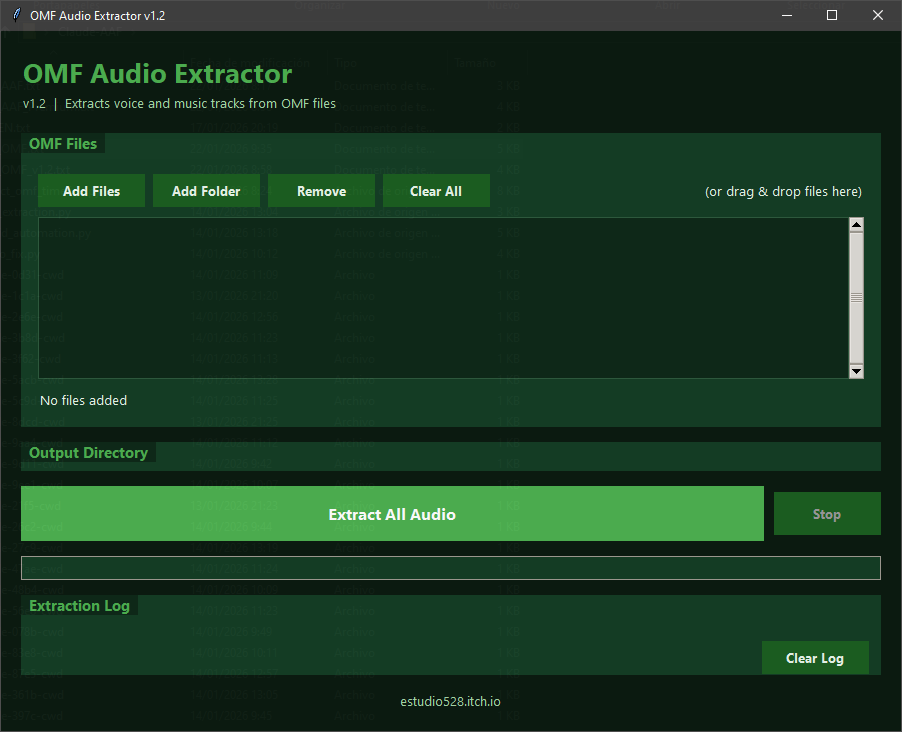
Struggling to pull clean audio stems out of those ancient (but still useful) OMF files from Pro Tools, Nuendo, Logic Pro, or other DAWs? This lightweight, standalone Windows tool does the extracting job for you.

OMF Audio Extractor grabs the embedded audio files from Open Media Framework exports and delivers them as ready-to-use WAVs. No timeline reconstruction here (that's what AAF is for—check my AAF Audio Extractor for clip-accurate work), but if you just need, as I do, the raw source audio isolated and organized, this is your quick-win utility.

Key Features:

  • Smart duplicate detection & removal — skips redundant copies automatically.
  • Voice/music track identification — uses duration heuristics to separate dialogue from beds/music.
  • Automatic stereo pair combining — merges L/R channels into proper stereo files.
  • AIFF WAV conversion — seamless output in modern WAV format.
  • Batch processing — drop a bunch of OMF files and let it rip.
  • Drag & drop support — super intuitive workflow.
  • 16-bit & 24-bit output — preserves original bit-depth for pro quality.

How to Use (Quick & Easy):

  1. Run OMF_Audio_Extractor.exe (no install, no dependencies).
  2. Drag & drop OMF files or add via button/folder.
  3. Choose output folder.
  4. Hit Extract — get organized WAVs in seconds.

More goodies are coming: selective track export menu (pick only the voice, music beds, or specific channels you need), optional metadata tagging (track names, timestamps from OMF where available).

Perfect companion to my AAF Audio Extractor if you need both formats covered.

This is pure donationware—100% free to download and use. If it saves you time on a tight deadline or makes your workflow smoother, toss a few euros my way via this link: https://estudio528.itch.io/omf-audio-extractor-12
Your support keeps these tools evolving.

Latest User Reviews

Average user rating of 0.00 from 0 reviews

Products similar to OMF Audio Extractor...

Comments & Discussion for Estudio 528 OMF Audio Extractor

Discussion
Discussion: Active

Please log in to join the discussion

Log In To KVR Audio
