16 KVR members have added Plexum to 8 MyKVR groups 18 times.
Download KVR Studio Manager (FREE)
Update 1.1:
- fixed occasional ghost notes at certain bpm
- fixed font not rendering anti-aliased in the step properties
PARALLEL SEQUENCE ENGINE.
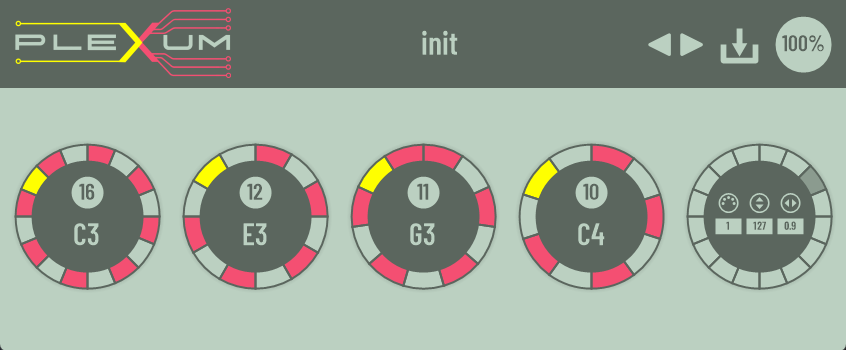
This plugin mixes the best properties of an arpeggiator and a multitrack sequencer by allowing you to trigger up to five independent parallel sequences. Each sequence loops over one bar in the host's tempo, but it starts when the assigned MIDI note starts and loops as long as it is held.
MIDI Note management is exactly as would be with an arpeggiator. First incoming note routes to the first sequence module, second note to the second, and so on. And just like an arpeggiator, notes that you release will force a re-assignment.
Example: Incoming notes C3, E3, G3
C3 plays in the first sequence, E3 in the second, G3 in the third. E3 is released. Now G3 plays in the second sequence.
Each sequence module's steps can be freely set between 1 and 32. This allows for polyrhythms. Each step of each sequence has independent settings for MIDI channel, velocity and gate length parameters.
Everything can be tweaked at runtime, allowing experimentation.
Usage:
I hope you enjoy it.

Reviewed By Eine Alte Oma [all]
July 15th, 2026
Version reviewed: 1 on Windows
pretty good plugin so far but when i bounce a track with plexum on it (bitwig 6.1 on windows 10) it doesn't output the sequence that happened in realtime, so it's not usable yet.
Response from tulamide from Sevenfifteen on July 17th, 2026
Thank you for the comment!
As for the statement, I don't quite understand it. Bouncing requires an instrument's audio output. Plexum is a pure MIDI effect. It outputs MIDI messages. You can't bounce it.
I'm not familiar with Bitwig, but the normal process with a plugin like Plexum would be this:
1. You create an instrument track with Plexum on it
2. You create an instrument track with a synth of your choice on it
3. You set the synth track's MIDI input to Plexum
When you are done with your MIDI editing (or are ready to record your live performance), you record arm the synth track, which will then record the MIDI input (which is Plexum's output). Once that is done, you can bounce that track at any time.

Please log in to join the discussion
Submit: News, Plugins, Hosts & Apps | Advertise @ KVR | Developer Account | About KVR / Contact Us | Privacy Statement | Sell @ KVR | KVR Marketplace Terms & Conditions
© KVR Audio, Inc. 2000-2026