6 KVR members have added Purr-LUFS to 4 MyKVR groups 7 times.
Download KVR Studio Manager (FREE)
Purr-LUFS is a LUFS-based gain compensation plugin designed to provide accurate loudness compensation for any plugin, hardware, or effects chain.
Our perception is easily influenced by loudness. Purr-LUFS removes this bias toward preferring what's louder when comparing, giving you a clearer perspective on your audio processing.
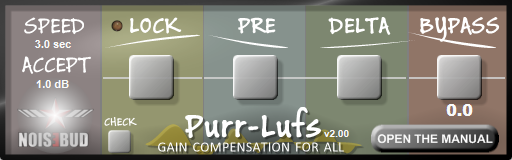
The innovative semi-lock feature ensures uninterrupted workflow, especially when dialing in compression or other dynamic processes. Purr-LUFS enters semi-lock mode once the compensated signal reaches a user-defined loudness threshold. For instance, you might choose a higher threshold if you're aiming for extremely subtle dynamics processing or a lower threshold to allow more flexibility when making broader adjustments. compared to the original audio. For example, if you set the threshold to 1 dB (the default), semi-lock activates when the processed signal is compensated to within 1 dB of the dry signal's loudness. When the signal is within the threshold, Purr-LUFS slows down the compensation to the speed set by the user in the 'Speed' field to the left in the UI. The default duration is 3 seconds, providing a balanced speed for typical dynamic adjustments. Extending the duration and threshold is particularly beneficial when working on precise mastering tasks or meticulous fine-tuning, allowing smoother adjustments within very tight loudness margins, such as 0.1 dB. However, in most cases, you can leave both settings as is.
Changelog v1.02 - v2.00.
Auto Semi Lock - The gain compensation will now semi-lock itself if the signal is within a user-set threshold.
+ A trillion fixes and enhancements are too many to mention here.
For Reaper users: There is a Reaper script that helps you set up and handle complex routing effortlessly if you're a Reaper user—You find it attached to the Patreon post.
Purr-Router for Reaper:
The Mac installer will install the Purr-Router automatically. It will route the incoming channels 1-2 to output 1 & 2 plus 3 & 4 of the plugin, which makes it easier to set up Purr-LUFS in Reaper. For Windows, the Router plugin comes as a stand-alone installer, which you'll find attached in the Patreon post together with the Purr-Configurator Reaper script. The script works for both Mac and Windows.
{See video at top of page}


Please log in to join the discussion
Submit: News, Plugins, Hosts & Apps | Advertise @ KVR | Developer Account | About KVR / Contact Us | Privacy Statement | Sell @ KVR | KVR Marketplace Terms & Conditions
© KVR Audio, Inc. 2000-2026