4 KVR members have added Retrospect to 2 MyKVR groups 5 times.
Download KVR Studio Manager (FREE)
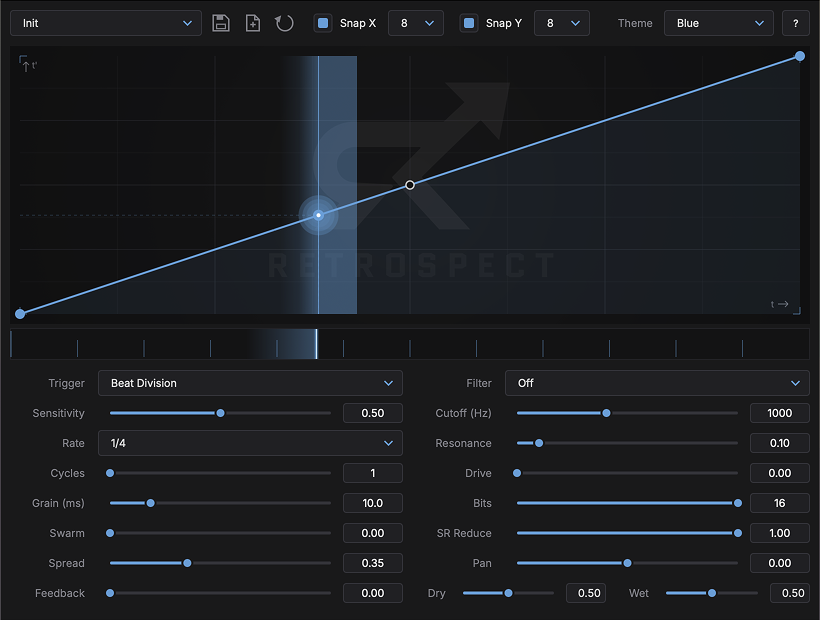
Retrospect is a curve-driven time-warping effect. It continuously captures your audio into a rolling buffer and replays it through a curve you draw — a curve that maps real time to read position. A straight line is passthrough. Bend it, and time bends with it: freeze and snap, stretch and glide, stutter, reverse, or all of those inside a single beat.
The curve's steepness is the playback speed. Flat sections hold the audio still; steep sections race through it or run it backwards; the shape in between glides between the two. Lock it to your host's tempo grid, or re-fire it on every transient so each drum hit gets its own warp.
How it works
At each moment of playback, Retrospect reads from curve(t) × buffer length. Because the read head follows your curve instead of the clock, the slope of the curve becomes the instantaneous playback speed:
Features:
Formats: macOS (VST3, AU, CLAP), Windows (VST3, CLAP), Linux (VST3, LV2, CLAP). Installs under Conceptual Machines Retrospect.

Please log in to join the discussion
Submit: News, Plugins, Hosts & Apps | Advertise @ KVR | Developer Account | About KVR / Contact Us | Privacy Statement | Sell @ KVR | KVR Marketplace Terms & Conditions
© KVR Audio, Inc. 2000-2026