Log InCreate An Account
  1. Plugins
  2. »
  3. Living Fish Studio
  4. »
  5. RhythmHelper
  6. »
  7. Details

RhythmHelper

Rhythm Designer Plugin by Living Fish Studio
MyKVRFAVORITE0WANT1
RhythmHelper
RhythmHelper by Living Fish Studio is a Virtual Effect Audio Plugin for macOS and Windows. It functions as an Audio Units Plugin and a VST 3 Plugin.
Product
Version
1.0
Windows 10 (64-bit)
VST3 compatible host
Product
Version
1.0
macOS 12.0 or later (Intel and Apple Silicon, 64-bit)
VST3 or AU compatible host
Effect
Formats
Copy Protection
Key File

MyKVR: Groups, Versions, ...

1 KVR member has added RhythmHelper to 1 MyKVR group 1 time.

Download KVR Studio Manager (FREE)

Not In Your MY KVR Groups
(or group limitation prevents versioning)
+1 in private groups

KVR Rank

Overall: 35945   20684   25378

30-Day: 35949; 7-Day: 35949; Yesterday: 35949

For music whose rhythms don't fit a grid.

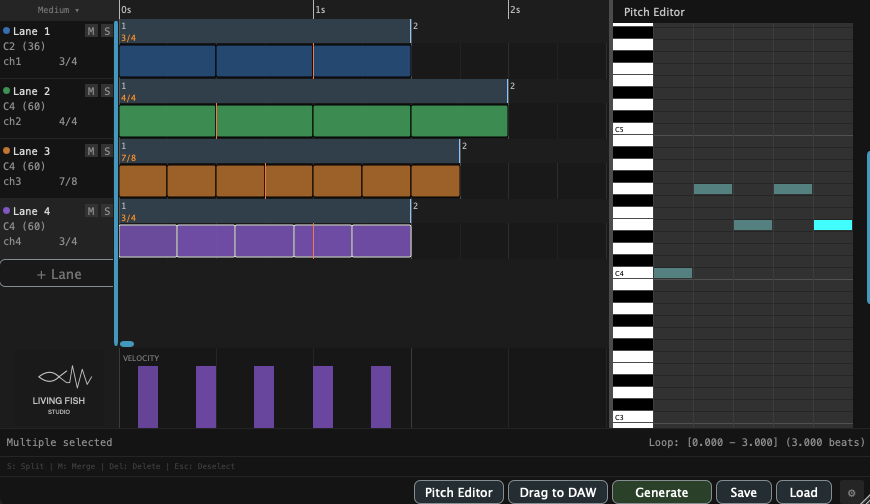
RhythmHelper is a rhythm-focused MIDI editor. Place blocks on parallel lanes — each lane with its own time signature — and design patterns that other tools make tedious: polyrhythms, polymeter, nested tuplets, and dense layered grooves. Shape every block by hand, then export the result as MIDI and play it through any instrument in your DAW.

Designed for composers and producers who want complex, deliberate rhythms without DAW gymnastics:

  • Parallel rhythm lanes — stack multiple rhythm parts on independent lanes and edit them together on one screen.
  • Per-lane time signature — each lane carries its own time signature, so polyrhythm and polymeter sit side by side.
  • Bar-by-bar meter changes — change a lane's time signature from one bar to the next; the bar grid shows how the lanes relate and where they realign.
  • Tuplets by block subdivision — select a block, press a number or ratio, and it splits into equal sub-blocks (e.g. 5, or 5:2:7).
  • Nested tuplets — divide any sub-block again, as deep as you like — 5-in-3, 7-in-4, nested 3-in-5-in-4.
  • Chords or single notes per block — every block holds any chord or note, not just a drum hit, so you can drive piano, synth, or pads as well as drums.
  • Pitch Editor — a piano-roll editor for the notes inside each block; select multiple blocks to edit them at once.
  • Rapid note entry — with one block selected, dictate notes from a MIDI keyboard and step through blocks with the arrow keys.
  • Per-block velocity — drag or sweep across the velocity panel to shape accents and dynamics.
  • Per-lane MIDI channel — route each lane to its own channel to drive a separate instrument.
  • Block editing — move, resize, copy, split, and merge with mouse drags and simple-key shortcuts.
  • Lane controls — per-lane mute, solo, color, and default note.
  • Per-lane Loop preview — set an in-plugin loop range to audition a section while you edit.
  • MIDI drag and drop — drag the finished pattern straight into your DAW as a MIDI clip.
  • Project save & load — save and reload your works as files.

Note: RhythmHelper outputs MIDI only — route it to an instrument in your DAW for sound. It is an editor, not an automatic pattern generator; you shape every block yourself. MIDI keyboard input is for note entry, not live performance.

Compatibility:
macOS: VST3 / AU (Universal — Apple Silicon & Intel, macOS 12+).
Windows: VST3 (64-bit, Windows 10).

Free version: Please try the free version first to confirm RhythmHelper fits your DAW and workflow.

Latest User Reviews

Average user rating of 0.00 from 0 reviews

Products similar to RhythmHelper...

Comments & Discussion for Living Fish Studio RhythmHelper

Discussion
Discussion: Active

Please log in to join the discussion

Log In To KVR Audio
