35 KVR members have added Room360 to 34 MyKVR groups 42 times.
Download KVR Studio Manager (FREE)
Room360 represents a step forward in the field of algorithmic reverb. No cut corners, and no cheating. Every aspect of the resulting sound comes directly from the hundreds of thousands of traced reflections, made possible in real time with careful optimization.
{See video at top of page}
Step into a new era of audio realism with Room360, the advanced spatialization and acoustics plugin designed for audio professionals who demand unparalleled authenticity in their sound environments. More than just a reverb, Room360 is a fully simulated acoustics sandbox that represents a significant leap forward in the field of algorithmic reverb.
Unrivaled Realism & Precision: Room360 stands as an Industry First, delivering a flexible, yet true-to-life experience without any cut corners or cheating. Every nuance of the resulting sound is derived directly from hundreds of thousands of traced reflections, rendered in real-time through careful optimization. This dedication to realism ensures an extra level of acoustic realism that goes beyond conventional methods, offering a principled approach to sound simulation.
Key Features for Ultimate Control:
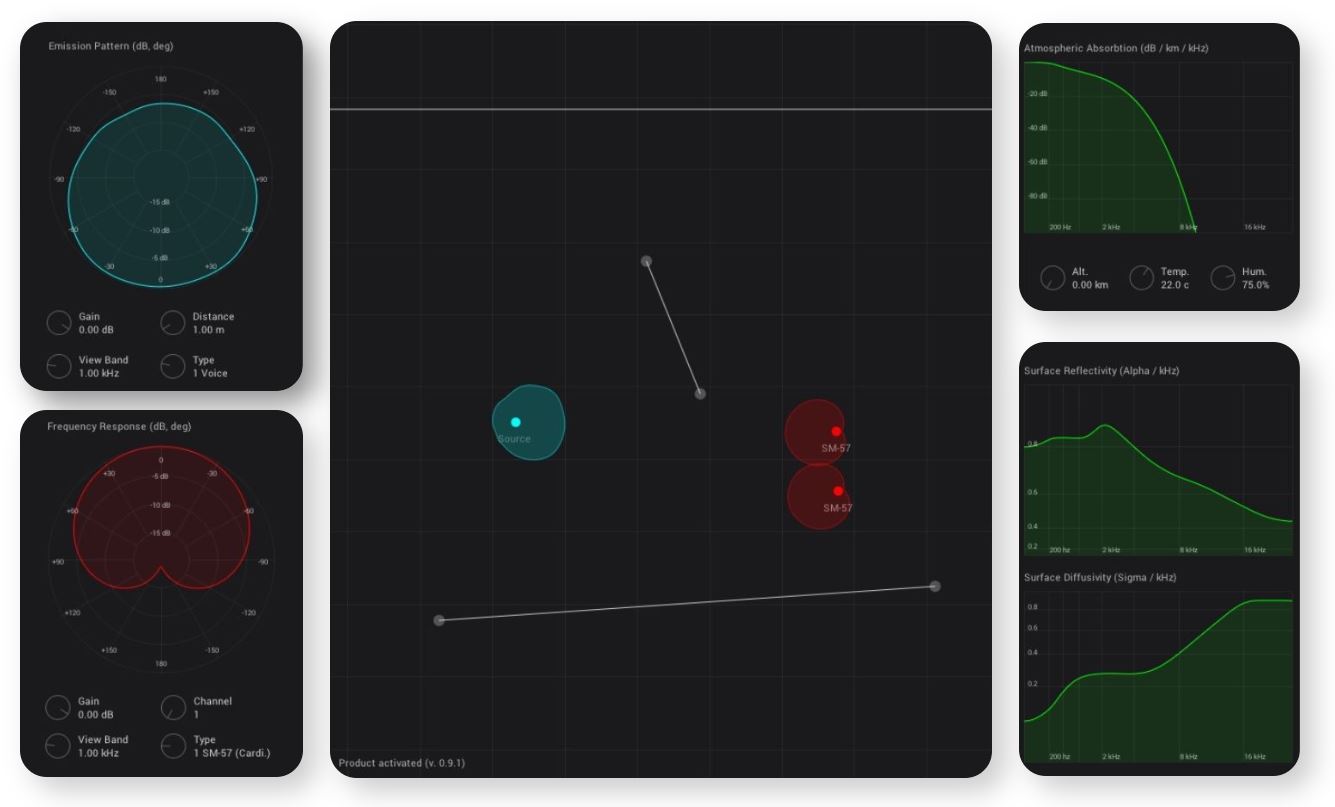
Source Control & Directivity: Intuitively click-and-drag to reposition and rearrange sound sources and microphones in space. Precisely control distance, angle, and stereo depth-of-field. You can pan sources left and right relative to microphone positions and rotate sources to simulate directionality, such as a voice speaking away from microphones, resulting in a quieter and more muffled sound.
Atmospheric Modeling: Recreate diverse environments from grand concert halls and echoing cathedrals to intimate studios and long hallways. Room360 provides complete control over the number and placement of walls. It even incorporates the ISO standard for atmospheric absorption over distance, allowing you to influence the acoustic scene with adjustable parameters for altitude, temperature, and humidity. This meticulous detail influences decibel per kilometer per kHz absorption, significantly impacting longer reverb tails.
Wall Surface Modeling: Gain complete control over the per-frequency acoustic response of each wall, including scattering. Easily add, delete, resize, and drag walls, or add segments by double-clicking vertices. You can even adjust the reflectivity of walls to sculpt the acoustic properties of your simulated space.
Microphone & Emission Patterns: Move beyond approximations with real-life data for full-spectrum, angle-dependent pickup and emission patterns. Room360 includes a variety of microphone options like:
Omni: A true omni, zero-bias pattern that records equally from all directions across all frequencies.
SM57 (Cardioid): Highly selective towards the forward direction, particularly at upper frequencies.
SM58 (Supercardioid): Features two distinct lobes.
NT2A (Bidirectional): Subtler, ideal for recording sounds both in front of and behind a microphone.
Asymmetrical Left and Right Ear Pair Transfer Function: Achieve impressive spatialization by selecting specific ear patterns and placing microphones approximately a head's length apart. A viewband dial allows for visual inspection of these detailed polar patterns. The source itself can also have various emission patterns, such as a voice emission pattern.
Seamless Workflow & Investment: Room360 assumes users have knowledge of installing and using audio plugins and digital audio software. It offers a unique approach to acoustic adjustments; for instance, adjusting the "wet/dry mix" is achieved by changing microphone proximity to the source, rather than relying on traditional knobs or sliders.
Pricing & Availability: Enjoy the peace of mind of a "Buy Once, Own Forever" license, complete with free updates and free support. Room360 is compatible with Windows, macOS, and Linux operating systems.
Elevate your audio production with Room360 – where simulation meets unparalleled realism.

Please log in to join the discussion
Submit: News, Plugins, Hosts & Apps | Advertise @ KVR | Developer Account | About KVR / Contact Us | Privacy Statement | Sell @ KVR | KVR Marketplace Terms & Conditions
© KVR Audio, Inc. 2000-2026