Log InCreate An Account
  1. Plugins
  2. »
  3. Help Me Devvon - HMD
  4. »
  5. Rosetta EQ
  6. »
  7. Details
Rosetta EQ
Rosetta EQ by Help Me Devvon - HMD is a Virtual Effect Audio Plugin for macOS and Windows. It functions as an Audio Units Plugin, a VST 3 Plugin and an AAX Plugin.
Product
Version
1.1.0
Product
Version
1.1.0
Effect
Formats

MyKVR: Groups, Versions, ...

4 KVR members have added Rosetta EQ to 4 MyKVR groups 5 times.

Download KVR Studio Manager (FREE)

Not In Your MY KVR Groups
(or group limitation prevents versioning)
+4 in private groups

KVR Rank

Overall: 28648   18048   21422

30-Day: 30269; 7-Day: 21268; Yesterday: 21301

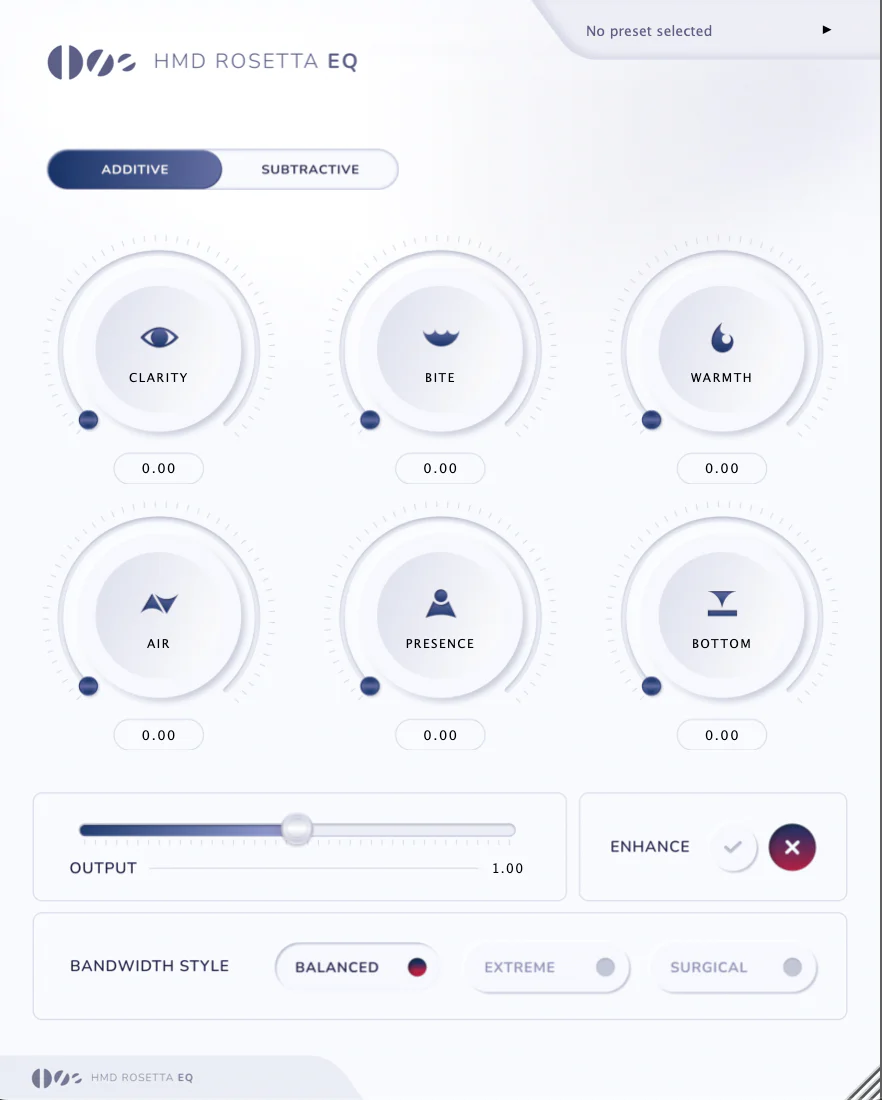
The HMD Rosetta EQ is designed to transform your sonic preferences into intuitive controls. Instead of relying on traditional hertz values, it uses descriptive words that directly correspond to the frequencies typically adjusted on standard EQs.

Unlike conventional EQs, Rosetta features no meters or dB units—this intentional design encourages you to trust your ears instead of your eyes. By removing visual distractions, the HMD Rosetta EQ helps you develop a stronger sense of frequency recognition, breaking the reliance on analyzers and improving instinctual mixing decisions.

Whether you're learning how to shape sound or refining your workflow, this EQ is designed to enhance creativity, speed up decision-making, and redefine the way you approach equalization.

Controls & Functions

  • CLARITY – Enhances the definition and brightness of a sound source using a combination of EQ boosting and subtle saturation.
  • BITE – Increases aggression and grit, adding sharpness and character to the sound.
  • WARMTH – Ideal for bass and vocals, adding body, depth, and weight.
  • AIR – A high-shelf EQ boost that enhances the overall brightness and openness of a sound.
  • PRESENCE – Pushes the sound forward in the mix, increasing its clarity and prominence.
  • BOTTOM – Strengthens the low-end, making it great for kicks and deep bass frequencies.
  • S's & T's – Reduces sibilance while preserving high-frequency detail. For stronger reduction, switch the bandwidth style to extreme.
  • DARKEN – Applies a low-pass filter, softening the highs for a warmer, smoother tone.
  • HARSHNESS – Helps reduce piercing or painful frequencies that become noticeable at louder volumes.
  • TUCK – Pulls a sound back in the mix, helping it sit more naturally without overpowering other elements.
  • MUDDY – Removes low-end resonance and unwanted buildup, improving clarity and separation.
  • LOW CUT – Applies a high-pass filter, eliminating unwanted low frequencies for a cleaner mix.

{See video at top of page}

Latest User Reviews

Average user rating of 0.00 from 0 reviews

Products similar to Rosetta EQ...

Comments & Discussion for Help Me Devvon - HMD Rosetta EQ

Discussion
Discussion: Active

Please log in to join the discussion

Log In To KVR Audio