Log InCreate An Account
  1. Plugins
  2. »
  3. Voidcontrol MIDI
  4. »
  5. SE-02 Unofficial Editor
  6. »
  7. Details

SE-02 Unofficial Editor

SE-02 Unofficial Editor
SE-02 Unofficial Editor by Voidcontrol MIDI is a Virtual Effect Audio Plugin and a Software Application for macOS and Windows. It functions as an Audio Units Plugin, a VST 3 Plugin and a Standalone Application.
Product
Version
1.2
Windows 10+
Product
Version
1.2
MacOS11+
Effect
Formats
Copy Protection
Online Activation

MyKVR: Groups, Versions, ...

1 KVR member has added SE-02 Unofficial Editor to 1 MyKVR group 1 time.

Download KVR Studio Manager (FREE)

Not In Your MY KVR Groups
(or group limitation prevents versioning)
+1 in private groups

KVR Rank

Overall: 29786   18867   22612

30-Day: 9851; 7-Day: 527; Yesterday: 4338

I wanted my SE-02 to fit into my DAW the way my soft synths do. I love the hardware, so translating it into software rather than reimagining the whole thing was a priority for me.

I run a hybrid setup with both hardware and software. The SE-02 was my first analog hardware synth, and remains a favorite. But integrating it into a DAW session was always clunky. The official editor, last updated years ago, has had compatibility issues on my system for a long time. So I designed my own.

For Mac (Apple Silicon) & Windows (10+).

What it does:

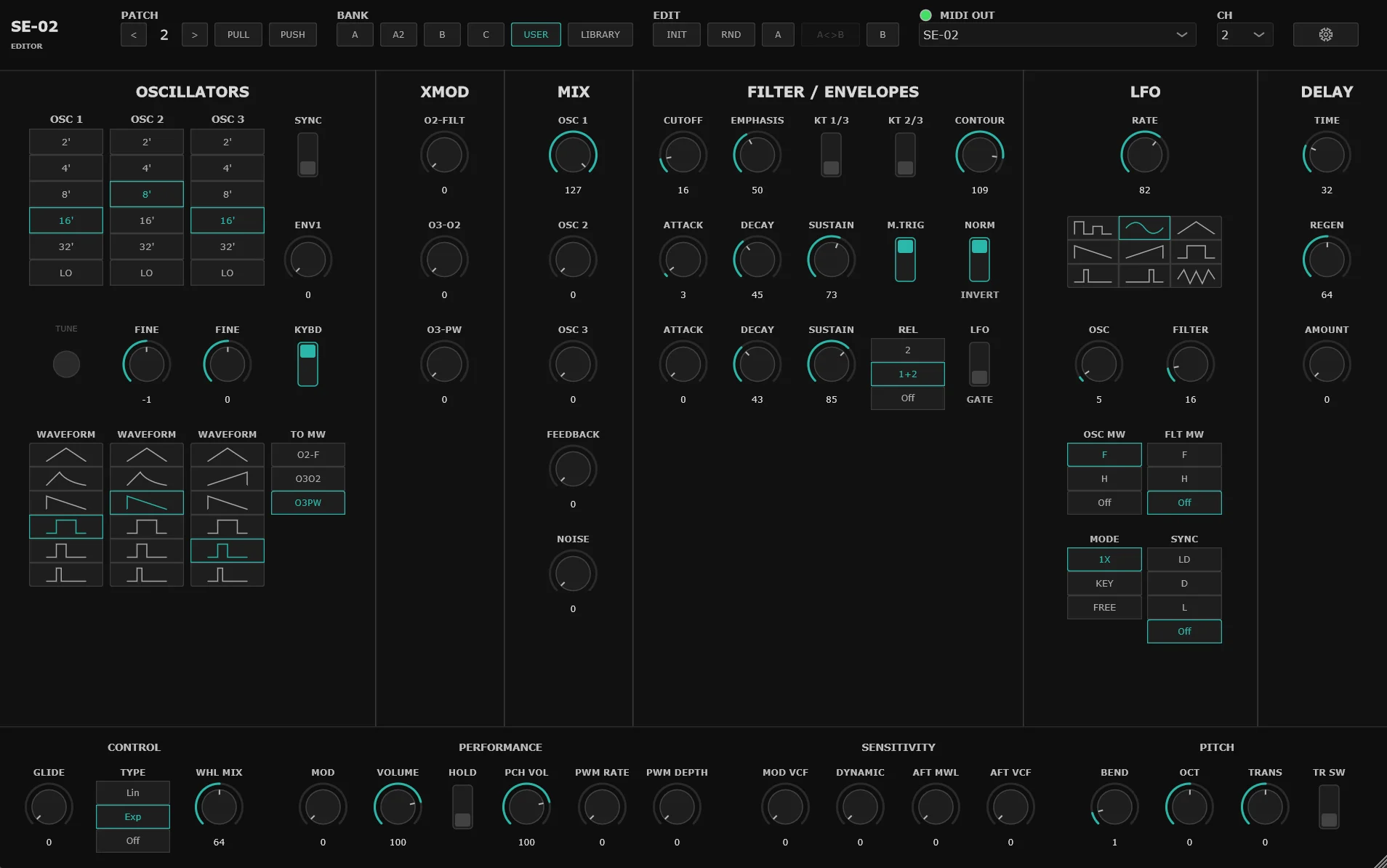
  • All 63 CC parameters on screen: Organized by section like the hardware.
  • Full DAW automation: Draw filter sweeps, automate LFO rates, record knob moves. Real automation lanes, not just MIDI learn.
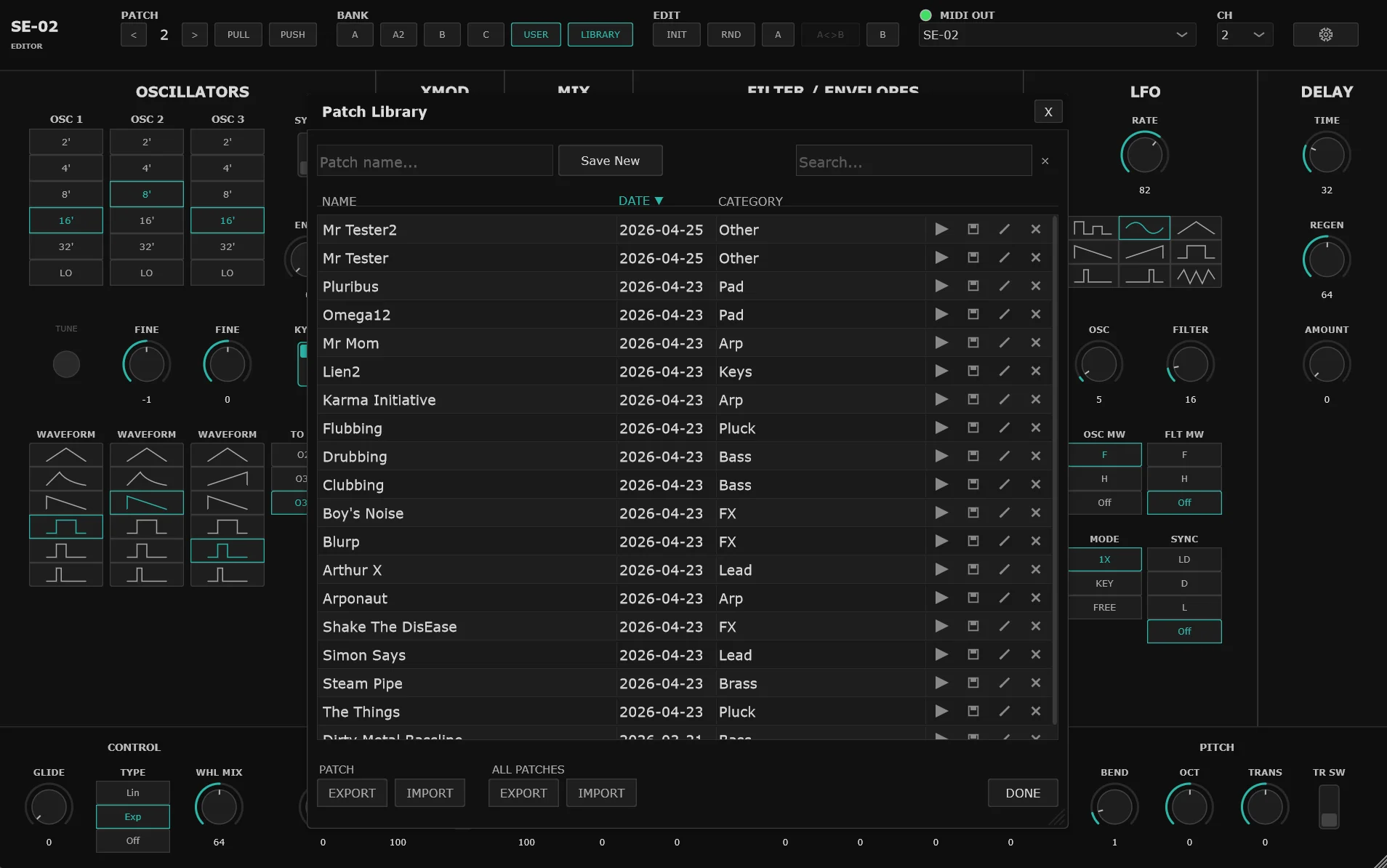
  • Patch library: Save your sounds, name them, search and filter, export and share. Your patches live on your machine.
  • PULL from hardware: Reads the current patch from the SE-02 over SysEx so the editor matches what's on the synth.
  • PUSH to hardware: Sends everything in the editor to the SE-02 in one shot.
  • A/B snapshots: Save two states and morph between them with a slider.
  • Init & Randomize: A clean starting point, and a weighted randomizer that stays musical.
  • Resizable UI: 50% to 300%.

What it won't do (the limitations).

Roland never published a full SysEx spec for the SE-02, so some parameters can't be read back over MIDI. PULL captures all oscillator, filter, envelope, LFO, and effect settings; a few performance and global parameters stay at whatever you last set in the editor. PUSH sends every parameter the SE-02 accepts over MIDI.

Patches you dial in are saved as CC snapshots, accurate to what you set rather than a copy of the hardware's internal state. Patches you import from a hardware bank keep their original file values.

Bulk preset transfer isn't available over MIDI, so it works a different way: Hardware Banks read and write the SE-02's own .PRM bank files while the synth is in USB restore mode.

Requirements:

  • Windows 10/11, or macOS 11 or later (Apple Silicon). Ships as VST3 and standalone on Windows; as Audio Unit, VST3, and standalone on Mac. Signed and notarized.
  • A compatible DAW for the plugin, or run the included standalone app with no DAW needed. Tested on Logic Pro, Ableton Live 12, Bitwig 6, Studio One 7, Reaper 7.69, Cubase 15, and Waveform 13.5.
  • Roland SE-02 connected via USB MIDI (recommended) or DIN MIDI via a MIDI interface.
  • Internet connection for initial license activation on Gumroad and periodic silent rechecks (every 30 days).
  • Works on Windows 11 alongside the MIDI 2.0 update.

One license key works on both Windows and macOS. It activates on up to 3 machines total, counted across both platforms combined (not 3 per platform). If you run out of activations after a reinstall or hardware change, email your Gumroad receipt and I will reset the count.

To set up on Windows:

  • Copy the .vst3 folder to C:\Program Files\Common Files\VST3\.
  • Add it to a track in your DAW as an Audio FX plugin.
  • Select your SE-02 MIDI port in the editor header.
  • Route your MIDI keyboard to the same track so notes reach the SE-02.
  • Without a DAW (standalone).
  • Run "SE-02 Unofficial Editor.exe" from the download. No installation needed.
  • Select your SE-02 MIDI port in the editor header.
  • Play the SE-02 as you normally would, from a keyboard or controller connected to it. The standalone handles patch editing; it does not need to sit in the note path.

To set up (Mac):

  • Copy SE-02 Unofficial Editor.component to ~/Library/Audio/Plug-Ins/Components/ for the Audio Unit, or SE-02 Unofficial Editor.vst3 to ~/Library/Audio/Plug-Ins/VST3/ for VST3. The Standalone app runs on its own; drag it to /Applications/ or launch it from wherever you keep it.
  • Add to a track in your DAW as an Audio FX.
  • Select your SE-02 MIDI port in the editor header.
  • Route your MIDI keyboard to the same track so notes reach the SE-02.

Support & Bugs

Sold as-is. If you hit a bug, please use the Bug Report Template included in your download folder and email me at voidcontrolmidi@gmail.com. I'll do my best to patch it.

Not affiliated with Roland or Studio Electronics. "SE-02" is a Roland trademark. This is a third-party tool made by a user, for users.

Latest User Reviews

Average user rating of 0.00 from 0 reviews

Comments & Discussion for Voidcontrol MIDI SE-02 Unofficial Editor

Discussion
Discussion: Active

Please log in to join the discussion

Log In To KVR Audio
