
22 KVR members have added semedo SPACE to 18 MyKVR groups 31 times.
Download KVR Studio Manager (FREE)
SEMEDO SPACE 2
Spectral sidechain separation for clearer, more controlled mixes.
Create space exactly where it is needed.
Semedo SPACE 2 is a spectral sidechain dynamic EQ that makes room for a priority
signal without pulling down the entire supporting track. Place it on a beat,
bassline, pad, music bed or any competing element, route in a vocal, kick, lead
or dialogue signal as the sidechain, and SPACE 2 dynamically reduces the
frequency areas demanded by that sidechain source.
Cleaner separation. Less masking. More control over the energy of your mix.
================================================================================
WHAT IT DOES
================================================================================.
Traditional sidechain compression reduces the level of an entire signal. That
can be useful, but it can also create obvious pumping or remove impact from parts
of the sound that were never causing a problem.
Semedo SPACE 2 works differently. It analyzes the spectral content of the
sidechain and applies dynamic, frequency-focused reduction to the main signal
inside your chosen SPACE range. A vocal can sit forward without flattening the
whole instrumental. A kick can gain room inside the low end without forcing the
entire bassline to disappear. Dialogue can stay clear above music while the bed
remains natural.
The result is controlled separation that stays focused on the frequency region
that matters.
================================================================================
IDEAL FOR
================================================================================.
- Vocals competing with beats, guitars, keys or dense instrumentals
- Kick and bass or kick and 808 separation
- Leads that need room inside pads and layered synths
- Dialogue or voice-over above background music
- Percussion that needs definition inside loops
- Modern mixes where full-band pumping is too obvious.
================================================================================
Key Features
================================================================================.
SPECTRAL SIDECHAIN DYNAMIC EQ
SPACE 2 responds to the spectral energy of the incoming sidechain and
dynamically carves the selected frequency region in the main signal. You get
frequency-aware space-making instead of simple full-band ducking.
FREQUENCY-CORRECT STEREO SIDECHAIN ANALYSIS
Stereo sidechain signals are analyzed per channel and combined in the frequency
domain, so wide or phase-different material retains accurate spectral targeting.
DRAGGABLE SPACE RANGE
Select the exact area that should move out of the way. Use SPACE LOW and
SPACE HIGH, or drag the range directly in the analyzer, to protect areas that
should remain untouched.
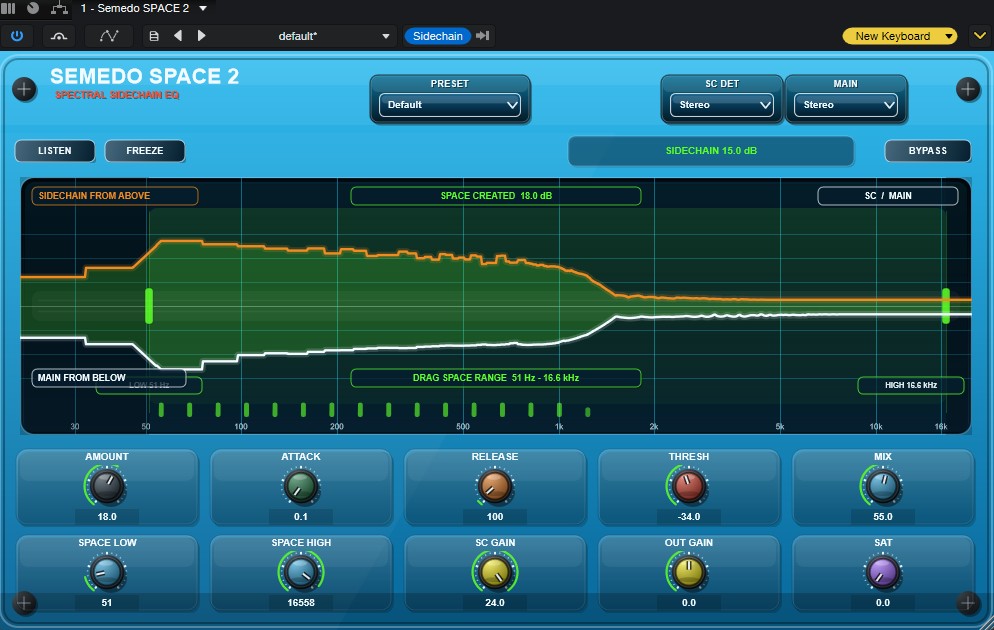
SPACE VIEW ANALYZER
A purpose-built central view visualizes the relationship between the sidechain
from above and the main signal from below. As processing opens room, the display
makes the created space clear and easy to understand.
LISTEN MODE
Audition the removed content to hear exactly what SPACE 2 is taking out of the
main signal. LISTEN uses a smooth, click-free transition for safe monitoring.
FREEZE
Hold the current analysis state while making decisions or comparing settings.
Loading a factory preset automatically returns LISTEN and FREEZE to normal
listening mode.
STEREO, MID, SIDE AND MONO SUM ROUTING
Choose how the sidechain detector listens and which component of the main signal
is processed. Stereo, Mid and Side options support precision work in wide mixes.
Mono Sum is available when intentionally collapsing the processed path is desired.
MIX, TRIM AND SATURATION
Blend the processed result with MIX, optimise detection using SC GAIN, balance
output with MAIN GAIN, and add controlled saturation when extra density is wanted.
CPU-CONSCIOUS REAL-TIME ENGINE
SPACE 2 is designed for production sessions. Its real-time engine prioritises
the strongest active reductions, avoids audio-thread allocations and keeps
sidechain processing controlled even in dense material.
========================================================================
FACTORY PRESETS
========================================================================.
SPACE 2 includes five focused starting points:
- Default — balanced general-purpose space-making
- Kick & Bass — targeted low-end separation
- Vocal & Music — room for vocals or dialogue over instrumentals
- Gentle — subtle, transparent movement
- Aggressive — stronger creative separation.
Presets are starting points. Refine SPACE LOW, SPACE HIGH, Amount, Threshold,
Attack, Release and Mix for the exact relationship in your track.
========================================================================
CONTROL OVERVIEW
========================================================================.
AMOUNT.
Sets the maximum depth of spectral reduction. Use lower settings for gentle
separation and higher settings when the priority signal needs a clearly defined
pocket.
THRESHOLD.
Controls how easily the sidechain triggers space-making. Lower the threshold
when the sidechain is too quiet to create enough movement.
ATTACK.
Controls how quickly SPACE 2 reacts to the sidechain. Faster settings create
tighter, more immediate clearance; slower settings preserve more transient shape.
RELEASE.
Controls how quickly the main signal returns after the sidechain stops demanding
space. Set it to follow the rhythm or smooth the motion.
MIX.
Blends the processed and original signal. SPACE 2 opens with a controlled blend
rather than an overly aggressive fully wet starting position.
SC GAIN.
Adjusts the sidechain detector level without changing the audio source itself.
Useful when a routed sidechain is present but not driving enough movement.
MAIN GAIN.
Adjusts the output level of the processed track for better level matching.
SPACE LOW / SPACE HIGH.
Define the active frequency range. These controls are linked to the draggable
selection in the analyzer.
SATURATION.
Adds controlled harmonic density to the processed path when more character is
desired.
LISTEN.
Monitors the removed/delta content.
FREEZE.
Holds the current spectral reduction state.
BYPASS.
Instantly compares the processed and original signal.
SC DET / MAIN ROUTING.
Choose Stereo, Mid, Side or Mono Sum operation for detector and processing paths.
========================================================================
WORKFLOW EXAMPLES
========================================================================.
VOCAL OVER A BEAT.
Insert SPACE 2 on the instrumental and route the vocal to its sidechain input.
Start with Vocal & Music. Set the SPACE range around the vocal presence area,
then raise Amount or lower Threshold until the vocal sits forward without the
beat losing its impact. Use LISTEN to verify that you are removing useful space,
not too much music.
KICK THROUGH BASS.
Insert SPACE 2 on the bass or 808 and route the kick into the sidechain.
Start with Kick & Bass. Restrict the SPACE range to the low end and shape Attack
and Release so the clearance follows the groove rather than sounding like broad
pumping.
DIALOGUE OVER MUSIC.
Insert SPACE 2 on the music bed and route the dialogue as sidechain. Begin with
Vocal & Music or Gentle, focus the active range on speech intelligibility, and
use MIX to keep the background bed natural while the voice remains clear.
LEAD THROUGH PADS.
Insert SPACE 2 on the pads and route the lead. Drag the SPACE range in the
analyzer around the frequencies where the lead needs definition. Use a moderate
Amount for separation that remains musical.
================================================================================
WHY SPACE 2
================================================================================.
Semedo SPACE 2 is built around one simple objective: let important elements
occupy the foreground without forcing supporting elements to lose their power.
- More targeted than full-band sidechain ducking
- More responsive than static EQ
- Visual space-making you can see and control
- Accurate stereo sidechain spectral targeting
- Useful routing for stereo and Mid/Side workflows
- Practical controls for fast real-world mixing decisions.
========================================================================.
========================================================================.
IMPORTANT SETUP NOTE
========================================================================.
SPACE 2 requires an active sidechain route from your DAW. Insert the plugin on
the signal that should make room, then send the priority signal into the
sidechain input. When routing is correct, the interface reports active
sidechain level and the analyzer shows the created space.

Please log in to join the discussion
Submit: News, Plugins, Hosts & Apps | Advertise @ KVR | Developer Account | About KVR / Contact Us | Privacy Statement | Sell @ KVR | KVR Marketplace Terms & Conditions
© KVR Audio, Inc. 2000-2026

