
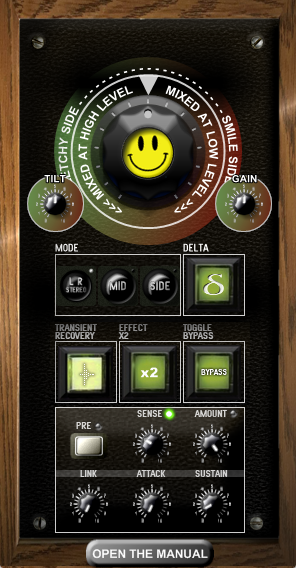
54 KVR members have added Smile to 38 MyKVR groups 60 times.
Download KVR Studio Manager (FREE)
Originally, Smile was developed to reduce harshness in mixes by compensating for the human ear's non-linear perception of loudness across the frequency spectrum. It was based on the original Fletcher-Munson curves, using a fixed contour to shape tonal balance in a musically useful way. While effective, it offered limited flexibility when adapting to different listening levels.
Version 5 of Smile is a tilt-style EQ that calculates the exact equal loudness contour in real time for any phon level between 72 and 88. This rebuild allows for far more precise tonal adjustments that align with how we actually hear—regardless of playback volume.
A separate contour can also be applied to transients, allowing different compensation for peaks and sustained material. The plugin now includes the full functionality of the discontinued Fletchy-Muncher plugin.
Key Features:
Real-time phon-accurate EQ based on ISO 226:2003.
Adjustable loudness target (72–88 phon).
Independent transient contour shaping.
Integrated and expanded Fletchy-Muncher functionality.
Low CPU usage, zero latency.


Totally donating — one of the best free plugins I've ever used.
Just applied it to a random draft and it sounds so sweet.
Please log in to join the discussion
Submit: News, Plugins, Hosts & Apps | Advertise @ KVR | Developer Account | About KVR / Contact Us | Privacy Statement | Sell @ KVR | KVR Marketplace Terms & Conditions
© KVR Audio, Inc. 2000-2026

