2 KVR members have added Sound Browser to 2 MyKVR groups 4 times.
Download KVR Studio Manager (FREE)
One of the drawbacks of Live is that when creating custom presets, no audio preview is generated, which makes it difficult to navigate through presets to select the right one.
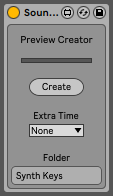
With Sound Browser, you can browse through your presets with audio previews and insert them into your project with a simple clip or drag-and-drop. It also includes a second device that makes it easy to create audio files for preview.
The preview file creation device automatically generates a file with the name of the instrument and places it in the appropriate folder. To use it, simply create a MIDI clip with the desired notes and press a button on the device.
Supports files in the following formats: ADG / ADV / ALC / AUPRESET / VSTPRESET.
More info at:
https://killihu.vstskins.com/sound-browser/
Check the PDF manual before buy:
https://killihu.vstskins.com/wp-content/uploads/Sound-Browser-Manual.pdf
Demo video:
{See video at top of page}


Please log in to join the discussion
Submit: News, Plugins, Hosts & Apps | Advertise @ KVR | Developer Account | About KVR / Contact Us | Privacy Statement | Sell @ KVR | KVR Marketplace Terms & Conditions
© KVR Audio, Inc. 2000-2026