
16 KVR members have added StereoChannel to 12 MyKVR groups 24 times.
Download KVR Studio Manager (FREE)
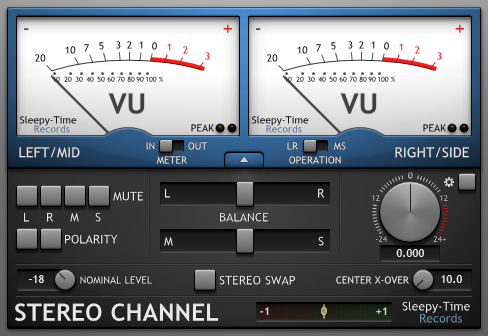
StereoChannel is a FREE plugin for Microsoft Windows designed to help you set the gain and balance of your audio.
Main Features:
7/21/2012: The download file now also includes the MonoChannel plugin and manual.
Reviewed By jam92189 [all]
July 2nd, 2012
Version reviewed: 1.0.1 on Windows
best damn Vu meter i have used in a while. I love my Klanghelm vumt but what this has that the other has is PHASE metering left right polarity switch muting left or right mono only or stereo signal only, you can switch polarity and the VU metering can be set up to the sensitivity you want.
the only thing I would like is like the klanghelm one showing a number value of the actual level and the rms on the sides of the meters under the needles
bust basically its clean easy to read smooth FREE and works perfect for checking stuff from mono stereo compatibility or panning to mono stereo volume control.

Please log in to join the discussion
Submit: News, Plugins, Hosts & Apps | Advertise @ KVR | Developer Account | About KVR / Contact Us | Privacy Statement | Sell @ KVR | KVR Marketplace Terms & Conditions
© KVR Audio, Inc. 2000-2026

