Log InCreate An Account
  1. Plugins
  2. »
  3. AugustRose Audio
  4. »
  5. The Growler
  6. »
  7. Details
The Growler
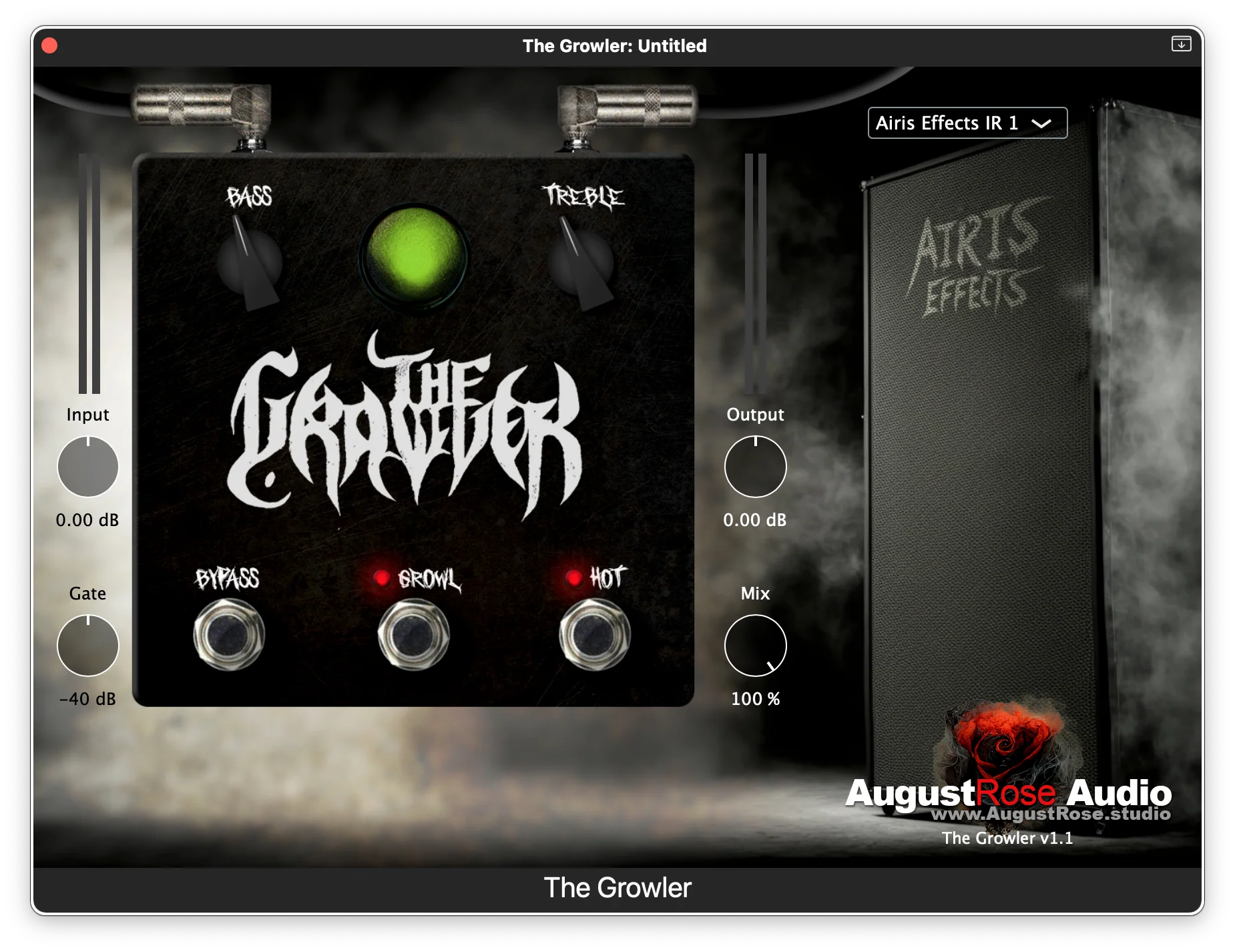
The Growler by AugustRose Audio is a Virtual Effect Audio Plugin for macOS and Windows. It functions as an Audio Units Plugin, a VST 3 Plugin and an AAX Plugin.
Product
Version
1.2.0
Product
Version
1.2.0
Effect
Formats

MyKVR: Groups, Versions, ...

38 KVR members have added The Growler to 33 MyKVR groups 41 times.

Download KVR Studio Manager (FREE)

Not In Your MY KVR Groups
(or group limitation prevents versioning)
+33 in private groups

KVR Rank

Overall: 15211   11435   12901

30-Day: 14716; 7-Day: 13409; Yesterday: 10017

The Growler is an all-in-one bass plugin suite that delivers a wide range of incredible bass tones. Whether you're looking for something more natural or full-on nasty, The Growler has you covered. What's more, is it super quick and easy to use.

Here's an overview of its current feature set:

  • Input – Use this to increase or decrease the overall distortion. Turning down the input will hit the distortion circuit with less gain, resulting in less distortion. Turning it up does just the opposite.
  • Gate – Sets the threshold for the built-in noise gate to cut out unwanted signal noise.
  • Output – Use this to compensate for any additional gain added from the Input or other processing done within the plugin.
  • Mix – Allows blending of the DI signal with the pedal processing before the impulse response section. Turning this fully to the left (0%) means all DI signal is going into the impulse response section. Turning this fully to the right (100%) means all the pedal processing is going into the impulse response section.
  • Bass & Treble – This two-band shelf style EQ is super power and can actually act as if it was a 3 band EQ. For example, if you want more midrange content, simply pull back the Bass and Treble settings and turn up the Output. Or, if you want less midrange, simply do the opposite.
  • Bypass – Bypasses the entire plugin. Switching the Bypass on will result in only the original DI signal coming out.
  • Growl – Adds low-end distortion and that highly sought after THICCness. Turning it off reduces the low-end distortion and will basically be the DI signal but this can change depending on how you use the Input knob.
  • Hot – Adds top-end distortion for a more aggressive sound. Turning this off will still result in some distortion but it will be very minimal. You can use the Input knob to either add a touch more or less distortion overall.
  • Impulse Responses – We teamed up with Airis Effects to provide 9 incredible bass IRs built into the plugin. These 9 Airis Effects IRs all offer a unique tonal characteristic. Flip through them and hear just how different, but also amazing, they all sound. Have your own bass IRs you want to use? No problem, just turn the built in IR loader off by selecting the "No IR" option from the dropdown menu and then use your own external IR loader to load up whatever IRs you want.

Latest User Reviews

Average user rating of 0.00 from 0 reviews

Products similar to The Growler...

Comments & Discussion for AugustRose Audio The Growler

Discussion
Discussion: Active

Please log in to join the discussion

Log In To KVR Audio
