
14 KVR members have added Time Razor to 14 MyKVR groups 16 times.
Download KVR Studio Manager (FREE)
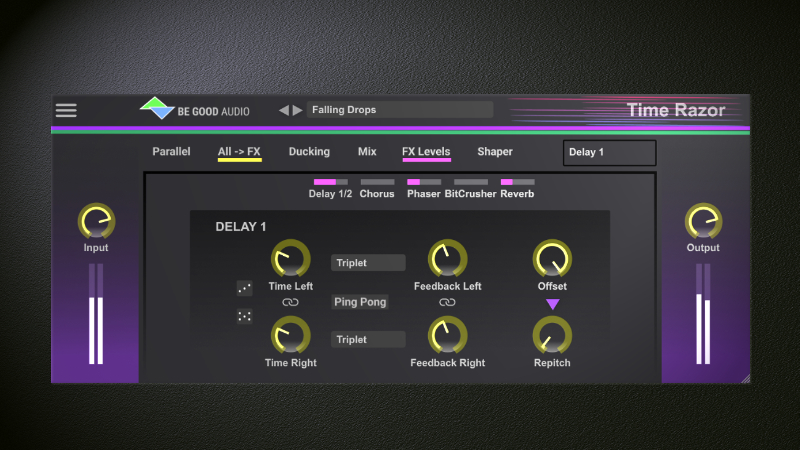
Time Razor is a Multi Effect. A dual delay - turned into a creative versatile power house by adding more effects and modulation to shape your sound. Makes stutter, tape, panning, rhythmic, granulated, ducked, filtered, Mid/Side etc. sounds a breeze to create. Apply effects on dry + wet, wet or dry only.
Time Razor has some colorful tricks up its sleeve that can boost your creativity. These include:
Each delay lines has 2 controllable delay time transition modes, repitch and fade, which enable users to create a unique sonic character. Fade mode can sound soft, hard or destructive when changing delay time. Avoid artifacts, unless you push it high. In repitch mode user can control the speed it repitch when changing delay time, and achieve e.g. light distorted or wild tape effects. Repitch and Fade mode are widely implemented in other delay plugins, but Time Razor puts users in control of how it does it, and on each delay line.
In Parallel mode, each delay line has separate ducking settings, making it easy to create dynamic effects such as fading up one delay line before the other.
It has unique level mix control of the delay lines. In serial mode, levels of delay line 1 and 2 can be mixed so that the first can also be heard, which is not typically possible with other delay plugins. In Parallel mode, only delay 2 level is set. This kind of control gives users more freedom to control how the second delay lines are mixed with the first delay line.
It offers a fast workflow. Time Razor has many functions that can be accessed via the submenu. To avoid constantly switching between UI windows, we have made it easy to mix and add effects to your sound from the global top menu. You only need to access other UI windows if you need to do deeper customization.
At a glance, here are its key features:
(New) Can receive MIDI input(note on/off).
(New) 2 ADSR MIDI triggered envelopes, for dynamic modulation with multiple dual destinations (select between 32 targets).
(New) MIDI retrigger LFO's (note on).
(New) 2 magic dice that speed up creating new presets.
Listen to audio demos and learn more about Time Razor at: https://kauffmannmichael.wixsite.com/my-site/products
 40%OFF$29.00Efx Refract
Please log in to join the discussion
Submit: News, Plugins, Hosts & Apps | Advertise @ KVR | Developer Account | About KVR / Contact Us | Privacy Statement | Sell @ KVR | KVR Marketplace Terms & Conditions
© KVR Audio, Inc. 2000-2026

