
3 KVR members have added Tracktion Daw Essentials Mixing Racks to 3 MyKVR groups 4 times.
Download KVR Studio Manager (FREE)
Tracktion Essentials Mixing Racks (5 mixing Racks)
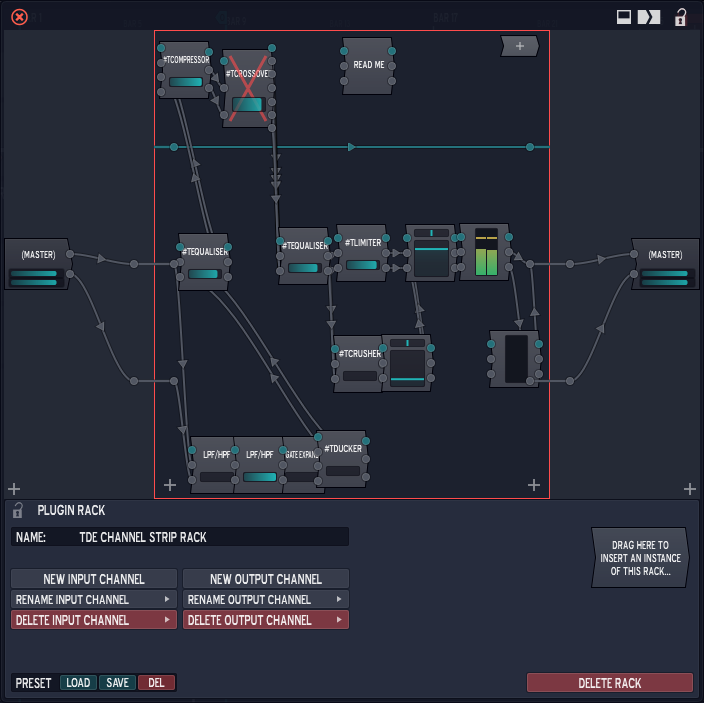
This Image Shows your Tracktion Daw Essentials Channel Strip Rack.
Note: (you must own the Tracktion Daw Essentails for this plugin to work when you open it but don't worry if you don't own the plugins you can swap each plugin wih a plugin of the same type that you currently own)
Click here to download the Tracktion Daw Essential
This Rack has all the perks.
Here is the chain order: hi pass, low pass, gate/expander, ducker, pre EQ, compressor, Crossover, post EQ, limiter, (parallel to limiter: (crusher) with (fader) that output to master fader. These plugins do not pass threw limiter), output fader, level meter.
Note and Tips:
Use (Crusher) plugin to add saturation and thickness to a track or whole edit or totally alter sound for creative sound design.
You can use the dry control in the plugin or the quick parameter on the plugin to add more drymix after the limiter. Just remember to put a limiter after this rack if you start to clip.
Use the crossover to shape the tracks or songs to you liking.
Always volume match after altering each plugin before you turn up the output of any track
to make sure it is better and not just louder.

Please log in to join the discussion
Submit: News, Plugins, Hosts & Apps | Advertise @ KVR | Developer Account | About KVR / Contact Us | Privacy Statement | Sell @ KVR | KVR Marketplace Terms & Conditions
© KVR Audio, Inc. 2000-2026

