29 KVR members have added Transient Control to 30 MyKVR groups 35 times.
Download KVR Studio Manager (FREE)
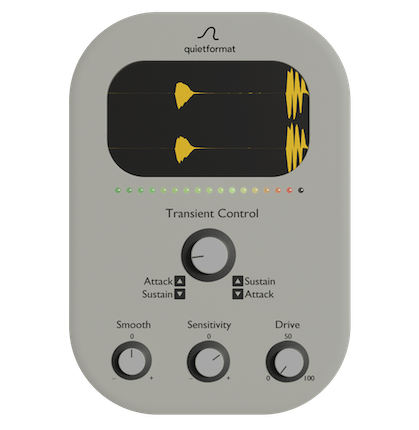
Transient Control is a transient shaper that lets you quickly balance attack and sustain with a single knob.
Turn the main knob to the right to bring out sustain and smooth the attack. Turn it to the left to emphasize the attack and shorten the sustain.
Sensitivity adjusts transient detection so the response fits your source.
For the Smooth control, the effective direction depends on the main knob.
- When the main knob is set toward sustain, turning the Smooth knob to the left (–) creates a softer feel.
- When the main knob is set toward attack, turning the Smooth knob to the right (+) creates a softer feel.
Drive saturates the signal to add density and presence. Without complex parameters, boosting punch or trimming tails takes only seconds.
Also, set the Transient Control knob to -100 and push Smooth and Sensitivity to maximum to create a unique texture where the attack becomes velvety while the body stays tight. It delivers a "soft yet tight" result that is uncommon among typical transient shapers.
{See video at top of page}
Requirements
- macOS 10.13 or later / Windows 10 or later (64-bit only)
- VST3 / AU compatible DAW
- Minimum 4GB RAM (8GB recommended)
- Universal (Apple Silicon + Intel) support.
 $49.00Bus TRANSIENT
 54%OFF$25.00Neutron Elements$79.00Mix DRUMS
Please log in to join the discussion
Submit: News, Plugins, Hosts & Apps | Advertise @ KVR | Developer Account | About KVR / Contact Us | Privacy Statement | Sell @ KVR | KVR Marketplace Terms & Conditions
© KVR Audio, Inc. 2000-2026