19 KVR members have added ttm001(Drum machine) to 7 MyKVR groups 30 times.
Download KVR Studio Manager (FREE)
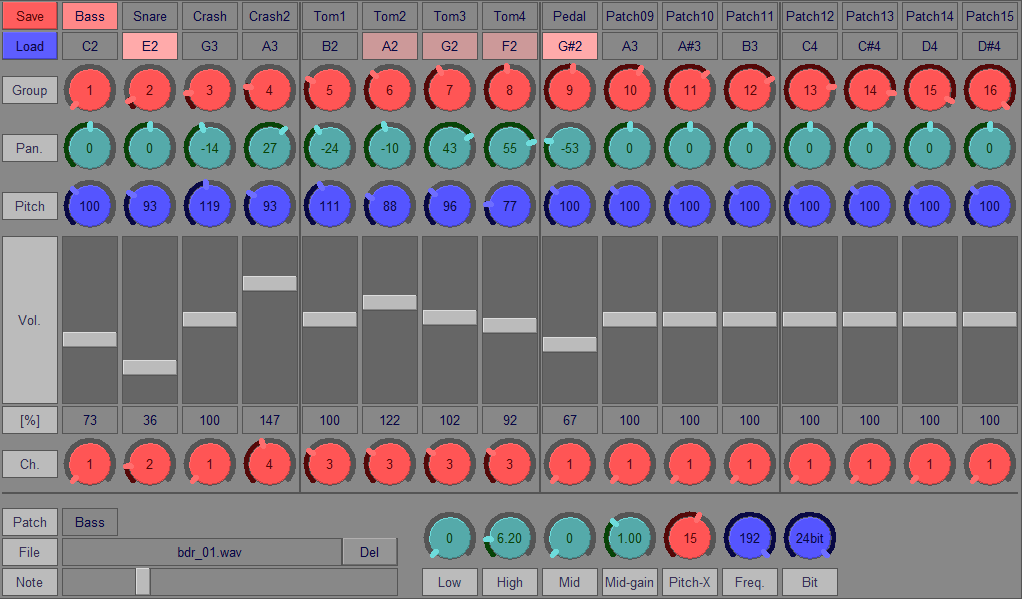
ttm001 is a VSTi for Windows (32/64-bit) that can create a drum set by combining any WAV files:
{See video at top of page}
For more information, please refer to the following links.
Introduction site for English
Introduction site for Japanese
Please download the drum kit from the link below: Last update 2023/10/16.
[Update History]
Ver.03.00 (2026/03/21)
1) Changed the settings to prevent duplicate saves of the same WAV file.
*Data created in version 3.00 or later will not play correctly in earlier versions.
Ver.02.03 (2024/10/18)
1) Fixed a bug that when multiple plug-ins are activated and one of them is closed, the other plug-ins cannot be operated.
Ver.02.02 (2022/07/03)
1) Modified to work correctly even if the mouse cursor goes out of Window while operating knobs, etc.
2) Reduced CPU load.
Ver.02.01 (2022/04/27)
1) Fixed a bug that the plugin freezes when exiting.
2) Changed the file name of the 32-bit version from "ttm001.dll" to "ttm001_x86.dll".
3) Changed to load preset data at startup.
4) Modified the dialog opened by "Save" button from "Open" to "Save".
Ver.02.00 (2022/01/29)
1) Fixed a bug in GUI operation.
2) Fixed a bug that failed to start.
3) Changed the saving format of configuration data.
4) Added the ability to read WAV files by drag and drop.
5) Fixed the bug that the filter does not work properly.
6) Changed the adjustment range of the peaking filter.
7) Changed the default patch name.
8) Changed the default note number.
9) Included a sample patch.
Ver.01.00 (2022/01/08)
First version.
 $149.00Spark

What if part names use the GM Standard order???
35 Kick 1
36 Kick 2
37 Rim
38 Snare 1
39 Clap
40 Snare 2
41 Goliath-LoTom
42 Closed Hat
43 LoMid Tom
44 PedalHat
45 Mid Tom
46 Open Hat
47 Hi-Mid Tom
48 Hi Tom
49 Crash
50 ...

You can change it to any note number by using the slider at the bottom of the window.
Please do this after changing the target patch at the top of the window.

i really like this drum environment. as it is, i can't use it comfortably because i can't control sample length (by control or by note gate).
another suggestion (that i think is quite important for use) is double click> reset control especially when tuning and panning and levelling many elements...
thank you for your works TTM works :) i really like your style.
Thanks for the comment.
I also struggled with the gate control specifications, but you can use it as a mute by turning on notes with low velocity. It works on the same principle as the hi-hat pedal muting.
I want to implement data initialization via double-clicking.
Please log in to join the discussion
Submit: News, Plugins, Hosts & Apps | Advertise @ KVR | Developer Account | About KVR / Contact Us | Privacy Statement | Sell @ KVR | KVR Marketplace Terms & Conditions
© KVR Audio, Inc. 2000-2026